
pfgfmegkbbeheopmgjfhpkjgflokcbbn
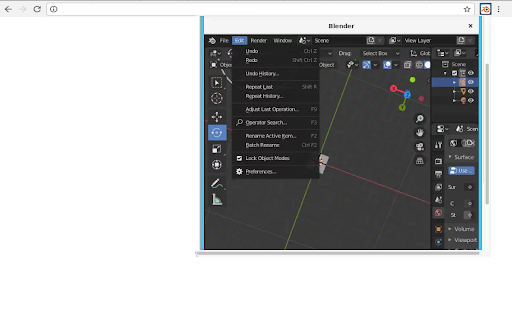
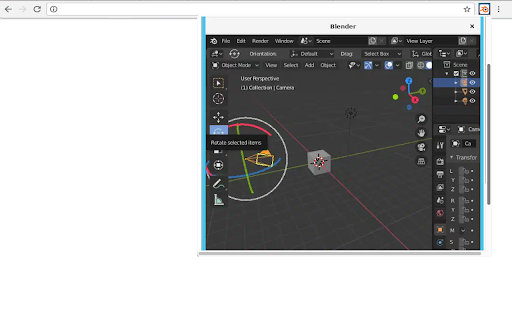
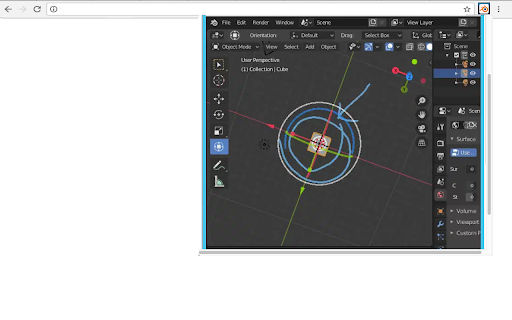
This extension allows users to use the Blender software program. Blender is a program for 3D computer graphics to create animated films, visual effects, art, 3D-printed models, motion graphics, interactive 3D applications, virtual reality, and video games. • Modeling - The creation of a 3D scene needs at least three key components: Models, materials and lights. In this part, the first of these is covered, that being modeling. Modeling is simply the art and science of creating a surface that either mimics the shape of a real-world object or expresses your imagination of abstract objects. • Rendering - Rendering is the process of turning a 3D scene into a 2D image. Blender includes three render engines with different strengths: - EEVEE is a physically based realtime renderer. - Cycles is a physically based path tracer. - Workbench is designed for layout, modeling and previews. • Video Editing - Blender can be used to edit videos. There are two possible methods for this, one being the Compositor and the other, described in this chapter, being the Video Sequencer. The Video Sequencer within Blender is a complete video editing system that allows you to combine multiple video channels and add effects to them. You can use these effects to create powerful video edits, especially when you combine it with the animation power of Blender! • VFX - Motion Tracking is used to track the motion of objects and/or a camera and, through the constraints, to apply this tracking data to 3D objects (or just one), which have either been created in Blender or imported into the application. • Compositing - Compositing Nodes allow you to assemble and enhance an image (or movie). Using composition nodes, you can glue two pieces of footage together and colorize the whole sequence all at once. • Texturing - Image textures are typically needed when the desired look is hard to achieve with procedural textures, or if the texture is not uniform. For example, a car would only have scratches in a few places where they make sense, not in random places all over its body. • Many types of Simulations. Blender’s physics system allows you to simulate a number of different real-world physical phenomena. You can use these systems to create a variety of static and dynamic effects such as: Hair, grass, and flocks, Rain, Smoke and dust, water. This extension also includes access to a file manager to upload and download the files, animations and videos created. This extension is the Blender online distribution so it is compliant with the Blender GPL

3D Viewer for Google Chrome™
View your 3D files (obj/slt) quickly from local computer. Do you need to view 3D files online? Just install our software 3D Viewer for Google Chrome™ To begin viewing your 3D files, simply do the following Install the software 3D Viewer for Google Chrome™ Click on the software icon Find the 3D file you wish to open Its that simple, begin viewing and editing your 3D files online today! This 3D viewer works well for both STL and OBJ file formats. Disclaimer: Please note this extension is NOT made by Google and is made by an independent development team. All copyrights belong to their respective owners. Google doesn’t endorse or sponsor this Chrome extension. 3D Viewer for Google Chrome™ is not owned by, is not licensed by and is not a subsidiary of Google Inc.

Voice Changer for Chrome (by noise-box)
The ultimate voice changer for Chrome to use with Google Meet, Zoom, and more! VOICE BOX Free real-time voice changer and effects soundboard NOTE: Open the extension in a tab with any URL, except for the Chrome homepage and the Chrome Web Store This extension allows you to add funny effects to your voice in real-time. By enabling the extension for a Chrome tab and accepting the use of the microphone, the extension will offer you a set of effects to apply to the voice in real time, including: - Squirrel - Dragon - Echo - Reverb Each effect comes with customizable settings (volume, pitch, etc...) You can use the voice changer in google meet (sharing tab to share the sound) and also in the web version of Skype, Discord, Viber, Teams, etc...

Kdenlive video editor
Create and edit videos with multi-track video editing and any audio / video format This extension allows users to use the Kdenlive video editor. Kdenlive is a program designed to answer most needs, from basic video editing to professional work. Its features are: • Multi-track video editing as Kdenlive allows you to use and arrange several audio and video tracks, each one can be locked or muted to your convenience. • Use any audio / video format because this application uses the well known FFmpeg libraries so Kdenlive can use almost any audio and video formats without the need to convert or re-encode the videos and clips. • Create 2D titles including: o Align and Distribute o Letter-spacing and Line-spacing adjustment o System font selector including font-family support o Design features: Color, Shadows, Outlines and Gradients o Embedded Crawl and Roll tool for text animation o Unicode decoder o Rotate and Zoom o Add images o Template support • A lot of effects and transitions for your videos, ranging from color correction to audio adjustments, as well as all the standard transform options. • Multiple audio and video scopes to make sure your footage is correctly balanced. o Audio Meter o Histogram o Waveform o Vectorscope o RGB Parade • Timeline preview that allows you to pre-render parts of your timeline to get a perfectly smooth playback. This extension also includes access to a file manager to upload and download the videos created. This extension is the Kdenlive online distribution so it is compliance with the Kdenlive GPL.

Android emulator MyAndroid
Run an android emulator and your Android games and apps you like more. This extension allows users to use an Android emulator and run any Android app or game directly on their Chrome browser. The Android emulator MyAndroid offers a wide range of features that enhance the Android app and gaming experience on Chrome. These features include: 1. Android Emulator: With this extension, users no longer need to switch between their Android device and PC to access their favorite apps or games. The integrated Android emulator provides a seamless experience on the Chrome browser, allowing users to enjoy their desired applications without any compatibility issues. 2. Quick Boot: Taking advantage of the top features in Android, the Android emulator MyAndroid includes a Quick Boot option. This feature enables lightning-fast start-up times, eliminating the tedious wait traditionally associated with launching an Android emulator. 3. Retain App State: Ensuring convenience and efficiency, the extension supports retaining the state of previously opened apps or games. Users can effortlessly switch between multiple applications without losing their progress or data. 4. Advanced Input and Controls: The Android emulator MyAndroid offers a range of input and control options, mimicking various aspects of touch screen devices. Users can easily interact with apps or games through the emulator using a mouse, keyboard, or joystick for a more immersive and enjoyable experience. 5. Multi-Platform Support: Our extension provides compatibility across different platforms, including Windows, Mac, and Linux, allowing users to access the emulator regardless of their operating system. To install and use the Android emulator MyAndroid, follow these simple steps: Step 1: Open your Google Chrome browser. Step 2: Navigate to the Chrome Web Store. Step 3: Search for “Android emulator MyAndroid" in the search bar. Step 4: Click on the extension and select "Add to Chrome". Step 5: Wait for the installation to complete, and then click on the extension icon in your browser toolbar. Step 6: The Android emulator will launch within the extension window, ready for you to run any desired app or game. The Android emulator MyAndroid opens up a new realm of possibilities for Android app and game enthusiasts. By providing an advanced Android emulator within the Chrome browser, users can seamlessly access and enjoy their favorite applications without the need for a separate Android device. With features such as Quick Boot, state retention, and multi-platform support, this extension guarantees a delightful and convenient user experience. • File Manager Integration for Android Files This extension allows users to automatically detect Android files, such as APK or APKX, while browsing the web and open them directly in the MyAndroid file manager to be run in the Android emulator MyAndroid.
