
femogemiolfjofilbccdokahgohlokha


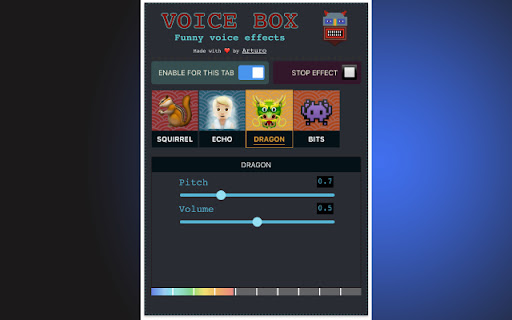
The ultimate voice changer for Chrome to use with Google Meet, Zoom, and more! VOICE BOX Free real-time voice changer and effects soundboard NOTE: Open the extension in a tab with any URL, except for the Chrome homepage and the Chrome Web Store This extension allows you to add funny effects to your voice in real-time. By enabling the extension for a Chrome tab and accepting the use of the microphone, the extension will offer you a set of effects to apply to the voice in real time, including: - Squirrel - Dragon - Echo - Reverb Each effect comes with customizable settings (volume, pitch, etc...) You can use the voice changer in google meet (sharing tab to share the sound) and also in the web version of Skype, Discord, Viber, Teams, etc...

Volume Booster for Chrome – Volume Booster
Volume booster for Chrome. Increase volume up to 600% with equalizer presets, bass boost, and active-tab audio control. Volume Booster for Chrome is a powerful Volume Booster that helps you increase volume up to 600% on any website. If videos, music, or online meetings sound too quiet, this Volume Booster makes audio louder on the active tab in one click. Unlike standard browser controls, this Volume Booster for Chrome can amplify sound beyond the default limit while giving you tools to fine-tune audio for clearer listening. This Volume Booster works across popular sites (including streaming platforms, social media, and web apps) and keeps boosted sound available even in full screen. Volume Booster up to 600% for any tab (beyond standard browser limits) Volume Booster controls with equalizer presets for music, movies, and voice Bass boost settings for fuller sound with this Volume Booster Active Tab Mode to prevent overlapping audio from other tabs while using Volume Booster Fullscreen support so Volume Booster stays on during playback Customizable keyboard shortcuts for quick changes with Volume Booster Simple controls designed for everyday use in Volume Booster Make quiet YouTube videos easier to hear with Volume Booster Increase volume on streaming sites and social media clips using Volume Booster Improve clarity during online meetings and web calls with Volume Booster Boost audio in browser games with Volume Booster Fix low-volume recordings, podcasts, and lectures using Volume Booster Use Volume Booster on laptops with weak speakers Lightweight & privacy Audio is processed locally in your browser. Volume Booster is lightweight for daily use and does not require creating an account to start boosting sound. FAQ Does this work on YouTube and streaming sites? Yes, Volume Booster works on most websites that play audio, including YouTube, streaming platforms, social media, and web apps. How much can it increase volume? You can boost tab volume up to 600% with Volume Booster, depending on the site and your system audio. Will it work in full screen? Yes, Volume Booster stays active in full-screen mode for videos and presentations. Can I control it with the keyboard? Yes, keyboard shortcuts are supported and can be customized in the settings for Volume Booster.

Meme Maker for Google Chrome
Free! Play popular sound memes in the browser. Do you get bored during online conference calls? Have an online meeting where you want to be funny and lighten up the mood. Simply install this meme sound extension today. Once you install this extension, you have access to over 20+ popular meme sounds. These meme sounds are played at the click of a button, so if you have the perfect response during a meeting, just click on the appropriate meme sound and it'll start playing. An example would be the meme "Are you sure about that", play this meme when you have a question during an online video conference call. To stop the meme sounds, simply click on the browser and the meme sound/meme song will stop playing right away. Disclaimer: Please note this extension is NOT made by Google and is made by an independent development team. All copyrights belong to their respective owners. Google doesn’t endorse or sponsor this extension. Meme Sounds for Google Chrome is not owned by, is not licensed by and is not a subsidiary of Google Inc.

Volume Booster & Sound Equalizer – Bass Boost for Chrome
Boost volume in Chrome tabs! Control sound, EQ, and bass for YouTube, Spotify, and all sites. 🎧 Boost Your Chrome Sound – Louder, Clearer, and Customizable Audio on Every Website! Tired of quiet videos, weak bass, or flat sound in your browser? Audio Control & Volume Booster is your ultimate tool to supercharge tab audio with powerful equalizer presets and full volume control. 🚀 Key Features: ➖Volume Booster – Exceed Chrome's default volume limit for louder audio ➖10-Band Equalizer – Tweak bass, mids & treble with precision ➖Bass Boost & Treble Control – Make music punchy and clear ➖Audio Presets – Choose from rock, EDM, classical, jazz, and more ➖Stereo Panning – Balance left/right channels for headphones or speakers ➖Headphone Amp Mode – Boost output while using headphones ➖Works on All Sites – Spotify, YouTube, Netflix, Twitch, and more 🎯 Perfect for: ➖Streaming music and podcasts ➖Watching low-volume YouTube or Netflix videos ➖Getting powerful sound from your laptop speakers ➖Customizing audio for any content or mood ✅ Install now and turn your browser into a sound powerhouse!

Bass Boost for Google Chrome™
Free! Make Youtube videos sound even better in your browser. Want to have a more enriching experience when you listen to songs on Youtube? Change the amount of bass to your specific needs when you install this software. Its extremely easy to use. Simply click on the extension icon and then you can adjust the bass. We have a preset list of bass which you can choose from. Disclaimer: Please note this extension is NOT made by Google and is made by an independent development team. All copyrights belong to their respective owners. Google doesn’t endorse or sponsor this Chrome extension. Bass Boost for Google Chrome is not owned by, is not licensed by and is not a subsidiary of Google Inc.
