
nbmlhoalmfhbhdpngmjkjdioahnglpbj


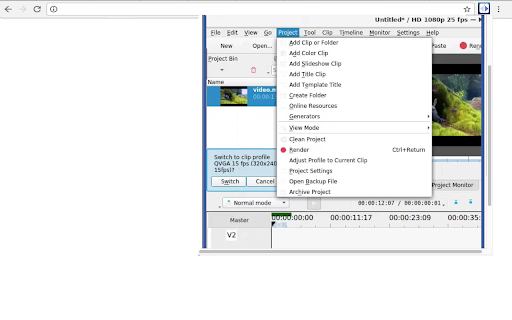
Create and edit videos with multi-track video editing and any audio / video format This extension allows users to use the Kdenlive video editor. Kdenlive is a program designed to answer most needs, from basic video editing to professional work. Its features are: • Multi-track video editing as Kdenlive allows you to use and arrange several audio and video tracks, each one can be locked or muted to your convenience. • Use any audio / video format because this application uses the well known FFmpeg libraries so Kdenlive can use almost any audio and video formats without the need to convert or re-encode the videos and clips. • Create 2D titles including: o Align and Distribute o Letter-spacing and Line-spacing adjustment o System font selector including font-family support o Design features: Color, Shadows, Outlines and Gradients o Embedded Crawl and Roll tool for text animation o Unicode decoder o Rotate and Zoom o Add images o Template support • A lot of effects and transitions for your videos, ranging from color correction to audio adjustments, as well as all the standard transform options. • Multiple audio and video scopes to make sure your footage is correctly balanced. o Audio Meter o Histogram o Waveform o Vectorscope o RGB Parade • Timeline preview that allows you to pre-render parts of your timeline to get a perfectly smooth playback. This extension also includes access to a file manager to upload and download the videos created. This extension is the Kdenlive online distribution so it is compliance with the Kdenlive GPL.

Volume Booster
Customize music file by volume booster tool. Allow you to increase the volume of your audio and video files Volume Booster is a handy application designed to enhance the audio output of your Chrome browser. It is a browser extension that can be easily installed and integrated into your Chrome web browser, providing a convenient way to boost the volume of various multimedia content. The primary purpose of Volume Booster is to amplify the sound levels of online videos, music, podcasts, and any other audio-based content you encounter while browsing the web. It can be particularly useful in situations where the audio output is too low, allowing you to increase the volume and enjoy your media more comfortably. Once installed, Volume Booster typically adds an icon or a control panel to the Chrome toolbar, giving you quick access to its settings and features. The extension works by applying digital signal processing techniques to increase the volume levels without significantly distorting the audio quality. With Volume Booster, you can adjust the volume according to your preferences. It often provides a slider or numeric control that allows you to increase or decrease the volume levels incrementally. Some extensions may also offer additional customization options, such as equalizer settings, to fine-tune the audio output to your liking. It's important to note that while Volume Booster can effectively boost the volume, excessively high volume levels may lead to audio distortion or reduce the overall audio quality. Therefore, it's recommended to use this extension responsibly and avoid pushing the volume levels to their maximum limit. Overall, Volume Booster is a convenient Chrome extension that enhances the audio output of your browser, ensuring you can enjoy multimedia content with improved clarity and volume.

Video to Text Converter
Use Video to Text Converter for transforming YouTube video to notes with transcription software and get summary of YouTube video. Looking for a fast and reliable way to transcribe or summarize YouTube clips to text? The Video to Text Converter Chrome extension does it all. Whether you are a student or a teacher, a digital marketer or an analyst, a freelancer or a project manager, this extension is for you. Save your time with a Video to Text Converter AI. 📌 Why do people choose us? 🔶 Precision:: Using advanced AI video transcription software, this tool ensures accuracy when you convert YouTube video to text. 🔶 Swiftness: You get clips transcription in seconds. 🔶 User-Friendly Interface: Even a child can do a summary of a YouTube video. 🔶 Comfort: You can convert recordings to text on its viewing page, without opening other tabs. ⚙️ Functionality 🔷 Do instant video to transcript. 🔷 Convert audio speech to video text. 🔷 Convert any YouTube clips speech to text 🔷 Get quick summary of YouTube content 🔷 Try option to change prompts in AI for new experience 💻 Perfect for everyone ▶️ Marketers, digital marketers.No need to browse gigabytes of content anymore, just check the summary of YouTube content. ▶️ Students and teachers. Prepare for lectures by learning new material in less time. ▶️ Project managers and freelancers. To study new topics, you can simply use the Video to Convert text converters and speed up your research many times over. ▶️ Self-development. Explore new ideas with a summary. 📎 How to Get Started? 1️⃣ Download and install the transcript from video to text extension from the Chrome Web Store 2️⃣ Open the YouTube Video to get a transcript of or get a short summary. 3️⃣ Use the widget by clicking on it and your video transcript generator will deliver the results instantly. 4️⃣ If you need summary of YouTube video to notes converter use special function button 🎯 Use Cases for YouTube Video to Text Converter ⏺️ Academic Research: Quickly transcribe video to text extension recordings to text for study purposes. ⏺️ Content Creation: Need to repurpose content? Use the video link to text converter to extract scripts or summaries. ⏺️ Any other needs: Use Video to Text Converter, if you need YouTube clips to text transcription 🤔 Frequently Asked Questions ❔ How to start to use it? ✔️ Click on special widget on video viewing page ❔ Is there a limit on the length of a recording on YouTube? ✔️ You can get full transcription of video of any length and not lose the transcription accuracy ❔ Is there limit of the number of YouTube video transcripts per day ✔️ You can transcribe YouTube content without any limits. ❔ How Summaries works? ✔️ This extension transcribes content to text along its entire length. Then AI-powered software makes a quick summary of text. ❔ Are these summaries accurate? ✔️ Modern artificial intelligence guarantees accuracy when you convert video to text AI. ⚒️ Wide facilities for process optimization ◾ Improve the experience of using the summary function by changing the prompts ◾ Choose any AI for summaries from wide list by your choice, or add URL of any other AI that not included ◾ Choose strategy for summaries for better experience. You can extract main points from the video, or try to summarize the video to text along its entire length. 🛑 Benefits of VIdeo to Text Converter Boost your productivity with YouTube AI Summary, the leading Google Chrome extension for AI YouTube summaries and transforming video content into text. Leverage ChatGPT to create meaningful summaries, making it perfect for students, digital marketers, and project managers. Simplify information extraction with the AI assistant and effortlessly convert YouTube videos into text for seamless content management. 🌐 Install the Video to Text Converter Now Don't waste time manually transcribing long visual mediafiles. Let the Video to Text Converter handle everything for you. Whether you need to convert text to video with artificial intelligence, create a summary of YouTube video, convert video speech to text or transcribe clips, this Chrome extension is your ultimate solution. 🖱️ try the extension and feel the difference. Make a transcript from a video YouTube with maximum efficiency. Try video audio to text converter now. Don't miss out on all the amazing features it has to offer. If you have any questions or need support, contact us. Open the extension and start your journey into the world of transcription today.

Text to Video - AI Video Creator | Pictory
Convert any text or URL into a professional AI-generated video with captions, visuals, and voiceovers — powered by Pictory 🎬 Turn Any URL or Text into a Video Instantly The Text to Video Chrome Extension by Pictory lets you transform any online article, webpage, or script into a complete video, all without leaving your browser. 📋 Paste a URL or text, and our AI automatically extracts the main ideas, writes a script, selects visuals, and adds captions and voiceovers. Whether you’re a marketer, educator, or content creator, you can turn blogs, research papers, or news articles into ready-to-publish videos in minutes. ⚙️ How It Works Step 1 – Capture a URL or Enter Text While browsing any webpage, click the Pictory Chrome Extension. The extension automatically captures the URL. Step 2 – Choose Video Type Select your preferred video style: 💡 Explainer 📣 Marketing 💼 Internal Communication 🎓 Tutorial This helps the AI tailor the tone and flow of your script. Step 3 – Generate Your Script Click “Generate Script.” Pictory AI will summarize the webpage or process your text input to create a concise, editable script optimized for video storytelling. Step 4 – Edit and Customize You’ll be redirected to your Pictory workspace, where you can: • Review and edit the generated script • Adjust visuals, captions, and audio • Apply your brand kit (logo, fonts, colors) • Choose voiceovers and music Step 5 – Generate and Download Video Preview your project and download a high-quality video, ready to share across social platforms, websites, or presentations. ✨ Key Features 🔗 URL to Video: Convert any online article or web page into a summarized AI video. 📝 Text to Video: Paste any text, and Pictory turns it into visuals, captions, and voiceover. 🧩 AI Script Summarizer: Automatically extract key ideas from long-form content. 🎨 Fully Customizable: Edit scenes, captions, visuals, and add your brand kit. 🎙️ Voiceover and Subtitles: Choose professional AI voices and auto-generate subtitles. ⚡ One-Click Workflow: Seamlessly integrated with your browser and Pictory account. 👥 Who It’s For 📈 Content marketers repurposing blogs and news articles into videos. 🎓 Educators turning lessons or research into visual explainers. 🏢 Corporate teams creating internal communication videos. 🎥 Creators and entrepreneurs sharing insights on YouTube, LinkedIn, and TikTok. 💎 Why Choose Pictory Pictory’s award-winning AI video platform powers this extension, enabling effortless text-to-video and URL-to-video conversion. 🌍 Trusted by over one million professionals worldwide, it combines script generation, video editing, and brand management in one seamless workflow. 🔒 Privacy & Permissions This extension requires minimal access: • Reads the active webpage only when you click the extension • No background tracking or data storage • Processes text securely via your authenticated Pictory account

YouTube Transcript Generator
Use this YouTube Transcript Generator tool as your transcriber and youtube to text converter. Transcribe video to transcript. 🔥 Step into the realm of transcription with our Youtube transcript generator chrome extension, your indispensable tool for effortlessly convert youtube to text! 🎬 💡 Are you scouring the internet for a reliable and free Youtube video transcript generator? Look no further! Our youtube transcript generator is here to revolutionize your watching and studying experience, offering free and fast service. 1. Get started by installing the YouTube Transcript Generator to streamline your transcription workflow. 2. With just a few clicks, generate transcripts from videos effortlessly, saving you time and effort. 3. Need to access transcripts later? Simply convert youtube video to text and then copy youtube transcript for future use. 1️⃣ Click the "Add to Chrome" button to install the extension seamlessly into your browser. 2️⃣ Navigate to the video you wish to transcribe to text. 3️⃣ Initiate the transcription process by clicking on the extension icon. 4️⃣ Sit back and relax as our tool works its magic, delivering accurate transcripts in record time. - Get text from youtube transcriber effortlessly: Immerse yourself in the world of seamless education as you easily convert spoken content into written text with our lightning-fast transcription technology. - YouTube Transcriber: feel the productivity as you get youtube to text results, allowing you to extract key insights and create concise summaries for streamlined content consumption. - Download YouTube Transcripts for Free: save your transcriptions for future reference, analysis, or sharing - all at the convenience of a simple download. - Convert YouTube to Text easily: experience the magic as any video is transformed into text with just a click. Harnessing the power of cutting-edge algorithms, our youtube transcript generator transcribe youtube video quickly and accurately with just a few simple steps. Install the Youtube transcript generator, choose a desired video, and let our tool do the rest. Our youtube transcript generator boasts an array of functionalities, including the ability to transcribe YouTube videos, download transcripts in various formats, and more. Whether you're a content creator, researcher, or student, our instrument caters to your transcription needs with precision and efficiency. ➤ Seamless Integration: Effortlessly transcribe videosdirectly from your browser with our extension's seamless integration. ➤ User-Friendly Interface: Enjoy a smooth process with our extension's user-friendly interface, designed for maximum convenience. ➤ Accurate Transcriptions: Trust our tool with unparalleled accuracy, ensuring every word is captured with precision. ➤ Time-Saving Automation: Boost your productivity with our youtube transcript generator's automation features, eliminating the need for manual transcription and saving you valuable time. ➤ Free Usage: Access our product's full range of features at no cost, ensuring accessibility for all users regardless of budget constraints. 📌 How accurate are the transcriptions made by the it? 1️⃣ Our product prides itself on delivering transcripts with unparalleled accuracy, leveraging advanced algorithms for precise results. 📌 Can I download youtube transcript generated by the app? 2️⃣ Absolutely! Our instrument allows users to download transcripts by copy youtube text for convenient access and sharing. 📌 What browsers does YouTube Transcript Generator support? 3️⃣ Currently, the tool is compatible with Chrome browsers, with plans to expand support to additional browsers in the future. 📌 Are you looking for a reliable online Youtube transcript generator? 4️⃣ Look no further! Try it today for fast, accurate, and hassle-free transcription from any video!
