
omlanehmflpiihaadkghlgnbocimgokm


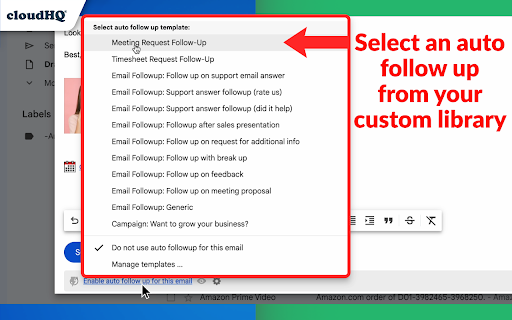

Automated follow up emails and mail merge Auto Follow Up for Gmail™ is a Google Chrome Extension that helps you follow up on your email emails. Just set up a sequence of emails to send to your recipients over time from your Gmail™. Let’s say you meet a lot of people at a networking event. You want to email all of them to explore opportunities, but it’s hard to follow up with so many people. Auto Follow Up for Gmail™ makes it easy to reach your clients. It automates the process for you with personalized emails to multiple contacts with just a few clicks. Auto Follow Up for Gmail™ has two methods to create auto follow-ups: ***Auto Follow Up on Your Emails*** Send an email as usual, then activate follow-up either during the sending (click on Gmail Auto Follow-Up under the send button) or after it’s sent by selecting the email in your Sent label and activating a follow-up template for this email. Follow-up templates specify intervals, email content, and whether to track clicks and opens. In other words, Follow-up templates define criteria and conditions under which additional emails will be sent and emails which will be sent. Example: You email an employee about a deal status. To ensure the email isn’t overlooked, activate a follow-up so if there’s no reply in two days, a follow-up email is automatically sent. This feature is great for managers, sales call follow-up, effective client communication, and more. ✅ Managers: Ensures timely communication by sending automatic reminders, like if there's no reply on a project status within a set timeframe. ✅ Sales Call Follow-Up: Increases conversion rates by maintaining persistent contact, such as resending proposal details to a client who hasn't responded after the initial sales call. ✅ Client Communication: ensure that important information requests are addressed promptly and not forgotten (e.g., reminding a client to send required documents). ***Auto Follow Up Campaigns*** Start the cloudHQ wizard, upload your recipient list, and set your follow-up rules and sequences. Follow-up rules determine the criteria and conditions under which additional emails will be sent. These rules can be based on various triggers, such as a recipient opening the initial email, clicking a link within the email, or not responding within a specified time frame. In addition, you need to establish your follow-up sequences, which are the series of messages that will be sent to recipients over a period of time. Example: You send an email campaign to 100 warm leads from a trade show offering to set up a demo of your product. When you send that campaign, you set it so that two days later, a follow-up email (a reminder) is sent to anyone who hasn’t replied. Three days after that, another reminder is sent, and a few days after that, a final email is sent asking for a reply. This approach is perfect for sales outreach for large number of recipient: ✅ Take advantage of all your opportunities and close more business. ✅ Save time and get more done with automated outreach emails to prospects. ✅ Always be visible to your clients in their inbox. 👉 Mail merge so that you can send out bulk email messages that look personalized. You can import recipient list and merge tags from Google Sheets, CSV or Google Contacts. 👉 Simple-to-set-up, automated email responses. 👉 Email tracking so that you know who read your emails, and when. 👉 Gmail email templates so that your emails can either be beautiful html-based templates, or just simple text-based templates. The choice is yours! 👉 Video email so that you can record yourself in an email via video so that you can "speak" to your audience. 👉 Screencasting so that you can demonstrate something on your screen. 👉 The ability to link back to your CRM, like Salesforce. All this, right from your Gmail™ account! There's no 3rd party website you'll need to learn or visit. Whether you're a: 👨🏾💼A busy professional, and you want to follow up with 40 new potential clients whose cards you just picked up at a convention last week. 👩🏫An overworked teacher that needs to schedule 75 parent/teacher conferences. 👨🏿⚖️A lawyer who needs to constantly remind his clients that they need to send their emails for discovery. 👩🏽💼A realtor who wants to send out her latest listing to your clients. 👨🏼🎓A job seeker who wants to make sure that they're automatically following up with recruiters. 👰🏻🤵🏽Or maybe you’re getting married and you need to remind 150 of your friends to RSVP. cloudHQ. Helping your productivity, 1 click at a time. cloudHQ website: https://www.cloudhq.net/ App website: https://www.gmail-auto-follow-up.com/ Pricing: https://www.gmail-auto-follow-up.com/pricing Support page: https://support.cloudhq.net/category/browser-extensions/gmail-auto-follow-up/ Blog: https://blog.cloudhq.net Demo: https://www.cloudhq.net/demo Google Workspace, Google Contacts, Google Sheets, Google Drive, Google Alerts and Gmail are trademarks of Google LLC. Use of this trademark is subject to Google Permissions.

Snooze Email by cloudHQ
Snooze of an email will temporarily remove them from your inbox - it will come back to the top of your inbox at the time you set it. Sometimes you're just not ready to read and respond to an email. With this snooze email extension, you can just tell us when you want to see that email reappear at the top of your inbox. Key features: - add notes to your snooze - snooze only if nobody replies - mobile text message reminders (paid feature) - auto-snooze on send (paid feature) cloudHQ. Helping your productivity, 1 click at a time. Website: https://www.snooze-email.com/ cloudHQ website: https://www.cloudhq.net Pricing: https://www.snooze-email.com/pricing Support page: https://support.cloudhq.net/category/browser-extensions/gmail_snooze_email Blog: https://blog.cloudhq.net Gmail, Google Calendar, and Google Workspace are trademarks of Google LLC. Use of these trademarks is subject to Google Permissions.

Email List Builder by cloudHQ
Build a spreadsheet with all your Gmail contacts and emails Are you looking for an email list builder that will create an email list for you in a matter of seconds? Email List Builder by cloudHQ gets you a list all of the people that you've ever had contact with in your Gmail™, into a neat and organized Google Sheet™ for you. This is an excellent solution to use so that you can: ✅ Create an email list to send an email campaign (*tip: use mailking.io, another one of our services for free email campaigns) ✅ Monitor interactions with your customers or your suppliers ✅ Keep an updated list of your email contacts in Google Sheets™ You'll get every email merge tag identifier needed in order to build an impressive email list of all your contacts and their information. You can even set this service up so that it can continuously update the contact information from your Gmail™ emails, to be captured and updated for you in your Google Sheet™ spreadsheet. Here is a list of all the email merge tag identifiers that you'll get in separate columns in your Google Sheet™: 1) Email Address 2) First name 3) Last Name 4) Full Name 5) Bio 6) Location 7) Personal Website 8) Last Sent Email Date (Last email sent to the contact) 9) Last Sent Email (A link to the actual email you sent) 10) Total Number of Emails Sent 11) Awaiting for Reply? (Awaiting reply from the contact) 12) Last Received Email Date (Last email received from the contact) 13) Last Received Email (A link to the actual email you received) 14) Total Number of Emails Received 15) Not Replied? (Not replied to the contact) 16) Company Name 17) Role at Company 18) Company Website 19) Company Logo 20) LinkedIn (Link to profile) 21) Facebook (Link to profile) 22) Twitter (Link to profile) We hope you enjoy this simple solution to help you build your email list! Happy email campaigning from your friends at cloudHQ. This is an excellent solution for small businesses to improve communications with their customer or supplier relationships. Your spreadsheet will automatically be updated in real-time as new emails or new contacts come into your inbox, so you will always have full visibility of each business-related relationship in an organized report whenever you need it, in a shareable way via Google Sheets. cloudHQ. Helping your productivity, 1 click at a time. cloudHQ website: https://www.cloudhq.net/ App website: https://www.email-list-builder.com/ Pricing: https://www.email-list-builder.com/pricing Support page: https://support.cloudhq.net/category/browser-extensions/email-list-builder/ Blog: https://blog.cloudhq.net Google Gmail and Google Sheets are trademarks of Google LLC. Use of these trademark are subject to Google Permissions.

Copilot for Gmail™ by cloudHQ
Mini CRM for your Gmail Copilot for Gmail™ is a mini CRM that lets you see a snapshot view of your email contact's profile information, and any past emails conversations you've had. This is crucial to have so that you can respond intelligently, and help you dramatically cut down your search time when you're looking for a past email conversation you had with your email contact. Right within Gmail, you can: ✔️View profile information of the person you're emailing, or who emailed you ✔️Create private notes about this contact (For example: This client has needed support for over 4 hours last week) ✔️Set up a reminder alarm for this contact (For example: Follow up with client on a specific date/time) ✔️A list of all the email conversation history you have with that email contact ✔️A list of all documents and attachments related to that email contact This is great for anyone who wants to appear more professional, and have everything neatly organized in their email. Key features: ⭐️ person and company profile info ⭐️ easy access to all email messages ⭐️ easy access to all attachments ⭐️ notes (private or shared with the team) ⭐️ reminders cloudHQ. Helping your productivity, 1 click at a time. cloudHQ website: https://www.cloudhq.net/ App website: https://www.gmail-copilot.com/ Pricing: https://www.gmail-copilot.com/pricing Support page: https://support.cloudhq.net/category/browser/gmail-copilot Blog: https://blog.cloudhq.net Demo: https://www.cloudhq.net/demo Google Workspace, Google Sheets, Google Drive, Google Alerts and Gmail are trademarks of Google LLC. Use of this trademark is subject to Google Permissions.

Gmail Web Clipper by cloudHQ
Save anything you see from web articles, texts, and snippets, directly in your Gmail. Free and simple. Give it a try today! Plus - save anything you want from the web like: ✔️ Articles, ✔️ Texts, ✔️ Images, and more! Everything is neatly saved in a Gmail label directly in your email. cloudHQ. Helping your productivity 1 click at a time. cloudHQ Website: https://www.cloudhq.net App Website: https://www.gmail-web-clipper.com/ Pricing: https://www.gmail-web-clipper.com/pricing Support page: https://support.cloudhq.net/category/browser-extensions/gmail-web-clipper/ Blog: https://blog.cloudhq.net Gmail, Google Shared Drive, Google Drive, and Google Workspace are trademarks of Google LLC. Use of these trademarks is subject to Google Permissions.
