
lhdibejmgbogidlakonbbnebddbhgkld


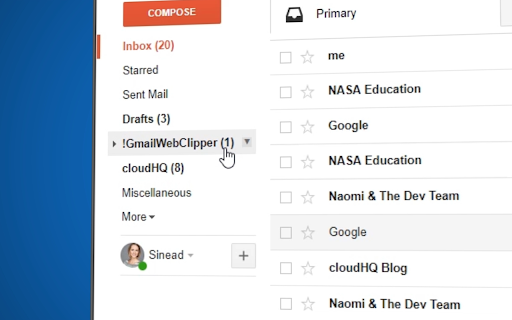
Save anything you see from web articles, texts, and snippets, directly in your Gmail. Free and simple. Give it a try today! Plus - save anything you want from the web like: ✔️ Articles, ✔️ Texts, ✔️ Images, and more! Everything is neatly saved in a Gmail label directly in your email. cloudHQ. Helping your productivity 1 click at a time. cloudHQ Website: https://www.cloudhq.net App Website: https://www.gmail-web-clipper.com/ Pricing: https://www.gmail-web-clipper.com/pricing Support page: https://support.cloudhq.net/category/browser-extensions/gmail-web-clipper/ Blog: https://blog.cloudhq.net Gmail, Google Shared Drive, Google Drive, and Google Workspace are trademarks of Google LLC. Use of these trademarks is subject to Google Permissions.

Share and attach files in Gmail™ by cloudHQ
Attach and share files effortlessly from OneDrive, Dropbox, Box, Google Drive, Evernote and many more. When you're in Gmail, wouldn't you love a button that you could just click to attach any of your cloud files to your email? Well, with Share and Attach Files in Gmail, you can! You can attach any of your cloud files too, like: Google Drive, Salesforce, Microsoft Excel, Dropbox files. You name it- we give you access with 1 little button right from your Gmail. This handy tool: ✅ Saves you time from searching through numerous cloud platforms ✅ Keeps everything in the cloud (great for Chromebook users) ✅ Keeps your files off your hard drive so that you can have a faster computer. 💻 Website: https://cloudhq.net/chrome_extensions Pricing: FREE Support page: https://support.cloudhq.net/ Blog: https://blog.cloudhq.net cloudHQ. Helping your productivity, 1 click at a time. Gmail, Google Shared Drive, Google Drive, and Google Workspace are trademarks of Google LLC. Use of these trademarks is subject to Google Permissions.

Gmail Message Preview by cloudHQ
Do you want to be able to see your emails quickly, without having to actually open them? Now, instead of just reading the subject headline of your emails, Gmail Message Preview lets you preview your emails in 4 different ways. You can preview your inbox emails without actually opening them with the following choice of views: ✔️ 1st line of your email ✔️ First 2 lines of your email ✔️ First 3 lines of your email ✔️ Entirety of your email This lets you quickly scan your emails without ever even clicking on them. And Gmail Message Preview by cloudHQ will never trigger "tracking pixels" - we will block *ALL* tracking attempt during previewing an email. cloudHQ. Helping your productivity, 1 click at a time. cloudHQ website: https://www.cloudhq.net/ App website: https://www.gmail-message-preview.com/ Pricing: https://www.gmail-message-preview.com/pricing Support page: https://support.cloudhq.net/category/browser-extensions/gmail-message-preview/ Blog: https://blog.cloudhq.net Gmail and Google Workspace are trademarks of Google LLC. Use of these trademarks is subject to Google Permissions.

Email Reply Status
Stop wasting time sorting through emails: Instantly know which of your emails needs a reply back. Never drop the ball again. Now you can know exactly which emails need a reply with Email Reply Status. You'll have an inbox indicator that will tell you: 1. Which emails you need to reply to 2. The emails that you already replied to 3. Those that you don't need to reply to at all *NOTE*: For best performances set Gmail page size to 50 emails or less. It's a perfect tool for: ✅ Small business owners ✅ Sales people ✅ Business people who are just too busy to keep track of emails ✅ Customer service representatives ✅ Customer support personnel With Email Reply Status, never miss another opportunity again! cloudHQ. Helping your productivity, 1 click at a time. cloudHQ website: https://www.cloudhq.net/ App website: https://www.email-reply-status.com/ Pricing: https://www.email-reply-status.com/pricing Support page: https://support.cloudhq.net/category/browser-extensions/gmail-reply-status/ Blog: https://blog.cloudhq.net

Snooze Email by cloudHQ
Snooze of an email will temporarily remove them from your inbox - it will come back to the top of your inbox at the time you set it. Sometimes you're just not ready to read and respond to an email. With this snooze email extension, you can just tell us when you want to see that email reappear at the top of your inbox. Key features: - add notes to your snooze - snooze only if nobody replies - mobile text message reminders (paid feature) - auto-snooze on send (paid feature) cloudHQ. Helping your productivity, 1 click at a time. Website: https://www.snooze-email.com/ cloudHQ website: https://www.cloudhq.net Pricing: https://www.snooze-email.com/pricing Support page: https://support.cloudhq.net/category/browser-extensions/gmail_snooze_email Blog: https://blog.cloudhq.net Gmail, Google Calendar, and Google Workspace are trademarks of Google LLC. Use of these trademarks is subject to Google Permissions.
