
dgdeilfnkkmcolnfmghjgjmlalanomdf

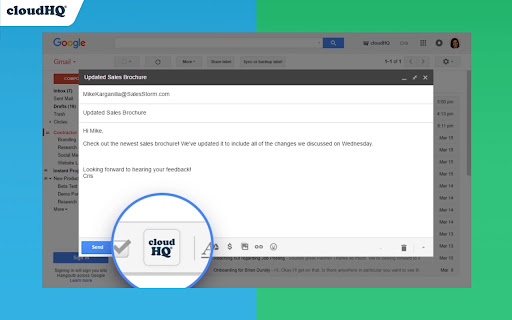
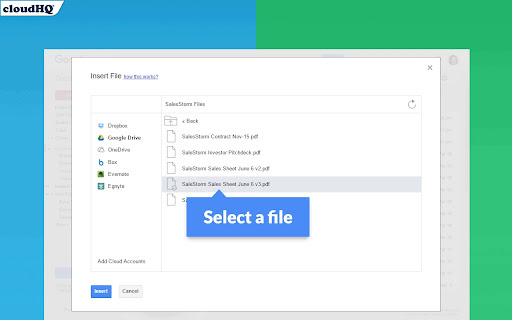
Attach and share files effortlessly from OneDrive, Dropbox, Box, Google Drive, Evernote and many more. When you're in Gmail, wouldn't you love a button that you could just click to attach any of your cloud files to your email? Well, with Share and Attach Files in Gmail, you can! You can attach any of your cloud files too, like: Google Drive, Salesforce, Microsoft Excel, Dropbox files. You name it- we give you access with 1 little button right from your Gmail. This handy tool: ✅ Saves you time from searching through numerous cloud platforms ✅ Keeps everything in the cloud (great for Chromebook users) ✅ Keeps your files off your hard drive so that you can have a faster computer. 💻 Website: https://cloudhq.net/chrome_extensions Pricing: FREE Support page: https://support.cloudhq.net/ Blog: https://blog.cloudhq.net cloudHQ. Helping your productivity, 1 click at a time. Gmail, Google Shared Drive, Google Drive, and Google Workspace are trademarks of Google LLC. Use of these trademarks is subject to Google Permissions.

Email Tracker by cloudHQ
Know when your emails are opened in real-time Now you can find out when your emails are read! This email tracker software is extremely easy to use, and gives you all of the following features where you'll have: ✔️ An email tracking dashboard ✔️ Mobile text, desktop, and email notifications when your email is read ✔️ Reminders if your email goes unopened after 48 hours ✔️ Link tracking ✔️ Email tracking removal options for personal emails you don't want tracked You'll also get a Gmail label to show you: - Tracked emails that you sent, and were opened - Tracked emails that you sent, and were opened, with links that were clicked on (how many times, and which links were clicked on) - A list of all opened but unanswered emails where people need to respond back to you - A list all opened, but unanswered emails where you need to respond back - A list all unopened emails where people need to respond back to you - A list all unopened emails that are awaiting your reply ✔️ As an upgrade: You can export all of your tracked emails to Google Sheets for an up-to-date report on open rates, link clicks and more. This is ideal for salespeople, customer service reps, head hunters, and more! cloudHQ. Helping your productivity, 1 click at a time. NOTE: For easy access to your settings and other cloudHQ apps, look for the cloudHQ icon in the top right corner of your Gmail inbox. Click on it to get started! cloudHQ website: https://www.cloudhq.net/ cloudHQ app list: https://www.cloudhq.net/apps App website: https://www.mail-tracker.com/ Pricing: https://www.mail-tracker.com/pricing Support page: https://support.cloudhq.net/category/browser-extensions/email-tracker/ Blog: https://blog.cloudhq.net

Save and Backup My Emails by cloudHQ
Backup and archive emails in 3 steps Backup all of your emails in just 3 simple steps, and feel more secure and in control in case: - You leave your job - You switch email hosting services and need a new account - You upgrade to a Google Workspace email address instead of using a free “@gmail.com” email - You got hacked and you cannot access your account any more - You accidentally deleted emails With this tool, you'll get all your emails, email threads, and any attachments in a PDF format that you can download to your hard drive or your USB key. You'll feel confident when your emails are literally in your hands. cloudHQ website: https://www.cloudhq.net Website: https://www.save-and-backup-my-emails.com/ Pricing: https://www.save-and-backup-my-emails.com/pricing Support page: https://support.cloudhq.net Support email: support@cloudhq.net Blog: https://blog.cloudhq.net Gmail and Google Workspace are trademarks of Google LLC. Use of these trademark is subject to Google Permissions.

Email Reply Status
Stop wasting time sorting through emails: Instantly know which of your emails needs a reply back. Never drop the ball again. Now you can know exactly which emails need a reply with Email Reply Status. You'll have an inbox indicator that will tell you: 1. Which emails you need to reply to 2. The emails that you already replied to 3. Those that you don't need to reply to at all *NOTE*: For best performances set Gmail page size to 50 emails or less. It's a perfect tool for: ✅ Small business owners ✅ Sales people ✅ Business people who are just too busy to keep track of emails ✅ Customer service representatives ✅ Customer support personnel With Email Reply Status, never miss another opportunity again! cloudHQ. Helping your productivity, 1 click at a time. cloudHQ website: https://www.cloudhq.net/ App website: https://www.email-reply-status.com/ Pricing: https://www.email-reply-status.com/pricing Support page: https://support.cloudhq.net/category/browser-extensions/gmail-reply-status/ Blog: https://blog.cloudhq.net

Get My Receipts by cloudHQ
Extract digital receipts and invoices from your email Managing digital receipts and invoices should not be a headache. Yet inboxes are full of them, and too often they get lost or forgotten when it is time to prepare tax returns, claim deductions, or file expense reports. Get My Receipts by cloudHQ is the simplest way to automatically collect, organize, and export receipts and invoices directly from Gmail™. With 99.2% accuracy, powered by artificial intelligence and machine learning, this app scans your inbox and generates a clean, well-structured spreadsheet. How it works: 1. Open Gmail™ and click on Get My Receipts. 2. The app instantly finds receipts and invoices across your inbox. 3. A spreadsheet is created for you with two tabs: one for receipts and one for invoices. The spreadsheet is stored for you in your Google Drive account to edit and share as you see fit. Each entry is organized into useful columns: ✅ Date ✅ Amount ✅ Taxes ✅ Merchant ✅ Subject line ✅ Email text ✅ PDF copy of the receipt Perfect for: - Tax planning and capturing every deduction - Audit-ready expense reporting - Small business owners, freelancers, and contractors - Anyone who wants receipts and invoices organized in seconds Stop wasting time searching your inbox when you need receipts most. With Get My Receipts, you will always have an accurate, audit-ready record of your expenses. cloudHQ. Helping your productivity, 1 click at a time. cloudHQ website: https://www.cloudhq.net/ App website: https://www.get-my-receipts.com/ Pricing: https://www.get-my-receipts.com/pricing Support page: https://support.cloudhq.net/category/browser-extensions/get-my-receipts/ Blog: https://blog.cloudhq.net
