
hbfacfkngeiejenggaabbnfhpjkbdknn
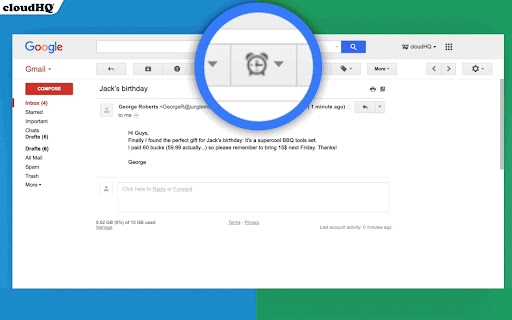
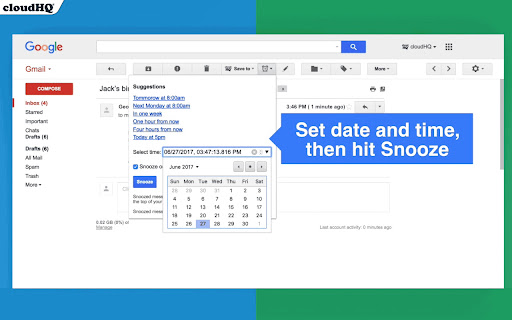

Snooze of an email will temporarily remove them from your inbox - it will come back to the top of your inbox at the time you set it. Sometimes you're just not ready to read and respond to an email. With this snooze email extension, you can just tell us when you want to see that email reappear at the top of your inbox. Key features: - add notes to your snooze - snooze only if nobody replies - mobile text message reminders (paid feature) - auto-snooze on send (paid feature) cloudHQ. Helping your productivity, 1 click at a time. Website: https://www.snooze-email.com/ cloudHQ website: https://www.cloudhq.net Pricing: https://www.snooze-email.com/pricing Support page: https://support.cloudhq.net/category/browser-extensions/gmail_snooze_email Blog: https://blog.cloudhq.net Gmail, Google Calendar, and Google Workspace are trademarks of Google LLC. Use of these trademarks is subject to Google Permissions.

Highlight Emails in Gmail by cloudHQ
✅ Select from a choice of calming or bright colors. ✅ Adjust background color based on email status, such as read/unread or selected. ✅ Customize the background color highlight depending on the sender’s email domain. ✅ Focus mode minimizes distractions, specifically designed to assist individuals with neurodevelopmental disorders to more easily navigate, read, and concentrate. In short, with this extension you can inbox customization through color-coding, allowing users to visually categorize emails. For example, assigning the color red to emails from security domains like security@google.com enhances the ability to quickly spot and prioritize critical alerts or notifications, streamlining inbox management and efficiency. Imagine having all your emails from clients, vendors, or internal company emails neatly color-highlighted. It's like having a personalized filing system right in your inbox. You'll easily spot emails that need your attention, while also decluttering your digital workspace. This is a game changer for anyone dealing with heaps of emails daily. This app isn't just about managing your inbox; it's about managing your time and focus too. There's even a unique "Focus Mode" that works when you hover over an email. That email stands out while everything else recedes into the background. All other emails gray out, removing distractions and letting you zero in on that single email. It's the visual equivalent of noise-canceling headphones for your inbox. This way, you can devote your full attention to each email in turn, without missing any important details. Perfect for anyone who needs a little help focusing amidst the constant barrage of incoming emails. Focus Mode is more than a feature, it's a way to reclaim control over your digital environment. ~~~~ Instructions for Use ~~~~ 1. Install the extension. 2. You can get started now by clicking on: - The cloudHQ log on the top of your Gmail inbox - Click on "Highlight Emails" - Click on "Highlight Rows (ON/OFF)" to toggle the feature on and off 3. To activate the "Focus Mode," just toggle "Reading Focus (ON/OFF)" to enable distraction-free reading. 4. To disable, toggle the feature off. cloudHQ website: https://www.cloudhq.net/ App website: https://www.highlight-emails.com Pricing: https://www.highlight-emails.com/pricing Support page: https://support.cloudhq.net/category/browser-extensions/highlight-emails/ FAQ page: https://support.cloudhq.net/highlight-emails-faq-frequently-asked-questions/ Blog: https://blog.cloudhq.net Gmail, Google Calendar, and Google Workspace are trademarks of Google LLC. Use of these trademarks is subject to Google Permissions.

Mailto: Set Default Email to Gmail by cloudHQ
Set Gmail as default email application when clicking on an email address on the internet Have you ever clicked on a website's "contact us" email link, only to find out that nothing happens when you click on it? Or maybe it opens an email client like iCloud email on your Apple MacOs device, or Microsoft Outlook on your Windows device? It's an annoyance that doesn't need to happen at all. With this extension, you'll be able to set Gmail (or your G Suite account) as your default email client anytime you click on an email address that you find online. This extension is great for: ✅ Large organizations that use Google Workspace to ensure that all your employees compose emails from their work emails and not accidentally sent from employees' private email accounts (ie. iCloud, Outloook.com, or other Gmail email). Save time from having to copy and paste email addresses from the web into your Gmail compose window with Mailto: Set Default Email to Gmail by cloudHQ cloudHQ. Helping your productivity, 1 click at a time. cloudHQ website: https://www.cloudhq.net/ App website: https://www.gmail-mailto.com Pricing: https://www.gmail-mailto.com/pricing Support page: https://support.cloudhq.net/category/browser-extensions/gmail-mailto/ Blog: https://blog.cloudhq.net Demo: https://www.cloudhq.net/demo Google Workspace, Google Sheets, Google Drive, Google Alerts and Gmail are trademarks of Google LLC. Use of this trademark is subject to Google Permissions.

Pause Gmail by cloudHQ
Take control over when emails appear in your Gmail. Eliminate interruptions, increase productivity, and reduce stress. Do you need time to concentrate and be productive? Are incoming emails a constant distraction for you? This free app is all about how to pause emails in Gmail's inbox (and notifications too!). Pause Gmail by cloudHQ temporarily pauses new email from coming into your inbox until you’re ready for it, keeping distractions at bay, and keeping you at the top of your game. Studies show that checking email only a few times a day reduces stress and boosts your work productivity. ✓ Remove interruptions so you can finish important projects ✓ Block off times for deep focus work ✓ Reclaim hours of lost productivity cloudHQ. Helping your productivity, 1 click at a time. Website: https://www.pause-gmail.com/ Support page: https://support.cloudhq.net/category/browser-extensions/pause-gmail-inbox/ Blog: https://blog.cloudhq.net

Gmail Message Preview by cloudHQ
Do you want to be able to see your emails quickly, without having to actually open them? Now, instead of just reading the subject headline of your emails, Gmail Message Preview lets you preview your emails in 4 different ways. You can preview your inbox emails without actually opening them with the following choice of views: ✔️ 1st line of your email ✔️ First 2 lines of your email ✔️ First 3 lines of your email ✔️ Entirety of your email This lets you quickly scan your emails without ever even clicking on them. And Gmail Message Preview by cloudHQ will never trigger "tracking pixels" - we will block *ALL* tracking attempt during previewing an email. cloudHQ. Helping your productivity, 1 click at a time. cloudHQ website: https://www.cloudhq.net/ App website: https://www.gmail-message-preview.com/ Pricing: https://www.gmail-message-preview.com/pricing Support page: https://support.cloudhq.net/category/browser-extensions/gmail-message-preview/ Blog: https://blog.cloudhq.net Gmail and Google Workspace are trademarks of Google LLC. Use of these trademarks is subject to Google Permissions.
