
boljkhffeonkhcipdflndnljbhigbhhe


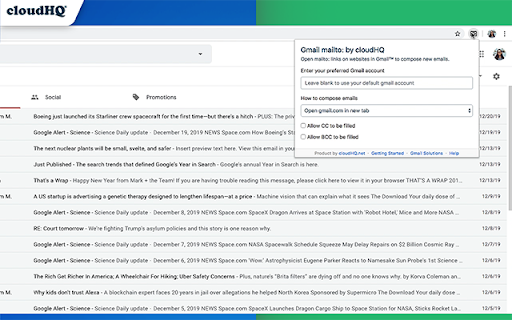

Set Gmail as default email application when clicking on an email address on the internet Have you ever clicked on a website's "contact us" email link, only to find out that nothing happens when you click on it? Or maybe it opens an email client like iCloud email on your Apple MacOs device, or Microsoft Outlook on your Windows device? It's an annoyance that doesn't need to happen at all. With this extension, you'll be able to set Gmail (or your G Suite account) as your default email client anytime you click on an email address that you find online. This extension is great for: ✅ Large organizations that use Google Workspace to ensure that all your employees compose emails from their work emails and not accidentally sent from employees' private email accounts (ie. iCloud, Outloook.com, or other Gmail email). Save time from having to copy and paste email addresses from the web into your Gmail compose window with Mailto: Set Default Email to Gmail by cloudHQ cloudHQ. Helping your productivity, 1 click at a time. cloudHQ website: https://www.cloudhq.net/ App website: https://www.gmail-mailto.com Pricing: https://www.gmail-mailto.com/pricing Support page: https://support.cloudhq.net/category/browser-extensions/gmail-mailto/ Blog: https://blog.cloudhq.net Demo: https://www.cloudhq.net/demo Google Workspace, Google Sheets, Google Drive, Google Alerts and Gmail are trademarks of Google LLC. Use of this trademark is subject to Google Permissions.

Chrome Extension Manager by cloudHQ
Manage extensions - a simple menu to enable, disable and access options of extensions. This extension is an easy way for you to manage all of your Chrome extensions that you've installed. ⛔ Problem 1: Many people are unaware that they installed Chrome extensions at all. You will be able to see any "hidden" extensions and apps that runs in background, so you can protect yourself from malware or malicious extensions and apps. This new Chrome extension is a simple solution that lets you: ✅ View all your installed Chrome extensions ✅ Quickly enable or disable certain Chrome extensions ✅ Group your extensions ✅ Enable or disable your Chrome extension groups (like the Chrome extension group "shopping", for example) This gives you full control of the management of your Google Chrome extensions. cloudHQ is a large company serving over 4M customers globally, with a strict privacy and security policy. We are safe to use, and we are helping to educate our customers about how they can enjoy their Chrome extensions without compromising their personal data or browser speed experiences. cloudHQ. Helping your productivity, 1 click at a time. cloudHQ website: https://www.cloudhq.net/ App website: https://www.chrome-extension-manager.com/ Pricing: https://www.chrome-extension-manager.com/pricing Support page: https://support.cloudhq.net/category/browser-extensions/chrome-extension-manager/ Blog: https://blog.cloudhq.net Demo: https://www.cloudhq.net/demo Google Workspace, Google Sheets, Google Drive, Google Alerts and Gmail are trademarks of Google LLC. Use of this trademark is subject to Google Permissions.

Email Reply Status
Stop wasting time sorting through emails: Instantly know which of your emails needs a reply back. Never drop the ball again. Now you can know exactly which emails need a reply with Email Reply Status. You'll have an inbox indicator that will tell you: 1. Which emails you need to reply to 2. The emails that you already replied to 3. Those that you don't need to reply to at all *NOTE*: For best performances set Gmail page size to 50 emails or less. It's a perfect tool for: ✅ Small business owners ✅ Sales people ✅ Business people who are just too busy to keep track of emails ✅ Customer service representatives ✅ Customer support personnel With Email Reply Status, never miss another opportunity again! cloudHQ. Helping your productivity, 1 click at a time. cloudHQ website: https://www.cloudhq.net/ App website: https://www.email-reply-status.com/ Pricing: https://www.email-reply-status.com/pricing Support page: https://support.cloudhq.net/category/browser-extensions/gmail-reply-status/ Blog: https://blog.cloudhq.net

Sort Gmail Inbox by cloudHQ
Find an email in seconds with free preset filters Find an email in seconds with these free preset filters We know how much you hate having to spend time searching for email. We hate it too! No more searching for the emails you need to find quickly—have the most popular filters set up in your Gmail label area so that you can easily find what you need in seconds. With this free Chrome extension, you'll be able to sort your Gmail inbox by: ✅ Unread emails ✅ Contacts who you need to respond back to ✅ Contacts who need to respond back to you ✅ Received Date organized by year, month, or exact date ✅ A specific person ✅ A specific company, like anyone with emails that have the domain "@youtube.com" ✅ Attachment size, and attachment type, too (no more searching for your presentation when you're about to present!) You'll also be able to: ✅ Save your contacts' emails to a PDF doc for backing them up for safekeeping ✅ Save your contacts' emails in a Google Spreadsheet to view them easily as a report ✅ Set up SMS text alerts for when important contacts email you If you're looking for a way to methodically work through your emails, this is the most effective way to get through them in an organized way that will help you get your work done, lightening bolt fast. cloudHQ. Helping your productivity, 1 click at a time. cloudHQ website: https://www.cloudhq.net/ App website: https://www.sort-gmail-inbox.com/ Pricing: https://www.sort-gmail-inbox.com/pricing Support page: https://support.cloudhq.net/category/browser-extensions/sort-gmail-inbox/ Blog: https://blog.cloudhq.net Demo: https://www.cloudhq.net/demo Google Workspace, Google Sheets, Google Drive, Google Alerts and Gmail are trademarks of Google LLC. Use of this trademark is subject to Google Permissions.

Resize Gmail Sidebar by cloudHQ
Now you can resize the label column in Gmail Gmail™ labels are a great way to stay organized, but your Gmail™ label names get hidden by the sidebar when their names are too long. Not anymore! With Resize Gmail Sidebar, you'll get all the space you need to reorganize your viewing space and become more efficient! You can easily slide your sidebar left or right, thereby increasing or decreasing your Gmail label view. Now you're in control of my inbox and can quickly locate the emails and information I need in my Gmail™ labels. cloudHQ. Helping your productivity, one step at a time. cloudHQ website: https://www.cloudhq.net/ App website:https://www.gmail-sidebar-resizer.com/ Pricing: https://www.gmail-sidebar-resizer.com/pricing (basically FREE but we offer paid support) Support page:https://support.cloudhq.net/category/browser-extensions/gmail-sidebar-resizer/ FAQ page: https://support.cloudhq.net/gmail-sidebar-resizer-faq-frequently-asked-questions/ Blog: https://blog.cloudhq.net
