
dnohjfkdahmofjedcbogjacjioimlmjk
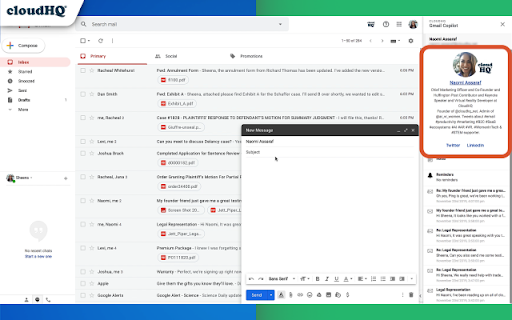
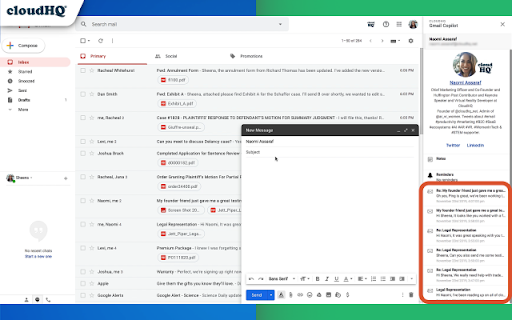

Mini CRM for your Gmail Copilot for Gmail™ is a mini CRM that lets you see a snapshot view of your email contact's profile information, and any past emails conversations you've had. This is crucial to have so that you can respond intelligently, and help you dramatically cut down your search time when you're looking for a past email conversation you had with your email contact. Right within Gmail, you can: ✔️View profile information of the person you're emailing, or who emailed you ✔️Create private notes about this contact (For example: This client has needed support for over 4 hours last week) ✔️Set up a reminder alarm for this contact (For example: Follow up with client on a specific date/time) ✔️A list of all the email conversation history you have with that email contact ✔️A list of all documents and attachments related to that email contact This is great for anyone who wants to appear more professional, and have everything neatly organized in their email. Key features: ⭐️ person and company profile info ⭐️ easy access to all email messages ⭐️ easy access to all attachments ⭐️ notes (private or shared with the team) ⭐️ reminders cloudHQ. Helping your productivity, 1 click at a time. cloudHQ website: https://www.cloudhq.net/ App website: https://www.gmail-copilot.com/ Pricing: https://www.gmail-copilot.com/pricing Support page: https://support.cloudhq.net/category/browser/gmail-copilot Blog: https://blog.cloudhq.net Demo: https://www.cloudhq.net/demo Google Workspace, Google Sheets, Google Drive, Google Alerts and Gmail are trademarks of Google LLC. Use of this trademark is subject to Google Permissions.

Email Privacy Protector: Is My Email Tracked?
Anytime you open your emails, people could be tracking when you do it, and which links you click on. Protect your email privacy. This extension is an email tracking blocker for Gmail - it blocks all email tracking pixels so preventing marketers and spammers from monitoring when you open emails and click on links, thereby protecting your email privacy and security. Stop spammers & marketers dead! Anyone who's tracking your emails, will be sorely disappointed. Do you know that almost all the emails you receive are tracked to see when you open them and when you click on the links in them? With this email privacy protector, no one will ever be able to know when you opened your email, or have any information about any links that you clicked. This extension will block email tracking attempts used to detect when you open and read emails. Email Privacy Protector displays an 'shields' when it finds and blocks a tracking attempt inside of an email. How it works: 1. Install the extension. 2. Open an email in your Gmail. 3. You will see a small shield icon in the left corner and the text "This email is being tracked". 4. If you want to notify the sender that you have opened and read the email, hover over the "Tracking is blocked" text and click "Unblock". Your email privacy and security is our goal. NOTE: For easy access to your settings and other cloudHQ apps, look for the cloudHQ icon in the top right corner of your Gmail inbox. Click on it to get started! cloudHQ. Helping your productivity, 1 click at a time. cloudHQ website: https://www.cloudhq.net/ List of cloudHQ apps: https://www.cloudhq.net/apps App website: https://www.email-tracking-blocker.com/ Pricing: FREE Support page: https://support.cloudhq.net/category/browser/email-tracking-blocker/ Blog: https://blog.cloudhq.net

Email Signature Generator by cloudHQ
Email signature generator and signature templates Are you looking for an amazing email signature tool that'll take seconds to create? Presenting: Email Signature Generator by cloudHQ, where you'll be able to easily create an email business card at the end of your emails as your email signature in Gmail™. You'll be able to include: ✅ Your company information ✅ Multiple aliases support ✅ An image like a logo, or your headshot ✅ A meeting calendar link ✅ A "big sale" link to your sales website ✅ A link to a YouTube video where you can put extra information about what your product does, or create a customized one created right inside the email signature generator ✅ A banner to wish your email recipients happy holidays ✅ A confidentiality clause ✅ A "save the planet" green quote so please don't print your email and hurt the environment ✅ An area for HTML if you want to include something of your very own Key features: * Customizable Signature Templates * Ready-to-Use Banner Designs * Integration with Google Workspace™ Admin Console * Multi-User Management Capability Your email signature template is highly customizable where you can choose your font size, colors, and anything else you want to include. How use this extension: 1) Install the extension 2) Compose a new email 3) Click on Email Signature Generator icon (next to your Send button) 4) Design your signature and save it Our platform also offers integration with Google Workspace™ admin console, enabling administrators to effortlessly manage and maintain consistent email signatures for all company employees. This feature allows for centralized control and uniformity in signatures across the organization. cloudHQ. Helping your productivity, 1 click at a time. cloudHQ website: https://www.cloudhq.net/ App website: https://www.email-signature-generator.com Pricing: https://www.email-signature-generator.com/pricing Support page: https://support.cloudhq.net/category/browser-extensions/email-signature-generator/ Blog: https://blog.cloudhq.net Gmail and Google Workspace are trademarks of Google LLC. Use of these trademarks is subject to Google Permissions.

Sort Gmail Inbox by cloudHQ
Find an email in seconds with free preset filters Find an email in seconds with these free preset filters We know how much you hate having to spend time searching for email. We hate it too! No more searching for the emails you need to find quickly—have the most popular filters set up in your Gmail label area so that you can easily find what you need in seconds. With this free Chrome extension, you'll be able to sort your Gmail inbox by: ✅ Unread emails ✅ Contacts who you need to respond back to ✅ Contacts who need to respond back to you ✅ Received Date organized by year, month, or exact date ✅ A specific person ✅ A specific company, like anyone with emails that have the domain "@youtube.com" ✅ Attachment size, and attachment type, too (no more searching for your presentation when you're about to present!) You'll also be able to: ✅ Save your contacts' emails to a PDF doc for backing them up for safekeeping ✅ Save your contacts' emails in a Google Spreadsheet to view them easily as a report ✅ Set up SMS text alerts for when important contacts email you If you're looking for a way to methodically work through your emails, this is the most effective way to get through them in an organized way that will help you get your work done, lightening bolt fast. cloudHQ. Helping your productivity, 1 click at a time. cloudHQ website: https://www.cloudhq.net/ App website: https://www.sort-gmail-inbox.com/ Pricing: https://www.sort-gmail-inbox.com/pricing Support page: https://support.cloudhq.net/category/browser-extensions/sort-gmail-inbox/ Blog: https://blog.cloudhq.net Demo: https://www.cloudhq.net/demo Google Workspace, Google Sheets, Google Drive, Google Alerts and Gmail are trademarks of Google LLC. Use of this trademark is subject to Google Permissions.

URL Link Previews for Gmail™ by cloudHQ
Automatically add full web URL link previews when composing your email. Share visually appealing previews, or the full contents of a URL link directly in your email. Here is how it works: - paste URL in your Gmail™ compose window - select "Preview", "Content", or "Preview" - we will automatically embed preview of the URL link into your email This includes private website URLs like: unpublished blog posts, pre-market listings for real estate, private legal contracts, and anything else that has a weblink! Sending attractive URL link previews, or a URL's full webpage content directly in your email, will help you get your message across in a visual way that people will appreciate. This is great for: -Realtors: Send your VIP clients a sneak preview for what's about to hit the market -Writers: Try sharing your unpublished blog posts with a graphic artist to make images or movies -Job Seekers: Try applying for a job by email with your LinkedIn profile and include its full content! -Business Owners: Did you get a contract that only you can see, but you want an outside opinion? Share it! -Salespeople: Sending emails with links to your products are boring! Send it with a visual preview! cloudHQ. Helping your productivity, 1 click at a time. cloudHQ website: https://www.cloudhq.net/ App website: https://www.gmail-url-link-preview.com/ Pricing: https://www.gmail-url-link-preview.com/pricing Support page: https://support.cloudhq.net/category/browser-extensions/gmail-url-link-preview Blog: https://blog.cloudhq.net
