
olajoinibmphanngkmckklcmkgckmaao
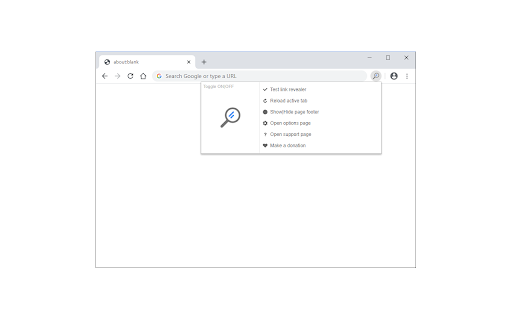
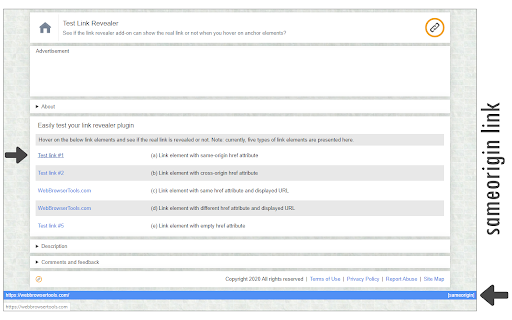

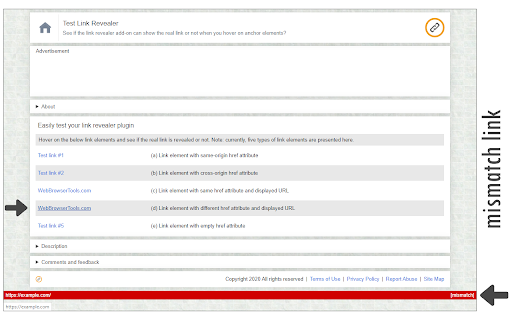
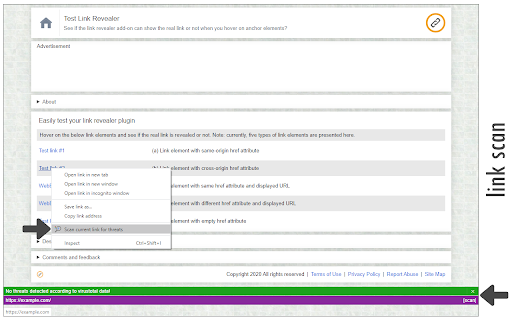
See the true URL for all links and improve your security! Link Revealer extension is designed to improve your online security. When you hover on any link element, the underlying - href - will be displayed as the link's title. Moreover, a colored footer will also be displayed at the bottom of the page showing the link href. If the underlying domain for the link is similar to the page's domain, this color will be BLUE. If the link is third-party the color is GREEN. For a situation where the displayed URL in the link's text content is different than the underlying href, the footer color will be RED. The toolbar icon color will also be updated according to the above rules. For any link, if you right-click and select - Scan link for threats, the add-on scans the link with the SafeBrowsing JavaScript API (https://safebrowsing.google.com/). When you first install the add-on, please visit the options page to activate the safe-browsing API. From the toolbar popup, you can also turn the add-on ON or OFF. Moreover, you can hide the page's footer if you find it inconvenient. Please note that you can still scan links for threats even if the page footer is hidden. If you have a feature request or found a bug to report, please fill out the bug report form on the add-on's homepage (https://mybrowseraddon.com/link-revealer.html).

Link Protector
Adds the noopener attribute to links (third-party only) and prevents websites from accessing the opener window. Link Protector extension is designed to potentially improve your online security. For all link elements (hyperlinks) within the page, if the link opens in a new tab and does NOT have an opener attribute (rel=noopener), this addon adds this attribute to the link to prevent the new window from accessing the opener window (previous tab). Please note that this addon only works if the links have a third-party href, otherwise it won't change the attributes at all. By adding the noopener attribute, it can potentially improve your online security and privacy, as the third-party website does not have access to the opener window (the tab in which the hyperlink is opened), therefore your online data will not be exposed to other websites. The toolbar button serves as an ON, OFF switch to quickly turn the extension ON or OFF. Badge icon text shows the number of hyperlinks that are being changed. This addon does not have separate options or settings page. If you have a feature request or found a bug to report, please fill the bug report form on the addon's homepage (https://mybrowseraddon.com/link-protector.html).

NoEval - Disable Eval()
Disable window.eval() in all websites and improve your online security! NoEval extension disables window.eval() function on all webpages. It also disables similar approached to eval() when the input argument's type is String: When eval or similar methods are used on websites, users might be at risk in terms of security. Please visit the below page to get more info about eval and why it is a dangerous function: https://developer.mozilla.org/en-US/docs/Web/JavaScript/Reference/Global_Objects/eval#Never_use_eval! To turn the extension ON/OFF, please open the toolbar popup and then press the toggle button on the left side. Next, please reload all open tabs for changes to take effect. If you found a bug, or have a feature request in mind, please fill out the bug report form on the add-on's homepage (https://mybrowseraddon.com/noeval.html).

Security Tweaks
Improve your online security with few tweaks via toolbar popup! Security Tweaks is an extension that helps you improve your security while browsing by using eight different techniques. Simply open toolbar popup UI and mark a desired tweak. Please note that, only few tweaks are selected by default. There are few settings (related to JavaScript, inline-script and cookie) available in toolbar popup to adjust. Currently there are 8 tweaks available for this add-on: 1. Block most common ads. 2. Block third-party JavaScript. 3. Enable safe-browsing. 4. Block cookies. 5. Block inline-script. 6. Block Flash contents. 7. Disable window.eval(). 8. Block most common malware URLs. Note 1: I have made this extension with Yubi's collaboration. This add-on is inspired by Speed Tweaks made by Yubi: https://chrome.google.com/webstore/detail/speed-tweaks/afebilemcaepdkmhmibgmnpfppnjimjf Note 2: to report bugs, please fill the bug report form in the addon's homepage (https://mybrowseraddon.com/security-tweaks.html).

Link Cleaner
Link Cleaner extension removes or replaces desired parts from a URL with regular expression rules. The toolbar button is the ON|OFF switch to enable or disable the extension. To work with this addon, please first open the options page. In the middle section, add a regex filter to match the request URL on the left side, then write a regex substitution pattern on the right side. For example: With the above regular expression rule, if you navigate to URL #1 below in the address bar, it will be redirected to URL #2 (as shown in the first screenshot). Note 1: The first match of the regex filter within the left side URL, will be replaced with the pattern on the right side URL. Note 2: In the regex substitution pattern, backslash-escaped digits (\1 to \9) are used to insert the corresponding capture groups. \0 refers to the entire matching text (see sample rule #1). Note 3: This extension only works when a URL or link is about to load in a tab or window; it does not change the link's href within the page. If you have a feature request or found a bug to report, please fill out the bug report form on the addon's homepage (https://mybrowseraddon.com/link-cleaner.html).
