
ahemebpfpianlpbbddghmfpigbjnjgmg
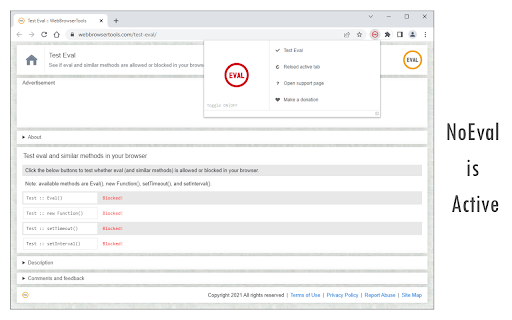
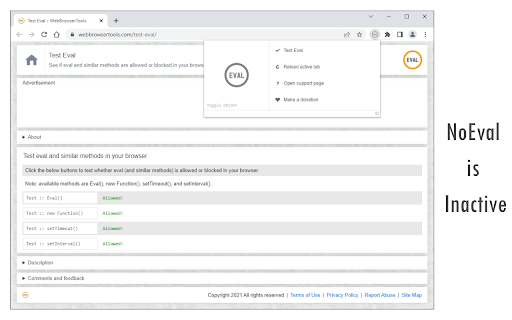
Disable window.eval() in all websites and improve your online security! NoEval extension disables window.eval() function on all webpages. It also disables similar approached to eval() when the input argument's type is String: When eval or similar methods are used on websites, users might be at risk in terms of security. Please visit the below page to get more info about eval and why it is a dangerous function: https://developer.mozilla.org/en-US/docs/Web/JavaScript/Reference/Global_Objects/eval#Never_use_eval! To turn the extension ON/OFF, please open the toolbar popup and then press the toggle button on the left side. Next, please reload all open tabs for changes to take effect. If you found a bug, or have a feature request in mind, please fill out the bug report form on the add-on's homepage (https://mybrowseraddon.com/noeval.html).

WebGPU Fingerprint Defender
WebGPU Fingerprint Defender is a browser extension that lets you easily hide your real WebGPU fingerprint by reporting a random fake value. This add-on adds a small noise to the actual fingerprint and renews it every time you visit a website or reload a page. With the browser's WebGPU API, in general, two types of fingerprints can be generated. One with WebGPU specs (constant metrics) and the other with an image that is rendered with the WebGPU API on a canvas. This extension can spoof both values at the same time. To disable this add-on, please visit the extensions page in your browser and then click on the disable button. Please note that this add-on does not have any options page. This extension is made in collaboration with the author of "WebGL Fingerprint Defender": https://chromewebstore.google.com/detail/olnbjpaejebpnokblkepbphhembdicik If you have a feature request or found a bug to report, please fill out the bug report form on the add-on's homepage (https://mybrowseraddon.com/webgpu-defender.html).

Privacy Guard & Manager
Easily control settings in your browser to improve your privacy. Privacy Guard & Manager is a browser extension that helps you increase your privacy by adjusting a few privacy settings in your browser. Please open the toolbar popup UI to see the list of available settings (around 15 items in total depending on your browser version). Each set has a drop-down list; click on the list to choose the desired value for that item. Once an item is changed, it will be saved to the memory automatically. Moreover, when you hover on any item within the toolbar popup, a description is shown at the bottom of the UI. Please read this description before changing any option. Note: you may see less/more than 15 items in the popup. This is due to the browser or OS version. Some items may become available or be removed in the future updates of your browser. Note: To report bugs, please fill the bug report form on the addon's homepage (https://mybrowseraddon.com/privacy-guard.html).

Privacy Protector Plus
Removes all forms of tracking including web-bugs, tracking-scripts and information-collectors, and protects your data. Privacy Protector Plus is a browser extension that removes all forms of tracking including web bugs, tracking scripts, and information collectors, and protects your data. Some features: a. protects your privacy by removing all forms of tracking from web pages. b. whitelist a website by adding it to the trusted list from the options page. c. clicking on the toolbar icon will enable or disable the extension. d. badge icon text shows you the number of blocked items on the current page. Note: to report bugs, please visit the addon's homepage (https://mybrowseraddon.com/privacy-plus.html) and fill out the bug report form.

WebGL Fingerprint Defender
WebGL Fingerprint Defender is a browser extension that let you easily hide your real WebGL fingerprint by reporting a random fake value. According to many tech blogs, completely blocking WebGL API is not a good idea, therefore reporting a fake fingerprint could be the best solution to better protect your privacy. This add-on simply adds a small noise to the actual fingerprint and renews it every time you visit a website or reload a page. With the browser's WebGL API, in general, two types of fingerprints can be generated. One with WebGL constants and the other with an image that is rendered with the WebGL API. This add-on can spoof both values at the same time. To disable this add-on, please visit the extensions page in your browser and then click on the disable button. Please note that this add-on does not have any toolbar icon/button. This extension is made in collaboration with the author of "Canvas Fingerprint Defender": https://chrome.google.com/webstore/detail/canvas-fingerprint-defend/lanfdkkpgfjfdikkncbnojekcppdebfp If you have a feature request or found a bug to report, please fill out the bug report form on the add-on's homepage (https://mybrowseraddon.com/webgl-defender.html).
