
pclbemffjpghlfbdjdifapggphgokeok


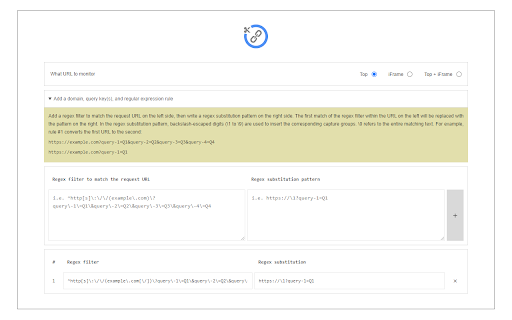
Link Cleaner extension removes or replaces desired parts from a URL with regular expression rules. The toolbar button is the ON|OFF switch to enable or disable the extension. To work with this addon, please first open the options page. In the middle section, add a regex filter to match the request URL on the left side, then write a regex substitution pattern on the right side. For example: With the above regular expression rule, if you navigate to URL #1 below in the address bar, it will be redirected to URL #2 (as shown in the first screenshot). Note 1: The first match of the regex filter within the left side URL, will be replaced with the pattern on the right side URL. Note 2: In the regex substitution pattern, backslash-escaped digits (\1 to \9) are used to insert the corresponding capture groups. \0 refers to the entire matching text (see sample rule #1). Note 3: This extension only works when a URL or link is about to load in a tab or window; it does not change the link's href within the page. If you have a feature request or found a bug to report, please fill out the bug report form on the addon's homepage (https://mybrowseraddon.com/link-cleaner.html).

Link Revealer
See the true URL for all links and improve your security! Link Revealer extension is designed to improve your online security. When you hover on any link element, the underlying - href - will be displayed as the link's title. Moreover, a colored footer will also be displayed at the bottom of the page showing the link href. If the underlying domain for the link is similar to the page's domain, this color will be BLUE. If the link is third-party the color is GREEN. For a situation where the displayed URL in the link's text content is different than the underlying href, the footer color will be RED. The toolbar icon color will also be updated according to the above rules. For any link, if you right-click and select - Scan link for threats, the add-on scans the link with the SafeBrowsing JavaScript API (https://safebrowsing.google.com/). When you first install the add-on, please visit the options page to activate the safe-browsing API. From the toolbar popup, you can also turn the add-on ON or OFF. Moreover, you can hide the page's footer if you find it inconvenient. Please note that you can still scan links for threats even if the page footer is hidden. If you have a feature request or found a bug to report, please fill out the bug report form on the add-on's homepage (https://mybrowseraddon.com/link-revealer.html).

Ping Blocker
Prevents sites from tracking you by blocking the PING request! Ping Blocker helps you prevent websites from tracking you by blocking ping requests. Ping requests can be generated via a few methods on websites. The most famous one is the navigator.sendBeacon() API. Another method is to use the "ping" attribute for anchor elements. The last method is via a tag with a "report-to" URL. This addon, when enabled, can successfully block all ping requests. Toolbar icon changes color when you click on it. The red color is when the addon is active and the grey color is for the inactive state. Within the add-on options page, there are several settings to adjust. You can choose which type of ping request to block via the first three options. Next, there is a console log error checkbox (to log blocked URLs to the browser's console). The last setting is for adding domains to be whitelisted. All entries should be comma-separated. If you have a feature request or found a bug to report, please fill the bug report form on the addon's homepage (https://mybrowseraddon.com/ping-blocker.html).

Clean URL Copy
Copy the current URL to clipboard without ? params except q. Quickly grab a clean URL of your current tab to share with others! This extension provides a one-click button to copy the current tab's URL to your clipboard. All query string parameters are removed except for the "q=" parameter.

Copy Clean Link
Copy a link without the query parameters Clean out all data after the question mark in the link. Use cases: * avoid data tracking * avoid leaking of personal info provided by 3rd-party providers
