
ohfbodcnjcljdibihcfkeldjlpefpjde
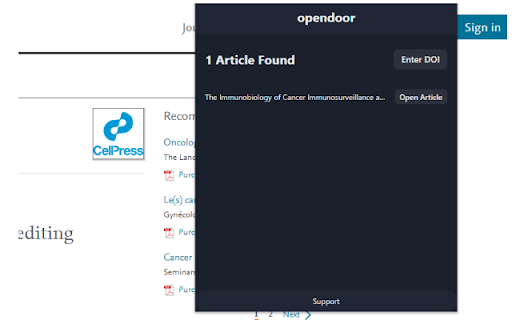
Essentially, the goal of opendoor is to grant access to special papers to any person that cannot afford it themselves. After opening a tab containing an article, press the extension on the top right navigation bar in google chrome. If the article you were looking for is listed, you're good to go! However, if the extension couldn't find the article on the page, you should find the DOI string (eg: http://doi.org/10.1093/ajae/aaq063), and paste it into the "Custom DOI" field.

mySpires
An unofficial assistant for INSPIRE, arXiv, and NASA/ADS. mySpires is a free, light-weight, and completely browser-implemented reference management system. It keeps track of your references while you focus on writing your research papers, dissertations, theses, or are just on a literature hunt for your next groundbreaking idea. There are a bunch of bibliography management systems out there catering to researchers, but quite often you need to go out of your way to an independent software or website to add to or maintain your database. This is where mySpires is different. mySpires integrates your reference library directly to your browser for a seamless experience. You never have to leave your browser or go to a dedicated website, or even click on a popup most of the times, to keep track of your literature survey. mySpires does this magic via this browser plugin. Whenever you visit inspirehep.net, arxiv.org, or ui.adsabs.harvard.edu, the plugin adds a small snippet to the page that allows you to add or modify a record in your library without ever having to interrupt your workflow. If you choose to, you can take it a step further and ask mySpires to keep a history of the references you visit. You can revisit your history later at any time and save the records that you found were helpful. mySpires maintains a BibTeX database for you of all the records that you add to your library. If you are into automation, you can link your Dropbox account and mySpires will keep an up-to-date copy of your BibTeX database in your Dropbox folder. You can refer to this file in your TeX projects, or better yet, symlink it to your texmf folder. Possibilities are endless.

FasterMe
FasterMe is a powerful Chrome extension that will help you learn new tools quickly and easily to improve efficiency and reach full… FasterMe is a powerful Chrome extension that will help you learn new tools quickly and easily to improve efficiency and reach full productivity potential. It is designed to help users be more productive and efficient with their work. Whether you're a student, freelancer, or professional, this extension can help you streamline your workflow and save valuable time. Try it now with a 7-day free trial. One of the key features of FasterMe is its ability to help users learn new shortcuts for their work. This is especially useful for those new to certain applications or software who need help navigating them quickly and efficiently. With FasterMe, you'll be able to access all of the shortcuts you need to get your work done faster and more efficiently. The extension works with popular applications such as Google Sheets, Docs, Figma, Github, and more. We are constantly working to improve the extension and add more supported applications, so you can expect to see new features and supported apps added in the future. FasterMe provides a versatile advantage with its custom shortcuts feature, applicable across multiple apps and websites. This functionality empowers you to optimize your workflow by creating personalized shortcuts for various actions and keys. FasterMe very easy to use. It runs in the background, so you don't need to worry about it getting in the way of your work, and it has a simple, user-friendly interface that makes it easy to navigate and access the shortcuts you need. Overall, FasterMe is a powerful, easy-to-use Chrome extension that can help you increase productivity and efficiency with your work. Whether you're new to certain applications or just looking to streamline your workflow, this extension is a must-have tool for anyone looking to boost their productivity and save valuable time.

ISAAC Chrome extension
A browser extension to add literature using DOIs and PubMed identifiers. Browser extension that helps adding resource output to the NWO ISAAC database. After selecting the type of "product", the extension pop-up dialog can be used to look up metadata using DOI, PubMed identifier, and ISBN. The extension supports adding authors will jump to the "add author" iteratively, allowing you to add additional information (ORCID/gender/DAI). The plugin uses citation-js, see https://peerj.com/articles/cs-214/ while the source code is available from https://github.com/citation-js/isaac-chrome-extension under the MIT license. Information is collected from Crossref, DataCite, and mEDRA (DOI), Google Books and OpenLibrary (ISBN), PubMed (PubMed identifiers) and Unpaywall (OA status). THIS IS NOT A NWO ENDORSED EXTENSION AND NWO HAS NOT BEEN INVOLVED IN THE DEVELOPMENT. BETA: this extension is early in its development cycle. All feedback is welcome. Use at your own risk.

Stopwatch for Excel
This extension adds a stopwatch to Excel. When the stopwatch isn't running you can start the stopwatch by clicking on the time. When the stopwatch is running you can click on the time again to pause the stopwatch. The stopwatch can be reset anytime by clicking on the X button next to the time. When the stopwatch is paused or reset the time is copied to the clipboard.
