
oandeohanomafjfihpigiakpjinadcla


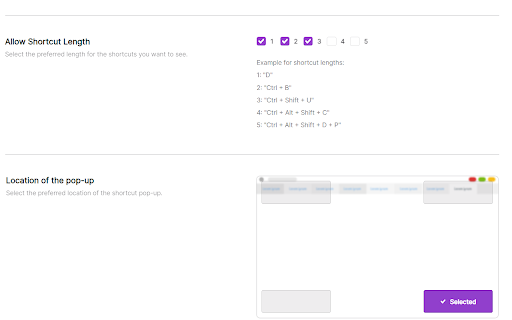


FasterMe is a powerful Chrome extension that will help you learn new tools quickly and easily to improve efficiency and reach full… FasterMe is a powerful Chrome extension that will help you learn new tools quickly and easily to improve efficiency and reach full productivity potential. It is designed to help users be more productive and efficient with their work. Whether you're a student, freelancer, or professional, this extension can help you streamline your workflow and save valuable time. Try it now with a 7-day free trial. One of the key features of FasterMe is its ability to help users learn new shortcuts for their work. This is especially useful for those new to certain applications or software who need help navigating them quickly and efficiently. With FasterMe, you'll be able to access all of the shortcuts you need to get your work done faster and more efficiently. The extension works with popular applications such as Google Sheets, Docs, Figma, Github, and more. We are constantly working to improve the extension and add more supported applications, so you can expect to see new features and supported apps added in the future. FasterMe provides a versatile advantage with its custom shortcuts feature, applicable across multiple apps and websites. This functionality empowers you to optimize your workflow by creating personalized shortcuts for various actions and keys. FasterMe very easy to use. It runs in the background, so you don't need to worry about it getting in the way of your work, and it has a simple, user-friendly interface that makes it easy to navigate and access the shortcuts you need. Overall, FasterMe is a powerful, easy-to-use Chrome extension that can help you increase productivity and efficiency with your work. Whether you're new to certain applications or just looking to streamline your workflow, this extension is a must-have tool for anyone looking to boost their productivity and save valuable time.

TestFiltering+
TestFiltering+ automatically monitors your internet connection to ensure your filter is correctly blocking illegal/harmful content We work with specific partners to host test URL's on various lists and have test pages hosted where they will be blocked. This service was setup in response to the introduction of statutory guidance for schools in the UK about appropriate levels of filtering and monitoring of school internet connections. The UK Safer Internet Centre first published its filtering and monitoring definitions in 2016 to help both schools and providers understand what should be considered as ‘appropriate’.

Ario Boost
Ario Boost is a companion to the Ario mobile app. Boost gives your Ario more context by connecting to other apps you use like: • Amazon • Doordash • Twitter

News Storyline
Know Thy History and Be Notified About Future A Chrome sidebar extension and companion newsletter that gives you an unbiased, context-rich timeline of any news story and quietly watches for what happens next—so you never miss a beat (or waste time scrolling). 📖 On-Demand Timelines in Your Sidebar • One-click access while you’re reading any article: hit the extension icon to slide open a concise, chronological view of past reports on that story. • Facts, not opinions: we aggregate across dozens of reputable outlets, stripping out commentary bias so you see the unvarnished sequence of events. • Top highlights only: instead of drowning you in every mention, we surface a handful of the most relevant milestones—headlines, timestamps, and sources—so you instantly understand “what led here.” 🤖 Background Story Scanning & Positive Alerts • Hands-free monitoring: once you’ve opened a timeline, our service continues scanning in the background for new developments on that very story. • Positive-only notifications: you decide what matters—receive alerts only when something significant (and positive) happens, so your inbox isn’t full of noise. • Peace of mind: no more endless manual refreshes or fear of overlooking a breaking update. 📰 Daily Newsletter & “New Developments” Bulletin • Daily digest delivered each morning: a simple roll-up of every event we tracked across your subscribed stories in the past 24 hours—no grouping, no spin. • On-demand “New Developments” email: when fresh updates arrive mid-day (for critical beats), we’ll ping you separately so you stay in the loop around the clock. 🔔 Story Subscriptions & Future Tracking • Subscribe in one click: any timeline can be turned into a “watched” story. From that moment on, we’ll keep you posted on each follow-up report. • Tailored alerts: choose your stories—finance, politics, tech, climate—and we do the rest, surfacing only the most impactful next chapters. 🔧 Platform & Integration • Chrome-based browsers supported (Chrome, Edge, Brave, Opera). • Privacy-first: minimal permissions, no tracking beyond the stories you opt in to follow. • Lightweight: sits quietly in your toolbar, loading only when you ask. Who It’s For • Journalists & analysts who need quick, neutral context before filing next headlines. • Researchers & students chasing down backstory and evolution of key events. • Curious readers who want more than a single outlet’s perspective—and zero surprises when the story moves on. Why Know Thy History? • Context at your fingertips—instantly see what happened before. • Stop missing updates—positive alerts mean you’ll always catch the next big development. • Save time & mental bandwidth—no more endless feeds or biased roundups. Install now and start each story with the past in view—and the future on your radar.

Peek for YNAB
Check on your YNAB category and account balances, and quickly add transactions. The Peek for YNAB extension gives you a snapshot of your current YNAB category and account balances. You can pin your favorite categories and accounts, view recent transactions, and add transactions right from the extension. Split transactions and transfers are fully supported. You can also setup customizable notifications and alerts for each budget. Peek for YNAB is a third-party extension, and is not maintained or supported by YNAB (the company). Please do not reach out to YNAB's official support channels for help or issues related to this extension. Instead, please refer to the extension's help page: https://peekforynab.com/help
