
ejidfomdndeogeipjkjigaeaeohbgcpf
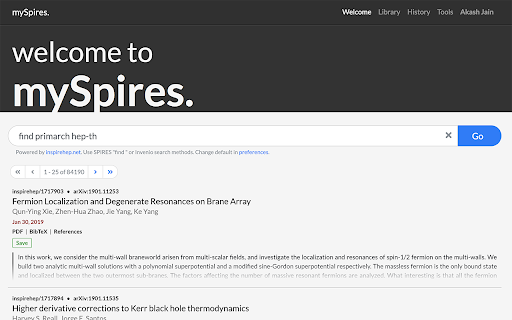

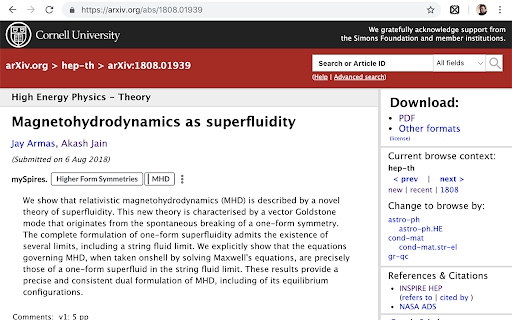
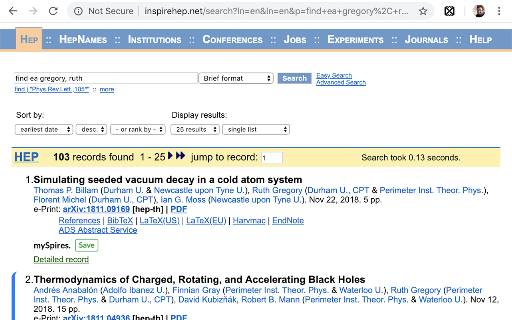
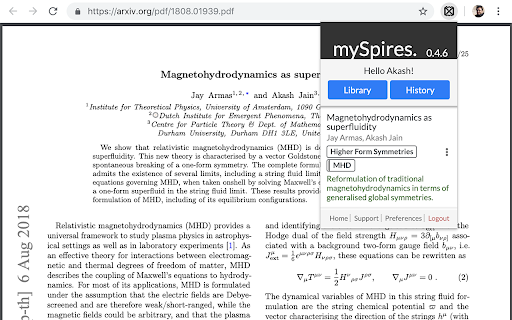
An unofficial assistant for INSPIRE, arXiv, and NASA/ADS. mySpires is a free, light-weight, and completely browser-implemented reference management system. It keeps track of your references while you focus on writing your research papers, dissertations, theses, or are just on a literature hunt for your next groundbreaking idea. There are a bunch of bibliography management systems out there catering to researchers, but quite often you need to go out of your way to an independent software or website to add to or maintain your database. This is where mySpires is different. mySpires integrates your reference library directly to your browser for a seamless experience. You never have to leave your browser or go to a dedicated website, or even click on a popup most of the times, to keep track of your literature survey. mySpires does this magic via this browser plugin. Whenever you visit inspirehep.net, arxiv.org, or ui.adsabs.harvard.edu, the plugin adds a small snippet to the page that allows you to add or modify a record in your library without ever having to interrupt your workflow. If you choose to, you can take it a step further and ask mySpires to keep a history of the references you visit. You can revisit your history later at any time and save the records that you found were helpful. mySpires maintains a BibTeX database for you of all the records that you add to your library. If you are into automation, you can link your Dropbox account and mySpires will keep an up-to-date copy of your BibTeX database in your Dropbox folder. You can refer to this file in your TeX projects, or better yet, symlink it to your texmf folder. Possibilities are endless.

ChatGPT Recall Prompts
"ChatGPT Recall Prompts" is an extension that allows you to quickly recall your previous inputs in the textbox by pressing the "up" keyboard button without copying and pasting. It saves you time and effort when composing messages. Try it out to experience fast text input recall with just a button press! Tip 1: If nothing shows in the textbox, try to press F5 key or send your first prompt to reload prompts. Tip 2: If you don't see the full text when recalling prompts, try to type any text or press space key to show full text in the textbox. Tip 3: If pressing "Enter" doesn't send your message, try editing the text box first. Simply type or delete something to enable the "Enter" key functionality. "No data is saved or used by any third party, all prompts are removed every time the page is reloaded."

Apiary - Web Highlighter & Annotator
Highlight and take notes directly on what you read online and instantly share them with friends and colleagues. Easily highlight and take notes on what you read online and then easily save them for later and share them with friends and colleagues in one click. Apiary is a free to try chrome extension based product that allows you to easily highlight and take notes on what you read online. After you have annotated something online it will be saved to your Apiary account where you can then organize in any way you like with our folder system. You can than easily share directly from the website where you took the notes or from your Apiary account later on with anyone you want. Just highlight and get a shareable link you can send to anyone with one click. When using Apiary on a website or email online you have two options. You can choose to just highlight some text or you can highlight and add a comment to that highlight. Allowing you to save and share you favorite parts and current thoughts while reading it with others. You can view your annotations live by clicking the chrome extension and having the Apiary sidebar appear showing all the highlights and notes you have made on that page. Or you can view them later in your Apiary account where we save all the contents of what you were reading and the highlights and notes you took. Allowing you to get the full context of whatever you were taking notes on. Annotate, save, and share what you read online instantly today. ----------------------------------------- Key Features: Web and Email Highlighting Take Notes On What You Read Online Apiary Account Access With Organization Systems Quick and Easy Shareable Notes Private Notes That Only You Can See Automatically Saving Notes ------------------------------------------- How To Use: In order to use the Apiary Chrome Extension you will need an account with Apiary. Please visit www.myapiary.io to create an account today. 1) Create An Account On Apiary (www.myapiary.io) 2) Download Chrome Extension 3) Sign Into Chrome Extension w/ Your Apiary Account 4) Select Text (Left Click & Drag) You Wish To Annotate 5) Click On Apiary Popup To Either Highlight Or Take Note On Selected Text 6) Delete An Annotation By Clicking On A Highlight And clicking Delete Icon 7) Share Your Notes For A Page By Clicking The Apiary Share Button On Bottom Left Corner Of Window 8) View A Note By Either Visiting Your Apiary Account Or By Clicking View On A Currently Annotated Web Page ------------------------------------ Pro Tips: 1) Make Sure You Are Logged Into Apiary Chrome Extension If You Are Having Issues Annotating 2) Organize Your Notes Into Folders On Apiary To Easily Find Notes Later 3) Share Your Notes With Friends By Clicking Share Button And Sending Link To Friends. --------------------------- Got Feedback? Please reach out to us at support@myapiary.io If you find bugs please let us know at https://forms.gle/rHvoLZwaXfVcbAMJ7. If you have a feature request please let us know at https://forms.gle/vguFD2Rxi2FCsSQi8. By installing the extension, you agree to Apiary's Terms of Service, Privacy Policy, and Community Guidelines (which can be found here: https://www.myapiary.io/term-services and https://www.myapiary.io/privacy-policy)

Numici - annotate, collaborate and synthesize
Use Numici to organize, highlight, annotate and synthesize content in web pages and documents collaboratively or individually. Organize content in Numici Taskspaces - collaborative workspaces for content by project or topic. Use Numici extension to highlight, annotate and tag text and images in web pages, including PDF documents rendered by web sites. Use Numici cloud application to annotate documents, email and notes. Collaborate with your team in conversations around highlights and annotations. Follow and join conversations in context from Slack and Microsoft Teams. Synthesize and curate content across web pages and documents as a digest in Numici Taskspace. Create posts that include one or more annotations in the web page along with a deep link to the web page and share on social media (Facebook, LinkedIn, Twitter and WhatsApp) or in enterprise applications like Slack. Share the digest through email, PDF or a link. Digests can be private (only users with access can view it) or public (anyone with the link can access). Use the purpose-built search to find instantly what you are looking for across annotations and content in documents and web pages. Use of Numici extension requires an account with Numici. Once you add the extension to Chrome, you will be taken to the Numici website (https://www.numici.com/) where you can sign up for a free account. Numici extension requires access to third-party cookies to check if the user is already logged in to a Numici account. If you block third-party cookies, you will need to add "[*.]numici.com" to the section "Sites that can always use cookies" in Chrome Settings -> Cookies and other site data. If you want to use "Sign-in with Google" to login to Numici, then you will also need to add "accounts.google.com" to the same section.

Degen Reply
Adds buttons to Twitter for easy replies using spintax and AI-generated responses. ⚡ Degen Reply AI Tool: Amplify Your X/Twitter Engagement with AI Magic ⚡ Unleash the power of AI in your X/Twitter conversations with the Degen Reply AI Tool, a revolutionary Chrome extension that takes your Twitter engagement to uncharted territories. Supercharge your X experience, be it casual chats, heated debates, or enlightening discussions - the Degen Reply AI Tool is your ultimate Twitter sidekick. 💡 AI-Powered Responses: Don't know what to say? Stuck in a conversation? Use the AI Reply button powered by the cutting-edge ChatGPT technology. With this feature, craft compelling, relevant, and razor-sharp responses to any tweet in a snap. 🌀 Spintax Text Support: Customize your replies with our preconfigured spintax text option. With this, you can make your responses more dynamic and personalized, taking your Twitter interactions to the next level. 🔮 AI Personality Configuration: Stay true to your unique style! Configure an AI Personality that mirrors your tone and language preferences, ensuring your responses never lose your personal touch. The Degen Reply AI Tool is not just an extension - it's a game-changer. Engage in meaningful interactions, build connections, influence conversations, all while saving time and effort. Let your personality shine through your tweets while the AI handles the heavy lifting. Start your Twitter revolution today with the Degen Reply AI Tool. Remember, the art of conversation is one click away! Download now and make every tweet count! Disclaimer: The Degen Reply AI Tool operates in adherence to Twitter's policy and respects user privacy.
