
ofkjoeocpbkpamfhbfmgglkhhincgbdj

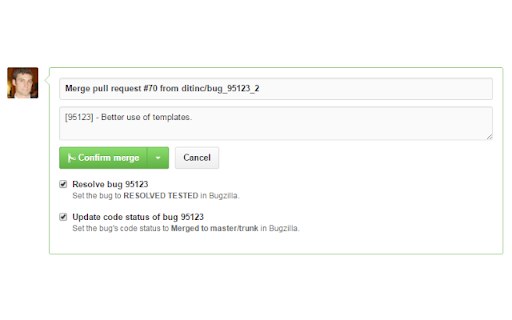

This extension integrates GitHub and Bugzilla Integrates Bugzilla and GitHub to make your life easier. It is a work in progress, so feel free to contribute: https://github.com/ditinc/bugzilla-github-extension - If GitHub Pull Request URL is populated with the pull request's URL, then a link will be added to the bug's title - There is a button for marking selected bugs as duplicates when changing several bugs at once - If the repository is associated with a Bugzilla product: - The Product will be listed under the repository name - There will be buttons to jump to Bugzilla lists of unresolved or resolved bugs - If the pull request's title includes the bug number (ex: 83513, [83513], Bug 83513, Bug85313) or if the branch contains the bug number (ex: bug_83513, Bug-83513, bug83513): - Bug number in title will be a link to the bug - Bugzilla section added to side listing some bug details - Comments will be sent to Bugzilla along with the Hours Worked entered in a new input added next to the comment buttons - This includes line comments, though they do not have an Hours Worked field - Have the option of setting but to RESOLVED FIXED when making a pull request comment - When creating a pull request, you have the option to: - Update the GitHub Pull Request URL on the bug in Bugzilla - Send the comment to Bugzilla - When merging a pull request, you have the option to: - Update the Code Status in Bugzilla - Update the bug to RESOLVED TESTED - Labels are pushed to the GitHub Labels field on the bug - If the release's comments include bug numbers (ex: 83513, [83513], [83513], [83513]): - Have the option of setting to In Staging or In Production in Bugzilla - Have the option of updating Release field in Bugzilla ... and more!

Refined GitHub
Simplifies the GitHub interface and adds useful features Highlights: - Linkifies issue/PR references and URLs in code. - Makes whitespace characters visible. - Reduces tabs’ size to 4 spaces instead of 8. - Adds one-click merge conflict fixers. - Adds reaction avatars showing who reacted to a comment. - Adds a button to revert all the changes to a file in a PR. - Adds a build/CI status icon next to the repo’s name. - Adds a button to view the source of Markdown files. - Shows PRs that touch the current file. - Highlights the most useful comment in conversations. - Shows the first Git tag a merged PR was included in. - Adds a link to an automatic changelog for each tag/release. - Adds possible related pages and alternatives on 404 pages. - Displays the age of the repository in the sidebar. And so much more! 200+ features. See the website for a full list of features. The GITHUB and REFINED GITHUB trademarks are owned by GitHub, Inc. and used under license.

Le Git Graph - Commits Graph for GitHub
A browser extension that displays the git graph for any GitHub repository. Calling all GitHub enthusiasts! Elevate your coding prowess with our exceptional browser extension, "Le Git Graph" – the ultimate tool that transforms your GitHub journey into a captivating visual spectacle. 🚀 Embrace Visual Clarity: Integrating seamlessly into the GitHub website, "Le Git Graph" introduces a dynamic and interactive Git graph to your repositories. No more deciphering complex commit logs or struggling to make sense of intricate branching patterns. This extension unveils your version control history in a striking, user-friendly graph, making project navigation an absolute breeze. 🎨 A Work of Art: Behold the mesmerizing visual representation of your Git history with "Le Git Graph." Witness branches, merges, and commits come to life in an organized and aesthetically pleasing manner. Analyze project progress, identify code changes, and make informed decisions with unparalleled ease. 🔍 Intuitive Exploration: Experience GitHub navigation like never before! "Le Git Graph" empowers you to explore branches effortlessly, delve into commits, and seamlessly switch between versions. Uncover hidden relationships between code changes and gain valuable insights with just a few clicks. 🛠️ Empower Collaboration: Take collaboration to new heights! "Le Git Graph" facilitates seamless code reviews, efficient conflict resolution, and effective communication among team members. Boost productivity and build remarkable projects together, all while enjoying the delightful visual experience. ⚙️ Hassle-Free Setup: Getting started is a breeze! Download "Le Git Graph" from your browser store, and instantly elevate your GitHub interface with this powerful extension. Lightweight, dependable, and compatible with major browsers, it ensures a smooth coding journey from the get-go. ⭐ Embrace the Revolution: Step into the future of GitHub collaboration and unleash the true potential of your repositories with "Le Git Graph" extension. Experience coding productivity like never before! 👉 Don't miss out on this game-changing tool – download "Le Git Graph" now and embark on an awe-inspiring coding adventure! Happy coding!

github-vscode-icons-updated
[UPDATED] This extension shows a VS Code icons in GitHub Repositories This is an updated extension that shows a VS Code icons in GitHub Repositories Displays vscode-icons in GitHub repo with new UI, nearly 1200 file/folder icons Additional support for bitbucket, gitlab, sourceforge and more

GitZip for github
It can make the sub-directories and files of github repository as zip and download it Why GitZip: - You DO NOT have to download the whole project just for those few files/folders you need. Usage: 1. Browse any Github repository page. 2. Two ways to download: 2.1. Choose the items: 2.1.1. In default, you can double click on items or check the checkbox on the front of items. 2.1.2. Click download button at the bottom-right of the page. 2.2. In context menu: 2.2.1. Click "GitZip Download" > "Whole Repository" or "Current Folder". 2.2.2. Move the mouse cursor on the item and click "GitZip Download" > "Selected Folder/File". 2.2.3. Click "GitZip Download" > "Checked Items" after doing 2-1-1. 3. See the progress dashboard and wait for browser trigger download. 4. Get the ZIP file. Options: "How to select" for item selecting behaviour and "theme" for dark or light themes. Get Token: - If you see the "Rate Limit" warning message on progress dashboard, you should get the Github API access token for upgrade rate limit. GitZip provide a convenient way for it: 1. Click GitZip Extension icon on your browser. 2. Click "Normal" or "Private" link beside "Get Token". 3. Authorize GitZip permission on Github auth page. 4. Back to repo page automatically. 5. Continue to use. 1.0.2: 1. Compatible with new UI (In feature preview called: New Code Search and Code View) 2. Fix a bug about saving personal token. 1.0.1: 1. Enhance popstate detection. 2. Deprecate ".repository-content" selector for items detection. 1.0.0: 1. More download ways in context menu. 2. Can change settings in options page for item selecting behaviour and theme. 3. Can use checkbox to select item. 4. Migrate to Manifest V3 spec.
