
ffabmkklhbepgcgfonabamgnfafbdlkn

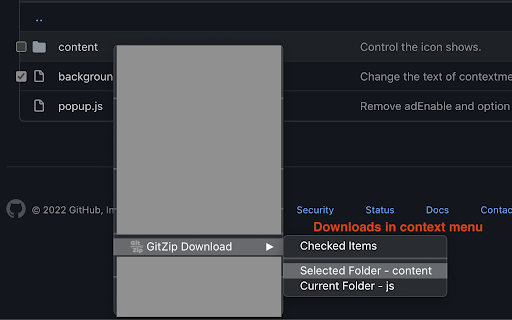

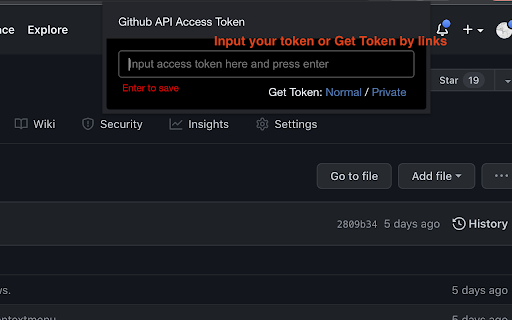

It can make the sub-directories and files of github repository as zip and download it Why GitZip: - You DO NOT have to download the whole project just for those few files/folders you need. Usage: 1. Browse any Github repository page. 2. Two ways to download: 2.1. Choose the items: 2.1.1. In default, you can double click on items or check the checkbox on the front of items. 2.1.2. Click download button at the bottom-right of the page. 2.2. In context menu: 2.2.1. Click "GitZip Download" > "Whole Repository" or "Current Folder". 2.2.2. Move the mouse cursor on the item and click "GitZip Download" > "Selected Folder/File". 2.2.3. Click "GitZip Download" > "Checked Items" after doing 2-1-1. 3. See the progress dashboard and wait for browser trigger download. 4. Get the ZIP file. Options: "How to select" for item selecting behaviour and "theme" for dark or light themes. Get Token: - If you see the "Rate Limit" warning message on progress dashboard, you should get the Github API access token for upgrade rate limit. GitZip provide a convenient way for it: 1. Click GitZip Extension icon on your browser. 2. Click "Normal" or "Private" link beside "Get Token". 3. Authorize GitZip permission on Github auth page. 4. Back to repo page automatically. 5. Continue to use. 1.0.2: 1. Compatible with new UI (In feature preview called: New Code Search and Code View) 2. Fix a bug about saving personal token. 1.0.1: 1. Enhance popstate detection. 2. Deprecate ".repository-content" selector for items detection. 1.0.0: 1. More download ways in context menu. 2. Can change settings in options page for item selecting behaviour and theme. 3. Can use checkbox to select item. 4. Migrate to Manifest V3 spec.

划词翻译
一站式划词 / 截图 / 网页全文 / 音视频 AI 翻译扩展,支持谷歌、DeepL、ChatGPT、百度、有道等 22 个国内外主流翻译服务,且均可用于全文翻译。能在 PDF 里使用。 划词翻译最初发布于 2013 年,距今已有 11 年历史,且仍在持续更新当中。 - 内置高准确度的谷歌翻译,能确保翻译结果跟 translate.google.com 是一致的。 - 鼠标划词功能,支持丰富的设置项,比如黑 / 白名单、关闭鼠标划词后通过快捷键来触发翻译等。 - 鼠标悬浮取词。 - 语音朗读。 - 内置独立翻译窗口,用于翻译浏览器外的文本。可以勾选持续监听剪切板,在任意程序复制文本即可自动弹出并翻译。 - 网页全文翻译,可以切换原文 / 译文 / 双语对照、自动开启等。 - 截图 / 图片翻译。 - 内置 PDF 阅读器,用于在 PDF 文件上实现鼠标划词、鼠标悬浮取词、截图翻译等功能。对 PDF 进行全文翻译的功能正在加紧开发中。 - 麦克风翻译。 - 音视频翻译(内测中),翻译网页中的音频 / 视频。 - 支持历史记录和收藏夹。收藏夹内容可以导出成多种文件,例如 json 和 csv。 完整功能介绍请查看 https://hcfy.ai/docs/guides/summary/ 英文单词会提供音标、详细释义、美音 / 英音朗读和词根,词根可以被点击,点击后即可查看词根的翻译结果。如果你需要,划词翻译也可以在划词后自动朗读被划选的单词。 默认使用弹窗在文本附近显示翻译结果,也可以固定在一处显示。 支持在任意程序里复制文本后,按下 Ctrl + Shfit + 1(macOS 将 Ctrl 改为 Command)查看翻译结果,无需切换回浏览器。这个快捷键是可以修改的。 支持历史记录和收藏夹,这两个功能也可以关闭。 如果你遇到了问题或者想要新的功能,可以在评论区留言,我基本上都会答复。官网(https://hcfy.ai)里也有其它反馈渠道。

RSSHub Radar
Easily find and subscribe to RSS and RSSHub. - Discover and subscribe to the RSS feeds associated with the current page effortlessly. - Explore and subscribe to the RSSHub supported by the current page promptly. - Easily identify the RSSHubs supported by the current website quickly. - Supports one-click RSS subscription for various platforms including Follow, Tiny Tiny RSS, Miniflux, FreshRSS, Feedly, Inoreader, Feedbin, The Old Reader, Feeds.Pub, Local Reader... Made with ❤️ by DIYgod

CCFrank
Displays CCF recommended rank of conferences/journals in dblp, Google Scholar, Connected Papers and WoS. 此扩展程序会添加一个网页标记,以便用户可以从 dblp、Google 学术、Connected Papers、Semantic Scholar 和 Web of Science 轻松查询学术文章的类别(即其在《中国计算机学会推荐国际学术会议和期刊目录》2022年拟定版(2022年12月)中的类别)。CCFrank 可执行以下操作: - 在 dblp 的 publication、person、conferences 和 journals 搜索结果中标记论文的类别;适配 dblp 各镜像站点。 - 在 Google 学术的 articles 和 author 搜索结果中标记论文的类别;适配 Google 学术各镜像站点; - 在 Connected Papers 的搜索结果中标记论文的类别。 - 在 Web of Science 的搜索结果中标记论文的类别。 - 在 Semantic Scholar 的 search results、citations 和 references 中标记会议和期刊论文的类别。 您的 Star 是我更新的动力

File Icons for GitHub and GitLab
A simple browser tool changes file's icon on GitHub, GitLab, gitea and gogs. On GitHub, no matter what kind of file is, their icons are all same. However, in your fancy editor, there are some packages which give every filetype an unique icon. Therefore, I build a simple extension to replace original file icon with filetype-specific icons. This improves visual recognition on GitHub, GitLab, etc. Hope you like it! **This extension is not a project of GitHub or any company**
