
hlepfoohegkhhmjieoechaddaejaokhf
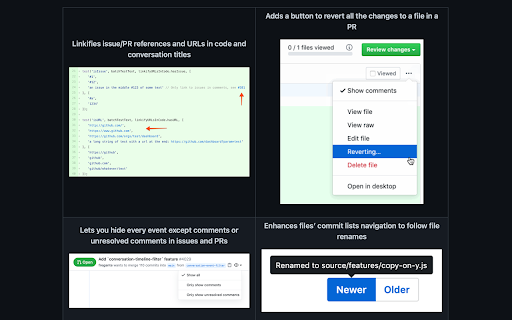
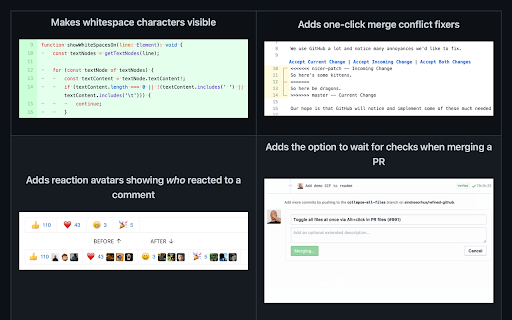
Simplifies the GitHub interface and adds useful features Highlights: - Linkifies issue/PR references and URLs in code. - Makes whitespace characters visible. - Reduces tabs’ size to 4 spaces instead of 8. - Adds one-click merge conflict fixers. - Adds reaction avatars showing who reacted to a comment. - Adds a button to revert all the changes to a file in a PR. - Adds a build/CI status icon next to the repo’s name. - Adds a button to view the source of Markdown files. - Shows PRs that touch the current file. - Highlights the most useful comment in conversations. - Shows the first Git tag a merged PR was included in. - Adds a link to an automatic changelog for each tag/release. - Adds possible related pages and alternatives on 404 pages. - Displays the age of the repository in the sidebar. And so much more! 200+ features. See the website for a full list of features. The GITHUB and REFINED GITHUB trademarks are owned by GitHub, Inc. and used under license.

Material Icons for GitHub
Material icons for the file browser of popular websites like GitHub, Azure, Bitbucket etc. Replace GitHub's default icons with icons from Visual Studio Code's Material Icon Theme icons. Use the same icons on your code editor and on github.com, and quickly identify file types, configuration files and project scaffolding at a glance. This extension pull icons and replacement lists directly from the open source vscode extension https://github.com/material-extensions/vscode-material-icon-theme. This extension can replace icons on many other leading source control platforms. For bug reports, please open Issues on the extensions repository at https://github.com/material-extensions/material-icons-browser-extension Don't forget to star the github repository if you like the extension.

Notifier for GitHub
Displays your GitHub notifications unread count It checks the GitHub Notifications API every minute. Supports GitHub Enterprise and an option to only show unread count for issues you're participating in. Make sure to add a token in the Options page. Both requested permissions are optional, so you can just decline if you don't want it. The first time you click on the extension icon, it will ask you for access to browser tabs. We need this to know if there is already an opened GitHub notifications page and switch to it if so. If you want to receive desktop notifications, you can enable them on extension options page. You will then be asked for the notifications permission.

npmhub
On every GitHub repository or folder with a package.json file, scroll to the bottom of the page to see a list of its npm dependencies and their descriptions. - the package.json file - npmjs.com - RunKit to test the package - BundlePhobia to see the package size when bundled - PackagePhobia to see the package size when installed - NPMGraph to explore the sub-dependencies - UNPKG to see the exact contents published to npm GitHub Enterprise is also supported by right-clicking on npmhub's icon in the toolbar and selecting Enable npmhub on this domain.

File Icons for GitHub and GitLab
A simple browser tool changes file's icon on GitHub, GitLab, gitea and gogs. On GitHub, no matter what kind of file is, their icons are all same. However, in your fancy editor, there are some packages which give every filetype an unique icon. Therefore, I build a simple extension to replace original file icon with filetype-specific icons. This improves visual recognition on GitHub, GitLab, etc. Hope you like it! **This extension is not a project of GitHub or any company**
