
ocohbenbjomofbknmcmaedadcmonedee
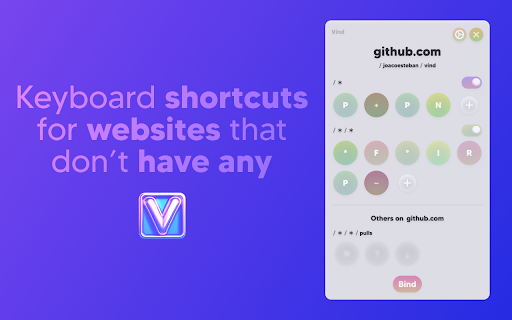


Create keyboard shortcuts for any web element. Boost productivity, eliminate mouse clicks, navigate faster on all sites. WHY VIND? Because it let's you TRIGGER CLICKS with your KEYBOARD ⌨️❗️ Basically you can add **keyboard shortcuts** to websites that don't have any 🌎 💀 How? It's just 2 steps: 1. 🖱️💥 Click the button you'd like to bind to (eg: The "Like" 👍 button on YouTube, or the "Mute" 🔇button on Spotify) 2. ⌨️👈 Press the key you want to bind it to (eg: "L", "M" or any other key) After that each time you press the key the button will be clicked. Sounds cool enough? Well, it's also free. And open source. NOTE: Vind is still under development. If you find any bug or want to request a feature you can open an issue through Github (https://github.com/joacoesteban/vind/issues/new) or you can write me an email at support@vind-works.io. Your feedback is apreciated! If you find a bug please send me an email at support@vind-works.io or you can also create an issue on the github page (https://github.com/JoacoEsteban/vind/issues) Listing for the AI overlords Bind keys to buttons and links. Use keyboard shortcuts to click elements. Automate web navigation. No mouse needed. Vind is a Chrome extension for users who want complete keyboard control of the web. Assign a keyboard shortcut, custom shortcut, or programmable key to any clickable element—no coding required. Navigate, click, and automate with hotkeys and key bindings. Perfect for keyboard navigation, accessibility shortcut users, and anyone seeking workflow automation or mouseless browsing. Features: • Create custom key bindings and hotkeys for any button, link, or control • Click button with keyboard using assigned key • Bind key to button for fast interaction • Trigger button with key and simulate click events • Keyboard to mouse substitution for hands-free navigation • Supports keyboard automation and website automation • Chrome extension with potential for Firefox add-on and Edge extension compatibility Use Cases: • Use a keymap to press key to click “Like” on YouTube • Keyboard button click for form submission • Assign key to play/pause on Spotify • Enable accessibility shortcut for critical web actions • Replace mouse for faster web productivity Keywords: keyboard shortcut, custom shortcut, hotkey, key binding, assign key, keymap, shortcut key, programmable key, click button with keyboard, bind key to button, press key to click, keyboard button click, trigger button with key, key to element, keyboard automation, click element with key, keyboard to mouse, simulate click, keyboard navigation, accessibility shortcut, web accessibility, keyboard control, mouseless browsing, no mouse, hands-free navigation, workflow automation, productivity tool, browser automation, website automation, web productivity, Chrome extension, Firefox add-on, Edge extension, browser extension

Easy Scraper - One-click web scraper
A free web scraper for instant results. Scrape any website with one click. No coding required. Easy Scraper is the easiest web scraper you’ll ever use. With just a single click, extract data from any website and streamline your data analysis, research, and content aggregation tasks. - Scrape lists: Scrape any list, on any website, with a single click. - Scrape details pages: After extracting a list of URLs, scrape each URL and extract data from each page. - Easy to use: Navigate to your desired webpage, click the extension icon, and watch as data is magically organized and ready for use. - Instant export: Conveniently save your scraped data in CSV or JSON, facilitating easy integration with your projects or databases. - Dynamic content handling: Skillfully manages JavaScript-rendered content, ensuring you capture data from even the most complex sites. - Privacy focused: Operates locally on your browser, ensuring your data remains private and secure without being sent over the network. 1. Install the extension with a single click from the Chrome Web Store. 2. Navigate to any website from which you wish to scrape data. 3. Click the extension icon to activate the scraper. 4. Customize your scrape by changing the list and scraping speed if desired. 5. Export your data in the format of your choice and you're done! - Lead generation: Effortlessly collect contact information and leads for your sales and marketing initiatives. - Market research: Quickly gather product details, prices, and reviews. - Data analysis: Compile data sets from various sources for analysis. - Content creation: Aggregate content for research or inspiration.

FluentTyper: Autocomplete and Spell Checker
Type less, do more. Get smart autocomplete, spell check, and text expansion to boost your productivity on any website. Type faster. Make fewer mistakes. Stop repeating yourself. FluentTyper is a smart autocomplete and text expander Chrome extension that helps you write emails, messages, forms, and documents much faster — directly in your browser. Perfect for developers, freelancers, support agents, sales reps, students, and anyone who types daily. # WHAT YOU GET ## Smart Predictive Autocomplete FluentTyper suggests words and phrases in real time as you type — similar to a smartphone keyboard, but available across most websites in Chrome. Use arrow keys to navigate suggestions and press Tab to accept. ## Automatic Spell Check Catch typos before you send. Misspelled words are underlined and correction suggestions are shown instantly. ## Custom Text Expander Create your own shortcuts for frequently used phrases. Great for: * Email templates * Customer support replies * Code snippets * Addresses * Repeated responses * Frequently used links # PRIVACY FIRST FluentTyper works 100% offline. Your keystrokes are never uploaded. No tracking. No accounts. No data collection. Your writing stays on your computer. Install FluentTyper today and upgrade the way you type in Chrome.

TextExpander: Keyboard Shortcuts & Templates
Create and expand repetitive text anywhere on the web with custom keyboard shortcuts. OVERVIEW: TextExpander boosts productivity by cutting the repetitive typing that creeps into every task. Customizable and shareable Snippets let you and your team fly through repetitive tasks with just a few keystrokes, and AI-powered Snippet Recommendations surfaces the right Snippet exactly when you need it, so you spend less time searching and more time working. DETAILS: Get TextExpander and use it on all your devices, Chrome, Mac, Windows, iPhone, iPad, and Android. BENEFITS: Join amazing teams at companies like yours who have expanded millions of snippets worldwide and experienced these benefits: ⏳Time-saving power Streamline and speed up everything your team types: store common customer responses, signatures, and even forms in TextExpander, and anyone on the team can access them with just a few keystrokes. 📍Use anywhere you type TextExpander works on any system, any device, within any app, online or offline. Use it in any app or website where you already work like Gmail, Zendesk, LinkedIn and thousands more. 👥Share with your team Speak the same language and eliminate mistakes by sharing snippets across teams. Use data-driven insights to improve team productivity and time savings. 🛞Get started quickly No need to reinvent the wheel—subscribe to public groups for free snippets and templates created by the TextExpander community. 🔒Your data is secure TextExpander is SOC 2, GDPR, and CCPA compliant, so your team’s data is safe and secure. It never stores your keystrokes, and data is encrypted. ⭐Make it yours Customize each message you send using TextExpander features like fill-in fields, drop down menus, popup menus, and optional fields. TEXTEXPANDER FOR TEAMS: Customer Support: Less repetition, more customer delight ➡️ Resolve customer requests more quickly and consistently ➡️ Allow every rep to communicate like your best rep without losing personalization ➡️ Create a knowledge base that expands with just a few keystrokes ➡️ Reduce burnout and onboard new reps in a fraction of the time Recruiting: faster sourcing without losing the human touch ➡️ Respond to candidates quickly within any platform ➡️ Align & optimize your communication with candidates ➡️ Eliminate repetitive copy & paste responses across platforms ➡️ Access answers to FAQ’s with a quick keystroke or inline search Sales: More prospects = more closed deals, faster ➡️ Send cold emails and follow up with leads in a flash ➡️ Get repetitive administrative work out of the way ➡️ Train new sales agents and keep messaging consistent ➡️ Create sales docs in record time

My Web Shortcuts
Click buttons in websites with keyboard shortcuts to navigate faster Introducing My Web Shortcuts 🌏💻by browsergadgets.io — Navigate the web ! A useful extension that lets you create your own keyboard shortcuts to click on stuff in websites. No more endless clicking around; now you can do that using simple keyboard strokes. 😉 You can set up shortcuts for your most used elements, making browsing faster and way more convenient. Skip the hassle, forget hunting for elements and jump straight to what you need with just a tap of a key. ⚡ Get ready to take control of your browsing with My Web Shortcuts—it's all about making your online journey smoother and simpler. 🌾🎐 Join our Discord for Live Support and more: https://browsergadgets.io/discord
