
mbjlobpodpimgbkmlmjiblnmfgajmebm


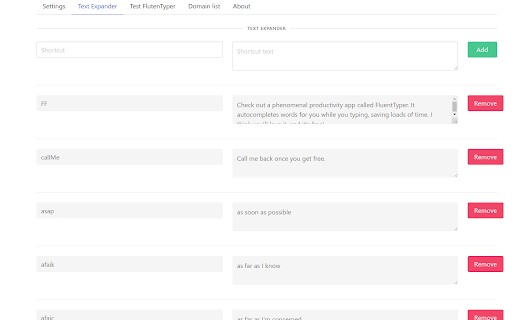
Type less, do more. Get smart autocomplete, spell check, and text expansion to boost your productivity on any website. Type faster. Make fewer mistakes. Stop repeating yourself. FluentTyper is a smart autocomplete and text expander Chrome extension that helps you write emails, messages, forms, and documents much faster — directly in your browser. Perfect for developers, freelancers, support agents, sales reps, students, and anyone who types daily. # WHAT YOU GET ## Smart Predictive Autocomplete FluentTyper suggests words and phrases in real time as you type — similar to a smartphone keyboard, but available across most websites in Chrome. Use arrow keys to navigate suggestions and press Tab to accept. ## Automatic Spell Check Catch typos before you send. Misspelled words are underlined and correction suggestions are shown instantly. ## Custom Text Expander Create your own shortcuts for frequently used phrases. Great for: * Email templates * Customer support replies * Code snippets * Addresses * Repeated responses * Frequently used links # PRIVACY FIRST FluentTyper works 100% offline. Your keystrokes are never uploaded. No tracking. No accounts. No data collection. Your writing stays on your computer. Install FluentTyper today and upgrade the way you type in Chrome.

Grammar autoCorrect
Automatically correct grammar by double hitting spacebar when you finish typing in chat or text fields! Automatically correct grammar by double hitting the spacebar when you finish typing in chat or text fields! This tool enhances your messaging experience by ensuring your text is clear and accurate.

Spell Check
Try Spell Check for auto correct texts using ai grammar checker and ortografia corrector. Improve sentence online. 🚀 Welcome to a new era of clarity and confidence in your writing! Spell check is now simpler, more efficient, and powered by intelligent technology. This extension offers grammar and punctuation corrector features, making every sentence shine. 🧩 Core Functionalities: 1️⃣ Spell cast checker: Detect minor to major errors with a single scan. 2️⃣ Spell grammar check: Enhance overall text coherence by spotting grammar slip-ups. 3️⃣ Spelling and grammar check: Get accurate suggestions to tighten your phrasing. 4️⃣ Check spelling and grammar: Enjoy a well-rounded approach to clarity and conciseness. 💡 Unlike ordinary solutions, this powerful spelling checker operates in real time. From social media posts to business emails, it provides impeccable spelling and grammar check without disrupting your flow. It also functions as an ai spell check partner, recognizing style nuances and language contexts. 🛠️ Additional Tools for Versatility: ✨ Auto correct: Experience instant fixes for common typos, saving time and effort. ✨ Grammar ai: Benefit from advanced machine learning that adapts to different writing styles. ✨ Ai grammarly checker: Gain a second opinion on your drafts to refine them further. ✨ Spelling checker: Eliminate subtle misspellings with minimal fuss. 🔥 Whether you aim to check for grammar in a sentence or review an entire article, the tool’s robust ai technology delivers instant feedback. Online spell checker capabilities mean that no installation is required for advanced analysis—just open your browser and type away. Embrace the freedom of focusing on ideas rather than mistakes. 📋 Upgrade Your Writing with Key Advantages: • Spell check online for universal accessibility anywhere you go. • Ai grammar to maintain consistent style across different documents. • Sentence correction built to fix tricky syntax in real time. • Check spelling capabilities integrated seamlessly into your daily routine. ✅ More Benefits in Action: - Grammarly spell check ensures your text aligns with professional standards. - Punctuation checker that offers quick solutions without interrupting your train of thought. - Spell check suggestions adapt to multiple dialects and specialized vocabularies. - Beyond surface-level error detection, focusing on clarity. 🌐 Whether you’re composing on a laptop at work or a tablet at home, your grammar ai companion stays by your side. This continuity lets you refine ideas and share them with colleagues or friends without missing a beat. 📖 Focus on Precision and Nuance: 1. Use grammar help extension to reduce proofreading time. 2. Spelling and grammar check ensures every paragraph maintains clarity. 3. Spell check runs in the background, offering subtle hints and corrections. 🎯 Built for Writers of All Levels Whether you’re a student drafting assignments or a manager sending proposals, a dependable spelling checker can be your ally. This extension serves a broad spectrum of writing needs, from straightforward personal notes to complex industry reports. Access top-tier writing guidance that doesn’t clutter your workflow. ✨ Streamlined Interface Highlights: 🔸 Minimalist design ensures easy navigation. 🔸 Instant feedback on language mistakes, letting you correct them on the fly. 🔸 Trusted by writers who demand excellence from their tools. 🌍 By combining grammar and punctuation corrector functionalities with advanced AI, the extension handles multiple languages and varied writing styles. Looking for ortografia corrector capabilities? Rest assured, you’ll find them here, too. The synergy between grammar ai and auto correct makes your typing process more natural and reliable. ⚡ Powerful Yet Intuitive Tools: ➤ Errors inspect online to ensure effortless cross-platform usage. ➤ Word ortography errors detector delivers swift scanning for hidden errors. ➤ Sentence rewriter that refine structure without stifling creativity. 💬 Often, the biggest hurdle in writing is ensuring clarity in each sentence. This extension offers grammar and spell check corrections that boost readability and comprehension. Need help with tricky phrasing? Rely on our ai grammarly checker to highlight subtle missteps and propose viable fixes. 🚀 Real-Time Enhancements: ▸ Errors detection in paragraphs, bullet points, or even short messages. ▸ Grammar checker for immediate highlights on subject-verb conflicts. ▸ to correct repeated words or missing articles. ▸ Ai spell check technology that evolves with your writing habits. 🌈 For professional endeavors, the ability to check for grammar in a sentence quickly is invaluable. This extension not only polishes text but also helps develop stronger writing habits. The combined powers of grammar ai and sentence correction reduce repeated errors over time, guiding you toward natural fluency.

Autocorrect Units
Helps format SI (metric), US customary, and imperial units correctly when typing. Automatically corrects measurement units as you type; supports SI, imperial, and US customary units. Type a measurement into any text box, then press Space or punctuation; it's instantly corrected to the proper format. For example: • Unit symbols — replaced with official notation • Thousands separators — commas replaced with non-breaking thin spaces, the universal thousands separator • Number–unit spacing — non-breaking spaces prevent awkward line wraps 🔒 Private — your data never leaves your browser. 📋 Accepts units in virtually any variant you can type. ⚠️ Some shortcuts favour common usage over strict SI (e.g. "C" corrects to °C, despite coulombs being valid). 🔧 Getting odd results? Click the toolbar icon to temporarily disable the extension. 💬 Missing a unit? Request it via email and I'll add it.

Grammarlyier - Unofficial Grammarly Autocorrect extension
✨ Grammarlyier Free Auto-Correct Extension 📝✨ Grammarlyier is an unofficial auto-correct tool meant for Grammarly Auto-Correct Pro Extension and dark mode tool designed to enhance your writing experience on Grammarly! 🚀 # Update Log: - Fixed all the issues with click and speed issues. - Added custom button to page - Will be adding more items soon. # Features - Auto-Correction: Seamlessly correct your grammar, punctuation, and spelling mistakes as you type. - Dark Mode: Protect your eyes and enjoy a comfortable writing environment with the dark mode feature. - Compatibility: Works seamlessly with Grammarly and other writing tools to ensure smooth integration. - User-Friendly: Simple and intuitive interface for effortless usage. - Enhanced Productivity: Focus on your writing without worrying about errors or distractions. # How to Use 1. Install Grammarlyier: Simply download and install the Grammarlyier browser extension. 2. Activate Auto-Correction: Start typing, and Grammarlyier will automatically correct your mistakes in real-time. 3. Enable Dark Mode: Toggle the dark mode feature for a visually pleasing writing experience. # Support If you encounter any issues or have suggestions for improvement, feel free to reach out to us through contact button below. # Disclaimer Grammarlyier is an unofficial tool and is not affiliated with Grammarly. Use it at your own discretion. # License This project is licensed under the [MIT License](LICENSE). Enjoy error-free writing and a comfortable writing environment with Grammarlyier! ✍️✨
