
cljbfnedccphacfneigoegkiieckjndh
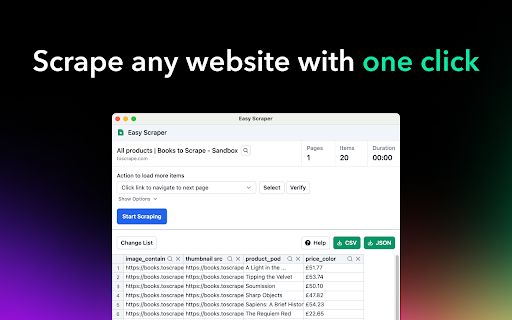
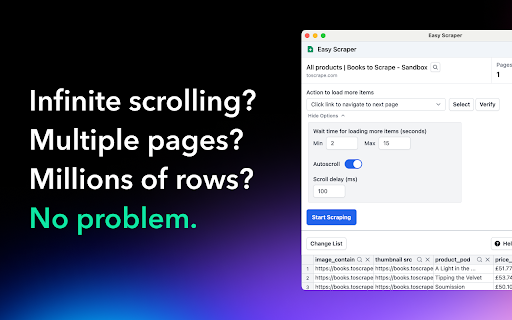
A free web scraper for instant results. Scrape any website with one click. No coding required. Easy Scraper is the easiest web scraper you’ll ever use. With just a single click, extract data from any website and streamline your data analysis, research, and content aggregation tasks. - Scrape lists: Scrape any list, on any website, with a single click. - Scrape details pages: After extracting a list of URLs, scrape each URL and extract data from each page. - Easy to use: Navigate to your desired webpage, click the extension icon, and watch as data is magically organized and ready for use. - Instant export: Conveniently save your scraped data in CSV or JSON, facilitating easy integration with your projects or databases. - Dynamic content handling: Skillfully manages JavaScript-rendered content, ensuring you capture data from even the most complex sites. - Privacy focused: Operates locally on your browser, ensuring your data remains private and secure without being sent over the network. 1. Install the extension with a single click from the Chrome Web Store. 2. Navigate to any website from which you wish to scrape data. 3. Click the extension icon to activate the scraper. 4. Customize your scrape by changing the list and scraping speed if desired. 5. Export your data in the format of your choice and you're done! - Lead generation: Effortlessly collect contact information and leads for your sales and marketing initiatives. - Market research: Quickly gather product details, prices, and reviews. - Data analysis: Compile data sets from various sources for analysis. - Content creation: Aggregate content for research or inspiration.

Free Web Scraper: Fast, Simple Web Scraping
Blazing fast web scraping. Easily scrape any web page data into a spreadsheet table or CSV, for free. Free Web Scraper is the the ultimate web scraping tool for blazing fast data extraction from web pages! With Free Web Scraper, you can extract data from any website for free in record time, with just a few clicks. Here are some reasons why Free Web Scraper is the go-to tool for web scraping: ★ Lightning-fast data extraction - Free Web Scraper is the fastest way to get structured data from any website quickly and efficiently. No more clunky manual copying and pasting. ★ The friendliest interface - Free Web Scraper has a super simple interface, making it easy to extract data from any site without code. ★ Smart data scraping technology - Free Web Scraper uses smart data scraping technology to extract data from even the most complex websites, without any manual configuration required. ★ Customizable data extraction - With Free Web Scraper, you can customize your data extraction to extract exactly the data you need, without any unnecessary data cluttering up your results. ★ CSV and Spreadsheet Export - You can download your results as a CSV file or import into Data Blaze, the spreadsheet that lets you use your data anywhere. ★ Free to use - Free Web Scraper is completely free to use. Simply install the extension and start scraping! ★ E-commerce sites: Free Web Scraper can be used to scrape product data from e-commerce sites like Amazon, eBay, and Walmart. This data can then be used for price comparison, market research, and more. ★ Social media sites: Free Web Scraper can be used to scrape data from social media sites like Facebook, Twitter, and Instagram. This data can be used for social media monitoring, sentiment analysis, and more. ★ Job boards: Free Web Scraper can be used to scrape job postings from job boards like Indeed, Monster, and Glassdoor. This data can be used for job searching, applicant tracking, and more. ★ News sites: Free Web Scraper can be used to scrape news articles from sites like CNN, BBC, and The New York Times. ★ Real estate sites: Free Web Scraper can be used to scrape real estate data from sites like Zillow and Realtor.com. This data can be used for house hunting, property valuation, and more. ★ Stock trackers: Free Web Scraper can be used to scrape data from stock trackers like Yahoo Finance, Google Finance, and Nasdaq. This data can be used for stock market research, portfolio tracking, and more. Whether you're a seasoned web scraper or just getting started, Free Web Scraper is the ultimate tool for fast and efficient data extraction. Try it out today and see for yourself how easy web scraping can be!

Web Scraper
Scrape website in seconds with our web scraper tool.Easy-to-use,fast,and free interface for hassle-free scraping Scrape any website in seconds with our 𝘄𝗲𝗯 𝘀𝗰𝗿𝗮𝗽𝗲𝗿 chrome extension. Designed to be fast, simple, and user-friendly, this free web scraper helps you collect data without hassle. 🛠️ 𝗪𝗲𝗯 𝗦𝗰𝗿𝗮𝗽𝗲𝗿 𝗖𝗵𝗿𝗼𝗺𝗲 𝗘𝘅𝘁𝗲𝗻𝘀𝗶𝗼𝗻: Extract web data instantly with a lightweight and powerful tool. 💡 𝗛𝗼𝘄 𝗜𝘁 𝗪𝗼𝗿𝗸𝘀: Use this web scraper chrome to gather data from multiple websites in just a few steps. 𝗣𝗿𝗲𝗽𝗮𝗿𝗲 𝗨𝗥𝗟𝘀: List all the website links you want to scrape. 𝗣𝗿𝗼𝘃𝗶𝗱𝗲 𝗙𝘂𝗹𝗹 𝗫𝗣𝗮𝘁𝗵𝘀: Add the exact XPaths of the data elements you wish to extract. 𝗟𝗼𝗮𝗱 𝘁𝗵𝗲 𝗗𝗮𝘁𝗮: Enter your URLs and XPaths into the extension. 𝗦𝘁𝗮𝗿𝘁 𝗦𝗰𝗿𝗮𝗽𝗶𝗻𝗴: Click the Start Scrape button and watch as data is extracted within seconds. It’s that simple—start scraping with our free web scraper today and save hours of manual effort. 🚀🖱️

Visual Web Scraper
Easily extract data from any website and export as CSV or JSON files. With Visual Web Scraper, you can begin extracting data from any site using a visual interface within a minute. All you have to do is click on the section of the page where you want to extract data from. No technical skills are required to use it. Visual Web Scraper simplifies the scraping process while keeping you in control. Key features of Visual Web Scraper: - Fully Visual Interface: Easy to use for users at any level. - Flexible Data Extraction: Can extract various data types like text, images, and links from any web page. - Real-Time Monitoring: Monitor the progress of the data extraction in real time. - Multiple Export Options: Export extracted data in CSV or JSON formats. - Wide Compatibility: Successfully tested on popular platforms like Twitter and Amazon. Can work on any website. - Rename Data Columns: Users can rename the extracted data columns as per their needs. - Automatic Page Traversal: Automatically navigates pages using 'load more' buttons to continue data extraction. - High-Quality Output: Provides precise data extraction with advanced selection algorithms. - Infinite Scroll Support: Supports extracting data from sites with infinite scrolling. - Pagination Support: Works efficiently on traditionally paginated sites too. Use cases for Visual Web Scraper: - Market Research: Enables businesses to make informed decisions by collecting critical data like competitor pricing, product specs, customer reviews, market trends. - Lead Generation: Businesses can extract contact info, business details from online directories, social media, company websites for targeted lead acquisition. - Content Aggregation: Content creators, marketers can collect articles, blog posts, images, videos from various sites. - Competitor Analysis: Analyze competitor strategies by extracting product info, pricing, promotions, customer feedback from their sites. - Financial Analysis: Financial analysts, investors can collect financial data, stock prices, market trends, economic indicators from finance sites. - Academic Research: Researchers can extract information from academic databases, journals for projects, publications. - Brand Monitoring & Reputation Management: Monitor brand mentions, customer feedback, sentiments from social media, review sites. - Supply Chain Management: Collect supplier data, product availability, pricing, shipping details across e-commerce, supplier sites. - Legal & Regulatory Compliance: Extract regulatory requirements, industry standards, case laws from government, legal databases. - E-Commerce Optimization: Optimize product listings, pricing, inventory by extracting data from competitor sites, marketplaces. Visual Web Scraper, a free Chrome extension, effortlessly extracts data from websites. All operations are performed within your browser, ensuring your data remains secure. You can provide feedback to help improve the extension. Thanks for your support!

Ultimate Web Scraper
Extract data instantly: Grab text, images, emails & links from any website with a single click. Fast, simple & powerful web scraper Your all-in-one tool for effortless web scraping, lead generation, and data extraction. No code, no setup — just instant results. + AI Assisted extraction for better results 😲 👇 One-Click Scraping Point the web scraper at any page with lists, tables, or directories and extract structured data instantly. Pagination and infinite scroll are handled automatically. 📄 Bulk Page Scraping Feed the data scraper a list of URLs and pull emails, business details, contact info, or custom fields from every page at once. 🖼️ Image Downloader Grab every image from a page in one click. 📬 Email Extractor Run the email scraper on one page or thousands — it finds and collects every address. 📊 Data Export Send your scraped data to CSV, Excel, or Google Sheets. 📧 Email Scraper — Pull email addresses for outreach and lead gen 📞 Phone Scraper — Collect phone numbers for sales follow-up 🏢 Business Scraper — Grab company names, addresses, and details 👤 People Scraper — Extract names, job titles, and work history 🌐 Social Scraper — Collect website URLs and social media profiles 💼 B2B Scraper — Get company size, industry, and revenue data 💬 Review Scraper — Scrape reviews and comments from any site 📄 Page Text Scraper - Scrape pages for clean text 📈 Sales & Marketing — Build lead lists with verified contact data 🎯 Recruiters — Scrape candidate info from job boards and LinkedIn 🛒 E-commerce — Monitor competitor pricing, products, and stock 🔬 Researchers & Data Scientists — Collect datasets for analysis and ML ✍️ Content & SEO — Gather data from blogs, news sites, and forums 📉 Brand & BI Teams — Track reviews, sentiment, and competitor moves ✅ AI‑powered extraction improves accuracy on messy, unstructured pages. ✅ No coding required, so anyone can start in seconds. ✅ Runs entirely in your browser, keeping your data private. ✅ Works on login‑protected pages and complex layouts. ✅ Handles pagination and infinite scroll for complete results. ✅ Fast exports to CSV, Excel, or Google Sheets. ☁️ Cloud Web Scraping — Run this web scraper in the cloud with cloud browsers for large‑scale data scraping. ⏱️ Scheduling — Automate web scraping and data extraction on a schedule. 🔗 Integrations — Connect your data scraper to n8n, Google Sheets, and Make.com. 1️⃣ Install the web scraper from the Chrome Web Store 2️⃣ Go to your target site 3️⃣ Click to scrape 4️⃣ Export your data
