
ocgeealadeabmhponndjebghfkbfbnch
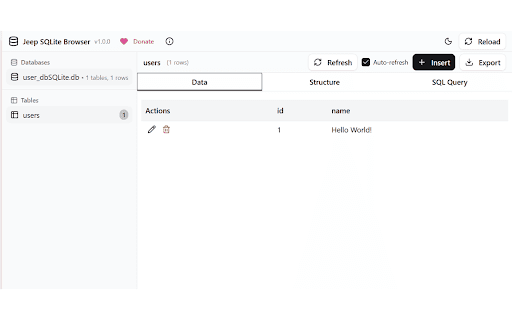


Browse and manage Jeep SQLite databases stored in IndexedDB A browser extension for browsing and managing Jeep SQLite databases stored in IndexedDB. 🔍 Database Detection - Automatically scans for Jeep SQLite databases in IndexedDB 📊 Table Browser - View all tables with row counts and structure 📝 Data Viewer - Browse table data with pagination and CRUD operations ✏️ Edit & Insert - Modify existing records or insert new ones 🗑️ Delete Records - Remove records with confirmation 🔧 SQL Query Editor - Execute custom SQL queries with results display 💾 Export Tools - Export as SQL dumps or CSV files 🌙 Dark/Light Mode - Toggle themes with preference persistence 🔄 Auto-Refresh - Monitor for database changes with configurable refresh 🎨 Modern UI - Built with shadcn/ui components

indexedDB viewer
view and export indexedDB data to json or csv Gain Transparency and Control Over Your Browsing Data with indexedDB viewer. indexedDB viewer empowers you to view and manage the data websites store on your browser using IndexedDB technology. Unveiling the Hidden: - See what websites store: Gain transparency into the data websites keep on your browser, often unseen. - Explore the data in detail: View the stored data in a user-friendly JSON format, allowing easy comprehension of its structure and content. - Expand or collapse objects: Navigate the data efficiently with the ability to toggle individual objects for focused inspection. Taking Control: Download for further analysis: Export the data as JSON or CSV for in-depth analysis using external tools or sharing with others. Empower informed choices: With knowledge of what's stored, you can make informed decisions about website permissions and data privacy. Usage: Open any website and click on the indexedDB viewer icon. If indexedDb is been used, it will display the data with the exporting options, otherwise it will inform you that indexedDb is not available. indexedDB viewer is the ultimate tool for understanding and managing your browsing data. Download it today and reclaim control over your online experience!

Open with Code
Works for: * Github * Azure devops

Kahuna
Browse, edit and manage IndexedDB databases. With Kahuna IndexedDB databases can be managed right in the browser. It can be used to create databases and modify their structure, as well as to view, query, edit, import and export the data they contain. Kahuna supports developers of IndexedDB databases and provides convenient access to the data they contain. Interested users can use Kahuna to satisfy their curiosity and find out what data the websites they visit permanently store in their browser. The main features provided are - signals with its icon in the browser's address bar when IndexedDB databases exist for a visited website - displays lists of the found databases and tables (aka object stores) - can create new databases, as well as copy and delete existing databases - its database schema editor can be used to create and delete tables, and to modify indexes - displays the data of a table page by page and enables the editing and deletion of data records - Filters can be configured and combined for all data fields to display or export a selection of the data contained in a table - imports and exports databases in dexie format - imports and exports tables in dexie, json and csv format, as well as selected data records in json and csv format - enables the entry and execution of arbitrary JavaScript code to modify databases, tables or data

SQLite Explorer
View in memory SQLite databases and tables Provides GUI to view Data and run queries on SQLite Web database instances used by any website for developer debugging and analytics purpose using Chrome Devtools. SQLite Explorer only works with in-browser web SQLite database sql.js https://github.com/sql-js/sql.js/ Steps - Open Chrome Devtools window and go to the tab 'SQLite Explorer' - Configure the connection using the Configuration dialog. - Then click on the Connect button to load the list of tables in the database. - Right click on any table to see more options (Open, Delete, etc) - Alternatively click on the New Query button to execute your own query. Update: Version 1.2.0 - New Context menu - 'Script as' opens a new tab with select query already filled in that can be tweaked if needed, thus saving some manual typing. - Layout fixes
