
ilafpdbgcaodnkdklgemggjamhpdjile

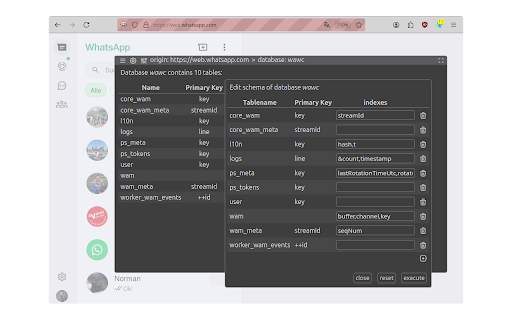

Browse, edit and manage IndexedDB databases. With Kahuna IndexedDB databases can be managed right in the browser. It can be used to create databases and modify their structure, as well as to view, query, edit, import and export the data they contain. Kahuna supports developers of IndexedDB databases and provides convenient access to the data they contain. Interested users can use Kahuna to satisfy their curiosity and find out what data the websites they visit permanently store in their browser. The main features provided are - signals with its icon in the browser's address bar when IndexedDB databases exist for a visited website - displays lists of the found databases and tables (aka object stores) - can create new databases, as well as copy and delete existing databases - its database schema editor can be used to create and delete tables, and to modify indexes - displays the data of a table page by page and enables the editing and deletion of data records - Filters can be configured and combined for all data fields to display or export a selection of the data contained in a table - imports and exports databases in dexie format - imports and exports tables in dexie, json and csv format, as well as selected data records in json and csv format - enables the entry and execution of arbitrary JavaScript code to modify databases, tables or data

Easy Local Storage Manager
Premium tool to edit LocalStorage, Cookies & IndexedDB with JSON Tree. Switch profiles, decode JWTs, and sync data securely. Transform your browser's "Application" tab into a powerful developer workspace with Easy Local Storage Manager. Designed for modern front-end workflows, this extension replaces the basic list view with a suite of advanced tools to manage, edit, and sync your storage data effortlessly. 🚀 Smart JSON Editor Stop parsing raw strings manually. View and modify LocalStorage, SessionStorage, Cookies, and IndexedDB as structured JSON/Tree objects. Edit keys and values with syntax highlighting and validation. 🔒 Per-Key State Locking Lock any localStorage or sessionStorage key to prevent accidental writes. Perfect for protecting critical configuration values, feature flags, or authentication tokens during development. 🕵️ Change Tracking with Stack Traces See exactly who changed a value and where in your code. Every mutation to localStorage, sessionStorage, and cookies is logged with the full call-site stack trace - invaluable for debugging unexpected state changes. 👤 Store User Profiles Locally Save and switch between multiple user profiles with different storage states. Test different user scenarios, permissions, or configurations instantly without manual setup. ☁️ Cloud Sync (Pro) Seamlessly sync your storage data across multiple devices. Keep your development environment consistent between work and home machines. Sync is optional and uses End-to-End Encryption to ensure your sensitive tokens remain private. 🔐 JWT Toolkit Debug authentication flows faster. Decode, verify, and inspect JWT headers, payloads, and signatures directly within the extension—no need to paste tokens into external websites. 🔍 Deep Search Find exactly what you're looking for. Instantly search for keys or values buried deep within complex nested JSON objects. 📂 Import & Export Never lose your setup. Backup your entire storage state to JSON files or restore them later to reproduce bugs and share configurations with your team. ✅ Offline by Default: Works completely without an account - all data stays on your device ✅ No Account Required: Use all core features without signing up ✅ Secure: Cloud Sync acts as an encrypted vault; we cannot see your data Stop struggling with the default dev tools. Upgrade your debugging workflow today with the most complete storage manager for Chrome.

WebDataMaster
Export and import web site data WebDataMaster is a highly efficient and practical Chrome extension that offers users the convenience of importing and exporting local website data, covering various data types such as Cookies, localStorage, sessionStorage, and IndexedDB. 1. Data backup and recovery: With WebDataMaster, you can easily back up local website data to prevent accidental loss. If needed, you can restore the backup data to the corresponding website at any time. 2. Debugging and development: WebDataMaster provides convenience for website developers by helping them retrieve local cache when users encounter errors, making it easier to reproduce errors under specific conditions. 1. Install the WebDataMaster extension 2. On the website, open the right-click menu and select "Export Data" or "Import Data" Due to IndexedDB API restrictions, when restoring IndexedDB data, the database and tables must already exist (even if they are empty) in order to complete the recovery.

Dev Tools - Web Dev Tools Suite
Streamline your workflow with a powerful, all-in-one browser extension designed for developers, designers, and tech professionals. Access 40+ premium tools directly from your browser, all optimized for speed, privacy, and productivity. Comprehensive Toolset: Everything you need for coding, debugging, testing, and designing in one place. Offline Functionality: All tools work seamlessly without an internet connection, ensuring privacy and speed. Customizable Interface: Pin your favorite tools for quick access or hide unused ones to declutter your workspace. Modern Design: Intuitive UI with light/dark themes for a comfortable user experience. Privacy-First: All processing happens locally in your browser—your data never leaves your device. Regular Updates: New tools and features added based on user feedback. Free Forever: No ads, subscriptions, or hidden costs. 🛠️ Tools Included: Code Formatter: Beautify and format code with syntax highlighting. Code Snippets: Save and organize reusable code snippets. Minifier/Beautifier: Compress or beautify JavaScript, CSS, and HTML. Regex Tester: Test regular expressions with live highlighting. Diff Checker: Compare texts and highlight differences. HTML Previewer: Live preview HTML with CSS (JavaScript disabled). API & Network Tools: API Tester: Test REST APIs with various HTTP methods. WebSocket Tester: Test WebSocket connections. Speed Tester: Measure network speed and latency. Network Speed Monitor: Monitor real-time network speed. Data Tools: JWT Decoder: Decode and verify JWT tokens. Base64 Encoder/Decoder: Encode/decode Base64 strings. Hash Generator: Generate MD5, SHA-1, SHA-256, and other hash digests. UUID Generator: Generate unique identifiers. Utility Tools: Calculator: Basic and programmer calculator. Unit Converter: Convert between different units (length, weight, temperature, etc.). Timestamp Converter: Convert Unix timestamps. QR Code Generator: Generate QR codes from text. Password Generator: Create secure passwords. Lorem Ipsum Generator: Generate placeholder text for layouts. Page Performance: Analyze webpage performance metrics. SEO Analyzer: Analyze webpage SEO and accessibility. Meta Tags Manager: Generate and analyze HTML meta tags. Visual Tools: Color Picker: Pick colors from webpages. CSS Grid Generator: Create CSS grid layouts visually. Flexbox Generator: Learn and generate flexbox layouts interactively. CSS Extractor: Extract CSS from selected webpage elements. Viewport Measure: Measure pixel distances and dimensions on webpages. Element Inspector: Advanced element inspection with detailed properties. Storage Tools: Cookies Manager: View, edit, and manage browser cookies. LocalStorage Manager: Manage browser local storage data. SessionStorage Manager: Manage browser session storage data. IndexedDB Explorer: Browse and manage IndexedDB databases. Storage Analyzer: Analyze storage usage across all browser storage types. 🎯 Extra Features: Pin Tools: Keep your most-used tools at the top for quick access. Hide Tools: Customize your interface by hiding tools you don’t use. Search Functionality: Quickly find tools using the built-in search bar. Keyboard Shortcuts: Access tools faster with configurable shortcuts. Export Options: Save results or configurations directly to your local storage. 🔥 Why Choose This Extension? Designed for Developers: Tailored for frontend/backend developers, designers, DevOps engineers, and students. Boost Productivity: Eliminate repetitive tasks with one-click solutions. Chrome Guidelines Compliant: Fully adheres to Chrome Web Store policies for security and performance. 🚀 Get Started Today! Transform your browser into a professional development powerhouse. Install now and experience the ultimate toolkit for coding, debugging, and designing—all in one extension.

IndexedDB Explorer
Explore and manage IndexedDB databases in your browser **IndexedDB Explorer – Chrome Extension** IndexedDB Explorer is a powerful Chrome extension that lets you explore and manage IndexedDB databases directly from your browser. It provides a clear view of database structures, stores, and indexes, and offers tools to efficiently fetch, search, and manipulate data. * Deep searc across dbs and stores. * Visualize database structures with interactive graphs. * Fetch and page through large datasets (up to 5000 records per page). * Real-time record search across stores. * Add or delete records with ease (CRUD operations). * Calculate store sizes and record counts. * Generate charts for quick insights using Chart.js. **Acknowledgments:** Built using Chrome APIs and Chart.js.
