
ifeenaocehipahiagdlnkokbekehooge

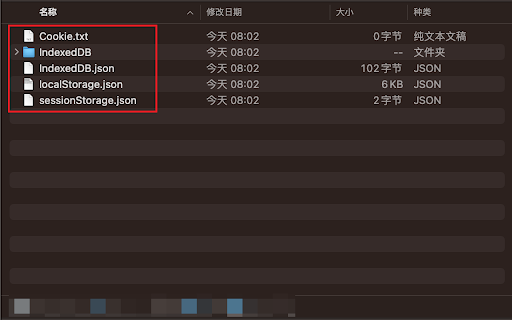
Export and import web site data WebDataMaster is a highly efficient and practical Chrome extension that offers users the convenience of importing and exporting local website data, covering various data types such as Cookies, localStorage, sessionStorage, and IndexedDB. 1. Data backup and recovery: With WebDataMaster, you can easily back up local website data to prevent accidental loss. If needed, you can restore the backup data to the corresponding website at any time. 2. Debugging and development: WebDataMaster provides convenience for website developers by helping them retrieve local cache when users encounter errors, making it easier to reproduce errors under specific conditions. 1. Install the WebDataMaster extension 2. On the website, open the right-click menu and select "Export Data" or "Import Data" Due to IndexedDB API restrictions, when restoring IndexedDB data, the database and tables must already exist (even if they are empty) in order to complete the recovery.

IDBPort
IndexedDB data Export and Import Tired of IndexedDB tools that only let you export? IDBPort is a modern browser extension designed to let you easily export AND import your IndexedDB data. It's your complete solution for data backup, migration, and management for web applications. * Seamless Export: Quickly select an IndexedDB database from the current website and export its entire content into a convenient `.idb` file. * Reliable Import: Effortlessly import data from a previously exported `.idb` file back into an IndexedDB database. Perfect for restoring data or setting up new environments. * User-Friendly Interface: A clean, intuitive, and responsive design (built with React and shadcn/ui) makes managing your data straightforward, even with no prior technical expertise. Many tools stop at exporting. IDBPort fills the critical gap by providing robust import functionality, giving you full control over your local web application data for: * Data migration across different browser profiles or machines. * Creating reliable backups of critical application state. * Easy restoration from backups. * Testing applications with specific datasets. 1. Click the IDBPort icon in your browser toolbar. 2. The extension may ask for permission to access data on the current tab. 1. IDBPort will list available IndexedDB databases for the current page. 2. Select the database you wish to export. (Firefox requires manual input of the database name). 3. Click "Export" and save the `.idb` file. 1. Switch to the "Import" tab within the extension. 2. Click "Choose File" and select your `.idb` file. 3. Data will be automatically imported. Technology Used: Built with WXT, React, Tailwind CSS, shadcn/ui, and TypeScript. Support & Contributions: We welcome your feedback and contributions! Please visit our Discrod group to report issues or suggest features. https://discord.gg/gFhKUthc88

indexedDB View Manager
A visual IndexedDB management tool with database tree, table view and JSON view, supporting data inspect, edit, export and full… ### indexedDB View Manager – Extension Overview (English) **indexedDB View Manager** is a graphical IndexedDB management tool designed for frontend developers, QA engineers, and data analysts. It lets you inspect, edit, export/import, and debug IndexedDB data directly in the browser with a combination of **tree view + table view + JSON view**, making local data debugging much easier. - **Visual database browser**: A tree panel on the left shows all databases, object stores, and indexes for the current origin, so the structure is always clear. - **Dual data views**: Switch freely between table mode and JSON mode, ideal for both quick scanning and detailed inspection of complex objects. - **Safe editing & deletion**: Edit single records or perform batch selection and batch deletion. Primary key columns are highlighted and protected to reduce the risk of accidental key changes. - **Field templates & form mode**: Define a “field template” for each object store and input data via a structured form, or use pure JSON mode for bulk inserts. - **Index management**: In the DevTools panel, inspect and create indexes (including unique and multi‑entry indexes) to optimize query performance. - **Export & copy options**: Export or copy data in three ways: **with primary key**, **without primary key**, or **schema + data**, which is useful for backup, migration, and debugging. - **Full i18n support**: Comes with 20 languages (Simplified/Traditional Chinese, English, Japanese, etc.), and can either follow the browser language or be switched manually. - **Popup + DevTools dual entry**: The popup is optimized for quick viewing and light edits, while the DevTools panel offers the full power of the manager, integrated directly into the browser’s developer tools. Whether you are working in a local dev environment or diagnosing issues in production, **indexedDB View Manager** helps you quickly understand and control the real data stored in IndexedDB.

indexedDB viewer
view and export indexedDB data to json or csv Gain Transparency and Control Over Your Browsing Data with indexedDB viewer. indexedDB viewer empowers you to view and manage the data websites store on your browser using IndexedDB technology. Unveiling the Hidden: - See what websites store: Gain transparency into the data websites keep on your browser, often unseen. - Explore the data in detail: View the stored data in a user-friendly JSON format, allowing easy comprehension of its structure and content. - Expand or collapse objects: Navigate the data efficiently with the ability to toggle individual objects for focused inspection. Taking Control: Download for further analysis: Export the data as JSON or CSV for in-depth analysis using external tools or sharing with others. Empower informed choices: With knowledge of what's stored, you can make informed decisions about website permissions and data privacy. Usage: Open any website and click on the indexedDB viewer icon. If indexedDb is been used, it will display the data with the exporting options, otherwise it will inform you that indexedDb is not available. indexedDB viewer is the ultimate tool for understanding and managing your browsing data. Download it today and reclaim control over your online experience!

Kahuna
Browse, edit and manage IndexedDB databases. With Kahuna IndexedDB databases can be managed right in the browser. It can be used to create databases and modify their structure, as well as to view, query, edit, import and export the data they contain. Kahuna supports developers of IndexedDB databases and provides convenient access to the data they contain. Interested users can use Kahuna to satisfy their curiosity and find out what data the websites they visit permanently store in their browser. The main features provided are - signals with its icon in the browser's address bar when IndexedDB databases exist for a visited website - displays lists of the found databases and tables (aka object stores) - can create new databases, as well as copy and delete existing databases - its database schema editor can be used to create and delete tables, and to modify indexes - displays the data of a table page by page and enables the editing and deletion of data records - Filters can be configured and combined for all data fields to display or export a selection of the data contained in a table - imports and exports databases in dexie format - imports and exports tables in dexie, json and csv format, as well as selected data records in json and csv format - enables the entry and execution of arbitrary JavaScript code to modify databases, tables or data
