
epieehlijjohhbgmbfnljkhnmohcehhd
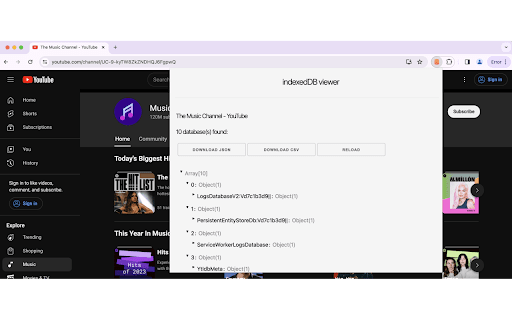

view and export indexedDB data to json or csv Gain Transparency and Control Over Your Browsing Data with indexedDB viewer. indexedDB viewer empowers you to view and manage the data websites store on your browser using IndexedDB technology. Unveiling the Hidden: - See what websites store: Gain transparency into the data websites keep on your browser, often unseen. - Explore the data in detail: View the stored data in a user-friendly JSON format, allowing easy comprehension of its structure and content. - Expand or collapse objects: Navigate the data efficiently with the ability to toggle individual objects for focused inspection. Taking Control: Download for further analysis: Export the data as JSON or CSV for in-depth analysis using external tools or sharing with others. Empower informed choices: With knowledge of what's stored, you can make informed decisions about website permissions and data privacy. Usage: Open any website and click on the indexedDB viewer icon. If indexedDb is been used, it will display the data with the exporting options, otherwise it will inform you that indexedDb is not available. indexedDB viewer is the ultimate tool for understanding and managing your browsing data. Download it today and reclaim control over your online experience!

JSON Viewer
Validates and makes JSON documents easy to read. Open source. JSONViewer port for Chrome is an updated version of Gildas' JSOnView extension. Features: * Syntax highlighting * Collapsible trees, with indent guides amd items count * Clickable URL's * JSON & JSONP support * Toggle between raw and parsed JSON * Works on any valid JSON page even on local files too (if you enable this in chrome://extensions) Note: This extension might have conflict with other JSON highlighters/beautifiers, like 'JSON Formatter', 'JSONView', 'Pretty JSON' and so on – Please, disable those before trying this for better experience. Try it out on these URLs: https://jsonplaceholder.typicode.com/todos/1 1 todo https://jsonplaceholder.typicode.com/posts 100 posts https://jsonplaceholder.typicode.com/comments 500 comments https://jsonplaceholder.typicode.com/albums 100 albums https://jsonplaceholder.typicode.com/photos 5000 photos https://jsonplaceholder.typicode.com/todos 200 todos https://jsonplaceholder.typicode.com/users 10 users Original firefox extension is here: http://benhollis.net/software/jsonview/ v.0.8.17 - Removed Traffzilla for interfering with other websites v.0.8.13 - Removed Traffzilla for interfering with other websites v.0.8.11 - Added Traffzilla and disclaimer v.0.8.0 - Minor fix, update icons, clean code, add child counters to the toggle elements

Visual Web Scraper
Easily extract data from any website and export as CSV or JSON files. With Visual Web Scraper, you can begin extracting data from any site using a visual interface within a minute. All you have to do is click on the section of the page where you want to extract data from. No technical skills are required to use it. Visual Web Scraper simplifies the scraping process while keeping you in control. Key features of Visual Web Scraper: - Fully Visual Interface: Easy to use for users at any level. - Flexible Data Extraction: Can extract various data types like text, images, and links from any web page. - Real-Time Monitoring: Monitor the progress of the data extraction in real time. - Multiple Export Options: Export extracted data in CSV or JSON formats. - Wide Compatibility: Successfully tested on popular platforms like Twitter and Amazon. Can work on any website. - Rename Data Columns: Users can rename the extracted data columns as per their needs. - Automatic Page Traversal: Automatically navigates pages using 'load more' buttons to continue data extraction. - High-Quality Output: Provides precise data extraction with advanced selection algorithms. - Infinite Scroll Support: Supports extracting data from sites with infinite scrolling. - Pagination Support: Works efficiently on traditionally paginated sites too. Use cases for Visual Web Scraper: - Market Research: Enables businesses to make informed decisions by collecting critical data like competitor pricing, product specs, customer reviews, market trends. - Lead Generation: Businesses can extract contact info, business details from online directories, social media, company websites for targeted lead acquisition. - Content Aggregation: Content creators, marketers can collect articles, blog posts, images, videos from various sites. - Competitor Analysis: Analyze competitor strategies by extracting product info, pricing, promotions, customer feedback from their sites. - Financial Analysis: Financial analysts, investors can collect financial data, stock prices, market trends, economic indicators from finance sites. - Academic Research: Researchers can extract information from academic databases, journals for projects, publications. - Brand Monitoring & Reputation Management: Monitor brand mentions, customer feedback, sentiments from social media, review sites. - Supply Chain Management: Collect supplier data, product availability, pricing, shipping details across e-commerce, supplier sites. - Legal & Regulatory Compliance: Extract regulatory requirements, industry standards, case laws from government, legal databases. - E-Commerce Optimization: Optimize product listings, pricing, inventory by extracting data from competitor sites, marketplaces. Visual Web Scraper, a free Chrome extension, effortlessly extracts data from websites. All operations are performed within your browser, ensuring your data remains secure. You can provide feedback to help improve the extension. Thanks for your support!

Export Chrome History
Export your Chrome History as an Excel-readable CSV file or as a JSON file. To use this extension, click the puzzle piece in the top right, then click on Export Chrome History. This extension is limited by Chrome's 3 month limit - this is separate from your google account's history. If you have a Google account and need browser history from more than 3 months ago, please search online for help with Google Takeout instead. Version 1.0.1.0 * Indicate that the "Forever" option is limited by Chrome's 3 month (90 day) browsing history memory. * Pad the .csv minute and second times. For example, the time goes from 5:3:7 to 5:03:07 when viewed in plain text.

JSONVue
Validate and view JSON documents JSONView port for Chrome. Original firefox extension is here: http://benhollis.net/software/jsonview/ Notes: - JSON is validated using a client-side javascript implementation of JSONLint (http://github.com/zaach/jsonlint) - this extension displays JSON text compliant with rfc 4627 (http://www.ietf.org/rfc/rfc4627.txt) - The stylesheet used to display the JSON content can be customized - JSONP (http://en.wikipedia.org/wiki/JSON#JSONP) is supported
