
dihloblpkeiddiaojbagoecedbfpifdj
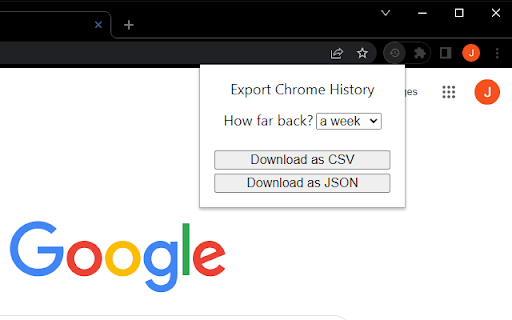

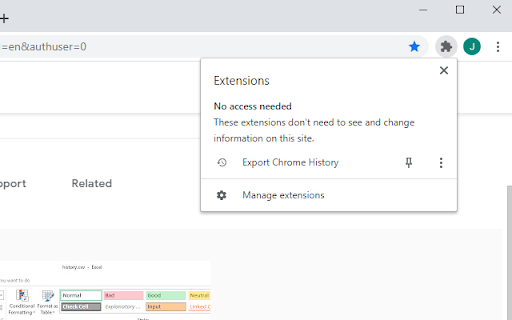
Export your Chrome History as an Excel-readable CSV file or as a JSON file. To use this extension, click the puzzle piece in the top right, then click on Export Chrome History. This extension is limited by Chrome's 3 month limit - this is separate from your google account's history. If you have a Google account and need browser history from more than 3 months ago, please search online for help with Google Takeout instead. Version 1.0.1.0 * Indicate that the "Forever" option is limited by Chrome's 3 month (90 day) browsing history memory. * Pad the .csv minute and second times. For example, the time goes from 5:3:7 to 5:03:07 when viewed in plain text.

Simple History Manager
This extension will replace Chrome's default history manager. It can search or clear browsing history by date range. How to use: • Click this extension's icon • Click menu item from Chrome -> History -> Show Full History • Use Chrome keyboard shortcuts, Windows/Linux is Ctrl + h, Mac is ⌘ + y

Quick Chrome History Export
Effortlessly export your Chrome history with Quick Chrome History Export extension. Experience seamless control over your browsing history with the Quick Chrome History Export extension. This user-friendly tool empowers you to effortlessly export your Chrome history to a CSV file, providing a detailed snapshot of your web journey. Whether you want to archive your online adventures, analyze your browsing patterns, or simply keep a backup, this extension simplifies the process with just a few clicks. Navigate through your browsing timeline and capture the details that matter to you. The Quick Chrome History Export extension ensures a swift and hassle-free export process, saving you valuable time. Stay organized and in control of your online narrative by easily accessing, storing, and sharing your browsing history in a format that suits your needs. Say goodbye to complex procedures and welcome a straightforward solution to manage your Chrome history. Download Quick Chrome History Export now and take charge of your web experience.

Bookmark Import/Export
Import and export your bookmarks easily 🚀 Bookmark Import/Export: Your Ultimate Bookmark Management Tool! 📚 Effortlessly transfer, backup, and organize your bookmarks across browsers and devices. Our powerful extension makes managing your digital library a breeze! ✨ Key Features: 📤 Export bookmarks to JSON, HTML, and CSV formats 📥 Import bookmarks from JSON, HTML, and CSV files 🔍 Advanced Export for fine-tuned control over your bookmarks 🎨 Clean, intuitive user interface for seamless navigation 🌙 Dark mode support that automatically matches your system theme 🌍 Multi-language support: Available in English and Spanish, adapting to your browser's language ⚡ Lightning-fast bookmark processing with improved performance 🔗 Seamless integration with Chrome's bookmark system 📁 Preserve your entire bookmark structure, including folders and subfolders 🔒 100% offline functionality - your data stays on your device 🛠️ How to use: 1. Click the extension icon in your toolbar 2. Choose between "Export" and "Import" tabs 3. For basic exporting: Select your preferred format (HTML, JSON, or CSV) and click "Export". 4. For advanced exporting: Click "Advanced Export" for more options and control 5. For importing: Click the "Import" button, select your bookmark file (HTML, JSON, or CSV), and watch as your bookmarks are instantly added! 💼 Perfect for: - Switching between browsers without losing your carefully curated bookmarks - Creating regular backups of your digital library - Sharing your favorite sites with friends and colleagues - Organizing your professional and personal browsing efficiently 🔒 Privacy-focused: We respect your data. Bookmark Import/Export works entirely offline, ensuring your browsing history and bookmarks remain private. 🆘 Need help or have suggestions? Visit our support page: https://github.com/AndryOre/bookmarks-import-export/issues 💡 Pro tip: Regular backups can save you from losing important bookmarks. Set a reminder to export your bookmarks weekly! Download Bookmark Import/Export today and take control of your digital bookmarks! 🌟

Bookmarks Exporter
Browser can export bookmarks as HTML file and there are extensions that can export bookmarks as JSON file, but their export files keep folder structure/hierarchy. Sometimes, the flat file structure (without folder hierarchy) is easier to read and import into other program. For instance, flat JSON and CSV files can be easily imported into database or tools like Notion, Excel. To keep folder structure info, this extension exports folder(s) as tags, it's easy to tell what folder(s) a particular bookmark item was in by looking at tags.
