
lefjpjkijgpdfmapohighokjlhfndggl

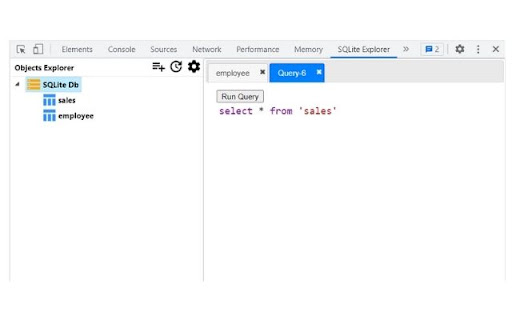
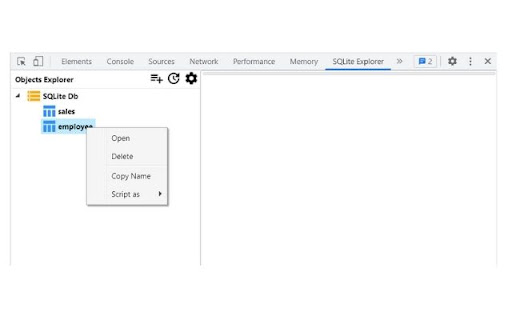
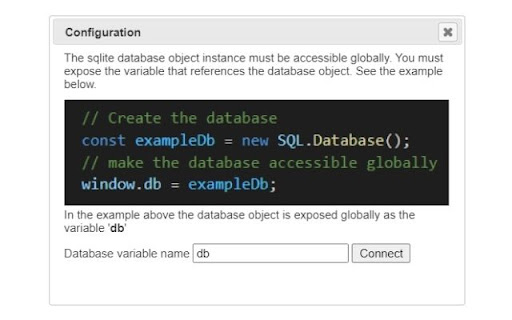
View in memory SQLite databases and tables Provides GUI to view Data and run queries on SQLite Web database instances used by any website for developer debugging and analytics purpose using Chrome Devtools. SQLite Explorer only works with in-browser web SQLite database sql.js https://github.com/sql-js/sql.js/ Steps - Open Chrome Devtools window and go to the tab 'SQLite Explorer' - Configure the connection using the Configuration dialog. - Then click on the Connect button to load the list of tables in the database. - Right click on any table to see more options (Open, Delete, etc) - Alternatively click on the New Query button to execute your own query. Update: Version 1.2.0 - New Context menu - 'Script as' opens a new tab with select query already filled in that can be tweaked if needed, thus saving some manual typing. - Layout fixes

SQLite Manager for Google Chrome™
SQLite Manager allows you to edit/view SQLite databases directly on Google Chrome. You can read one or multiple SQLite databases and run SQLite commands right in your browser. ✔ Load SQLite database files from your device - Use the "File" menu to open or create a new SQLite database or simply drop a database into this window. You can work on several databases. To select the active database use the selector tool in the top right side of the screen. Work on your database now ✔ Manage your database, using SQL or Math,js commands - You can run one or more SQLite or Math.js commands in each computational box. To execute the command press the "Enter" key. To move to the next line without executing the command use "Shift" + "Enter" key combination. Note that each computational box can either run SQLite or Math.js commands. You are not allowed to mix these two. ✔ Extended help by commands - Use help("command name") to get more info about each Math.js command (e.g.: help("selected")). This function is not usable for SQLite commands at the moment. ✔ Build plots of database - plot: plot one or more arrays. See the Chart.js menu for examples This software is 100% free and does not require you to pay. Disclaimer: Please note this extension is NOT made by Google and is made by an independent development team. All copyrights belong to their respective owners. Google doesn’t endorse or sponsor this Chrome extension. SQLite Manager is not owned by, is not licensed by and is not a subsidiary of Google Inc.

SQLite Reader
Easily browse, edit and manage SQLite database inside your browser! SQLite Reader is an extension that helps you easily browse, edit and render SQLite databases. You can execute any SQLite command that you would like (SQL and SQLite have many differences but SQLite has most of the SQL standard). This add-on uses SQLite library which is compiled from C language to JavaScript with Emscripten compiler. Emscripten is a source-to-source compiler that can compile native C/C++ codes to JavaScript language. To work with this add-on, just open the app UI and drag an SQLite file to the designated area in the app (top section). Once the SQLite is fully loaded, you will see the commands in the text area (middle section) within the UI. Simply add/edit the code and then click on the - Execute SQLite - button at the top left corner (the green button). Please note that executing any command may take some time depending on the SQLite database size. The result is rendered in the result section (section III) within the app UI. You can also save the database by pressing the - Save Database - button at the top. Moreover, there is also a button to insert a "sample" SQLite code. Simply press this button and then click on the - Execute SQLite - button to see the results. Note 1: since this add-on runs SQLite commands within the browser, it runs slower than the native SQLite application/library. However, using it is very easy compared to the native SQLite application. Please note that, for a very large SQLite database, you still need the native application. This add-on is only suitable for a reasonable database size. Note 2: this add-on is still in beta and may work as expected. Please report your bugs or any feature request via addon's homepage (https://mybrowseraddon.com/sql-reader.html), bug report form.

SQLite Manager for Google Chrome™
SQLite Manager for Google Chrome™ allows you to edit/view SQLite databases directly on Google Chrome. You can read one or multiple SQLite databases and run SQLite commands right in your browser. On our web-site you can easily load SQLite databases from your PC or from your Google Drive, edit your database and save the db file onto your PC or right on your Google Drive without saving it onto your desktop computer. You can edit the SQLite database directly inside the Google Chrome browser. This software is 100% free and does not require you to pay. Disclaimer: Please note this extension is NOT made by Google and is made by an independent development team. All copyrights belong to their respective owners. Google doesn’t endorse or sponsor this Chrome extension. SQLite Manager for Google Chrome™ is not owned by, is not licensed by and is not a subsidiary of Google Inc.

OPFS Explorer
OPFS Explorer is a Chrome DevTools extension that allows you to explore the Origin Private File System (OPFS) of a web application. OPFS Explorer is a Chrome DevTools extension that allows you to explore the Origin Private File System (OPFS, https://fs.spec.whatwg.org/) of a web application. To use it, open Chrome DevTools and click on the OPFS Explorer tab. The extension will automatically analyze the OPFS of the current web application and display the file hierarchy. You can then click on any file to download its contents or delete the file (which may fail if the file is locked). Note that deleting files may cause the application to break. You can test the extension on the demo page (https://tomayac.github.io/opfs-explorer/). The source code is on GitHub (https://github.com/tomayac/opfs-explorer).
