
acndjpgkpaclldomagafnognkcgjignd
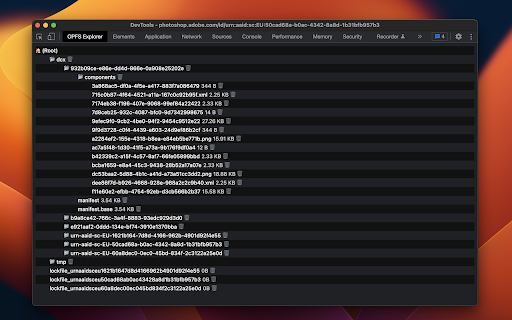

OPFS Explorer is a Chrome DevTools extension that allows you to explore the Origin Private File System (OPFS) of a web application. OPFS Explorer is a Chrome DevTools extension that allows you to explore the Origin Private File System (OPFS, https://fs.spec.whatwg.org/) of a web application. To use it, open Chrome DevTools and click on the OPFS Explorer tab. The extension will automatically analyze the OPFS of the current web application and display the file hierarchy. You can then click on any file to download its contents or delete the file (which may fail if the file is locked). Note that deleting files may cause the application to break. You can test the extension on the demo page (https://tomayac.github.io/opfs-explorer/). The source code is on GitHub (https://github.com/tomayac/opfs-explorer).

Solid Devtools
Chrome Developer Tools extension for debugging SolidJS applications. It allows for visualizing and interacting with Solid's reactivity graph, as well as inspecting component state and hierarchy. The debugger is not bundled in with SolidJS at the moment, as the project is in early development and requires frequent changes. See the guide on how to install it: https://github.com/thetarnav/solid-devtools/tree/main/packages/extension#getting-started

Drizzle Studio
Drizzle Studio Extension Drizzle Studio extension to browse PlanetScale, Cloudflare and Vercel Postgres serverless databases directly in their admin panel

webgpu-devtools
WebGPU devtools for debugging WebGPU applications WebGPU devtools is a web browser extension that helps debug WebGPU applications. It captures WebGPU usage. You can check for example - Created WebGPU objects - WebGPU command history and callback - Error WebGPU commands - WGSL shader code - Buffer, texture, and framebuffer contents The WebGPU devtools is still in the alpha stage. I'm happy if you send any bug reports or feature requets.

SQLite Viewer
Effortlessly manage SQLite databases stored in OPFS with SQLite Viewer. This extension provides a visual SQL editor. SQLite Viewer: A Chrome Extension for Managing SQLite Databases stored in OPFS Gain instant insights into your SQLite databases stored within Chrome's OPFS with SQLite Viewer. This lightweight Chrome extension caters specifically to developers, offering a convenient and efficient way to browse and analyze your data directly in the browser. - SQL Viewing: SQLite Viewer allows you to view and navigate your database schema with clarity. Explore tables, columns, and data types to understand the structure and content of your databases. - Intuitive Interface: The extension prioritizes a clean and user-friendly interface. Easily navigate your databases, view table structures, and inspect data records with minimal effort. - Enhanced Data Management: View, edit, and manipulate your data with ease. The extension offers a clear and concise table view, allowing you to browse, update, and delete records intuitively. Built for Developers: SQLite Viewer streamlines the process of exploring and understanding your OPFS-based SQLite databases. This extension empowers developers to quickly gain insights into their data, fostering a more efficient development workflow. Due to limitations with Chrome Extensions, the functionality of SQLite Viewer relies on an external library: sqlite-client: https://github.com/magieno/sqlite-client. This library must be included on the webpage you're working with for the extension to function properly. With SQLite Viewer, exploring and understanding your SQLite databases within OPFS becomes effortless. Download the extension today and unlock a streamlined approach to data exploration!
