
kmcfjchnmmaeeagadbhoofajiopoceel

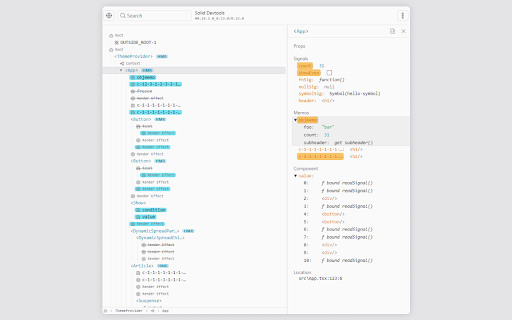
Chrome Developer Tools extension for debugging SolidJS applications. It allows for visualizing and interacting with Solid's reactivity graph, as well as inspecting component state and hierarchy. The debugger is not bundled in with SolidJS at the moment, as the project is in early development and requires frequent changes. See the guide on how to install it: https://github.com/thetarnav/solid-devtools/tree/main/packages/extension#getting-started

Tailwind CSS Devtools
All-in-one browser extension for Tailwind CSS Developer. Features 🔥 🗂 Quickly inspect edit and filter HTML elements with TailwindCSS utility classes. ✨ Support Tailwindcss Intellisense autocompletion for JIT mode. ✔️ Custom config support. Personal data 🔒 Tailwind CSS Devtools had never collected and will never collect any personal data, browsing history, etc. Tailwind CSS Devtools also doesn't share/care about your data at all.

Gimli Tailwind
A DevTools extension enabling smart tools for Tailwind CSS. The professional Devtools extension for Tailwind CSS developers. It lets you view and intuitively edit utility classes. Please note: Gimli Tailwind requires a $49 one-time lifetime license. No subscriptions. You can purchase your license via the extension (includes a 14-day money-back guarantee). ✔️ Autocomplete: Intelligent suggestions for class names. It also supports searching for CSS property names. ✔️ Quickly toggle utility values with Cmd/Ctrl + Click. ✔️ Intuitive UI We don't want to overwhelm developers with options and inputs. Here’s a list of features that enable developers to find relevant utilities quickly: ➤ Variant override: Displays what variant is active. ➤ Inputs are grouped the same way as in the official docs. ➤ Some sections like Grid and Flex will only be visible when relevant. ➤ Active inputs are always shown. ➤ Customizable UI.

ProseMirror Developer Tools
Run prosemirror-dev-toolkit as Chrome extension Inspect and debug any ProseMirror rich-text editor from your browser without having to bundle prosemirror-dev-toolkit https://github.com/TeemuKoivisto/prosemirror-dev-toolkit Created in the spirit of React and Redux DevTools. Report any issues or bugs to the GitHub repository.

CSS Pro Editor & Debugger
Visual CSS styling and debugging tool for developers. CSS Pro Editor is the ultimate visual styling tool for developers and designers. Forget inspecting elements and manually typing CSS values. With CSS Pro, you just click an element and edit it visually. 🚀 Why CSS Pro is Different? Most "inspector" tools in the store are read-only or require you to write raw code. CSS Pro is a full Visual Editor. It's like having Figma or Webflow tools directly inside your browser, working on any live website. ✨ Key Features 👆 Click & Edit Select any element on the page and change its color, font, size, spacing, and more with a simple visual interface. 📦 Computed Box Model (NEW) Visualize margins, borders, and padding instantly. See the exact computed pixel values for every layer of your element. 💎 Glassmorphism (Instant frosted glass effect) ☁️ Neumorphism (Soft, extruded shadows) 📏 Debug Redline (Instantly outline all elements) 🃏 Card Shadows (Beautiful, elevated dropshadows) 📐 Layout Engine Debug Flexbox and Grid layouts efficiently with visual alignment controls (Start, Center, End, Space-Between). 📋 One-Click Copy Happy with your changes? One click copies the clean generated CSS code to your clipboard, ready to paste into your project. 100% Offline: We don't send data to any server. No Tracking: Your usage is completely private. Lightweight: Zero impact on page load speed. Perfect for: Designers: Test fonts and colors on live sites. Developers: Debug layout issues in seconds. Students: Learn how CSS works by interacting with it. Try CSS Pro Editor today and design the web at the speed of thought! ⚡
