
iefihcnlpcaplfbklakcbcbngfangjeg


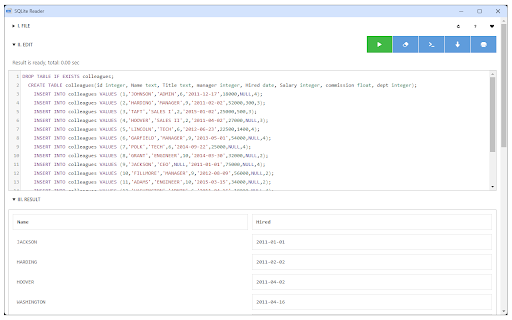
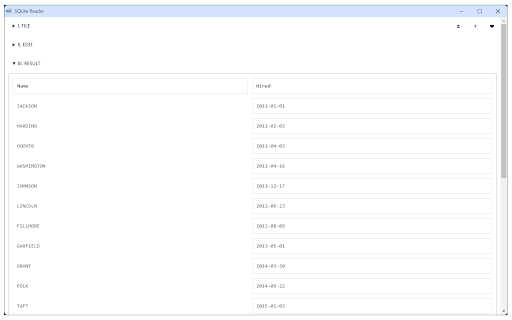

Easily browse, edit and manage SQLite database inside your browser! SQLite Reader is an extension that helps you easily browse, edit and render SQLite databases. You can execute any SQLite command that you would like (SQL and SQLite have many differences but SQLite has most of the SQL standard). This add-on uses SQLite library which is compiled from C language to JavaScript with Emscripten compiler. Emscripten is a source-to-source compiler that can compile native C/C++ codes to JavaScript language. To work with this add-on, just open the app UI and drag an SQLite file to the designated area in the app (top section). Once the SQLite is fully loaded, you will see the commands in the text area (middle section) within the UI. Simply add/edit the code and then click on the - Execute SQLite - button at the top left corner (the green button). Please note that executing any command may take some time depending on the SQLite database size. The result is rendered in the result section (section III) within the app UI. You can also save the database by pressing the - Save Database - button at the top. Moreover, there is also a button to insert a "sample" SQLite code. Simply press this button and then click on the - Execute SQLite - button to see the results. Note 1: since this add-on runs SQLite commands within the browser, it runs slower than the native SQLite application/library. However, using it is very easy compared to the native SQLite application. Please note that, for a very large SQLite database, you still need the native application. This add-on is only suitable for a reasonable database size. Note 2: this add-on is still in beta and may work as expected. Please report your bugs or any feature request via addon's homepage (https://mybrowseraddon.com/sql-reader.html), bug report form.

SQLite browser
Try our SQLite Browser for easy management of SQLite databases. This sqlite db viewer is tailored for developers Introducing the ultimate tool for database management: SQLite Browser! Have you ever wondered how to open db files directly in your browser? Look no further. Our SQLite viewer is here to revolutionize the way you handle your databases. 1️⃣ Install the extension from the Chrome Web Store 2️⃣ Click on the extension icon in your toolbar 3️⃣ Open database files by simply dragging and dropping them into the extension 4️⃣ View your databases effortlessly SQLite Browser, also known as sqlitebrowser, is your go-to tool for managing and viewing SQLite databases effortlessly. This powerful extension is designed to make your life easier by providing a seamless experience for developers, and data analysts. Say goodbye to complicated setups and hello to simplicity of db browser! 1. User-Friendly Interface: Our app boasts an intuitive GUI, making it easy for anyone to navigate through their databases. Whether you're a pro or a newbie, you'll feel right at home. 2. Convenient Accessibility: Forget about downloading heavy software. SQLite viewer allows you to access and manage your databases directly from your browser. It's quick, efficient, and hassle-free. 3. Cross-Platform Compatibility: No matter what operating system you're on, our database browser works like a charm. It's designed to be versatile and adaptable to your needs. 4. Secure: Your data's safety is our top priority. SQLite database viewer extension operates client-side, ensuring your information stays private and secure. Here's a joke for you: Why did the database administrator break up with their girlfriend? They had too many issues and couldn't commit to a single table! It's all about making your life easier and more productive. Our SQLite database browser is packed with features that will make you wonder how you ever managed without it. ➤ It's fast and reliable ➤ No need for additional software installations. Perfect for quick database management tasks ➤ Ideal for developers on the go Another joke: Why did the developer go broke? Because they used up all their cache! Our SQLite file client-side management is second to none. No more fumbling around with complex software installations. 🎉 List of benefits you get with our solution: 1️⃣ Easy-to-use interface 2️⃣ Cross-platform compatibility. 3️⃣ Quick access from your browser 4️⃣ Rich feature set (filters and sorting) Ever wondered how to open SQLite files client side without any hassle? Our browser makes it a breeze. Just upload your file, and you're good to go. It's like magic! Thinking of using SQLite online? Our app is optimized for online use, ensuring you have access to your databases anytime, anywhere. It's the perfect companion for remote work or quick database checks. Here's another joke: What does a database say when it’s in love? "I’ve got an exclusive lock on you!" Our SQLite GUI tool is sleek and modern, making database management a pleasure. With our browser solution, you can open files and get to work in no time. It's efficient, effective, and designed with you in mind. ❤️ Lists of features you'll love: • Intuitive GUI • Cross-platform support. Online access • Your information stays private and secure So, if you're looking for a SQLite database browser, give our app a try. Say goodbye to the old ways and embrace the future with our extension. In summary, this db browser is your ultimate solution for database management. Try it online today and see the difference for yourself! Since this add-on runs within the browser, it may be slower than the native application/library. However, it's much easier to use compared to the native application. For very large DBs, you'll still need the native application. This add-on is best suited for databases of a small to medium size. In summary, our sqlite browser (mac and windows are supported) is not just a tool; it’s a solution. A solution to make your DB management tasks simpler, faster, and more enjoyable. So, whether you're a seasoned developer or a curious learner, give our app a try. You won’t regret it! Don't let DB management stress you out. Download SQLite reader today and turn your data woes into data wows! Happy browsing and may your data always be in order! Our app is perfect for students learning SQL and DB management.

SQLite Viewer
Easily browse, edit and manage SQLite database inside your browser! SQLite Viewer extension is intended to make browsing the SQLite database easier. You can simply open a local or Google drive database with one click. The extension displays containing tables in the database, and you can view any table. Extension downloads results that fit into the user’s screen, so you don’t have to worry about the SQLite query returning huge tables. Data is selected on demand when scrolling down. You can use this extension to view an SQLite query or even create new databases or modify an existing database. You can alter and save the results for later use. . Opens local and SQLite databases on Your Google drive . Creates SQLite databases on your browser memory . Download SQLite databases after edit . Works offline without any server interaction All operations available right in your browser! This software is 100% free and does not require you to pay.

IndexedDB Explorer
Explore and manage IndexedDB databases in your browser **IndexedDB Explorer – Chrome Extension** IndexedDB Explorer is a powerful Chrome extension that lets you explore and manage IndexedDB databases directly from your browser. It provides a clear view of database structures, stores, and indexes, and offers tools to efficiently fetch, search, and manipulate data. * Deep searc across dbs and stores. * Visualize database structures with interactive graphs. * Fetch and page through large datasets (up to 5000 records per page). * Real-time record search across stores. * Add or delete records with ease (CRUD operations). * Calculate store sizes and record counts. * Generate charts for quick insights using Chart.js. **Acknowledgments:** Built using Chrome APIs and Chart.js.

SQL Formatter Pro
Effortlessly format, validate, and copy SQL queries with SQL Formatter Pro! 🔥 Optimize queries easily.Try now! "Effortlessly format SQL queries with our SQL Formatter Pro Chrome Extension! 🔥 Instantly format, validate, and copy to clipboard your SQL code for better readability and error detection. Supports MySQL, PostgreSQL, SQL Server, and more. Perfect for developers and database professionals. Try it now!"
