
obkehignjblpidgnopmikpgjklkpbgpj
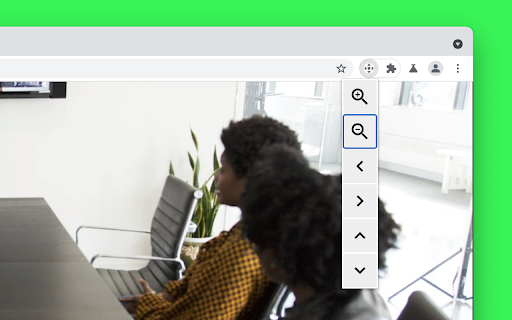
Control camera pan, tilt, and zoom Control camera pan, tilt, and zoom on any video conferencing website. Keyboard shortcuts: Alt + Z and Alt + Shift + Z to zoom in and out. Source code: https://github.com/GoogleChromeLabs/camera-pan-tilt-zoom-chrome-extension By installing this item, you agree to the Google Terms of Service and Privacy Policy at https://www.google.com/intl/en/policies/.

Camera and Microphone Control
Control camera brightness and zoom, and disable microphone auto-adjustment. This is an extension that allows you to adjust camera brightness, flip the video horizontally, and disable automatic microphone adjustment. A feature to reduce microphone noise and echo has also been added, and it will be applied when installed along with the option to disable automatic microphone adjustment. After installation, you must grant camera and microphone permissions for the extension to function properly

Camera Test
Camera Test. The webcam video is generated locally by your browser and will not be sent to the server. This is a tool for web camera test. It can be used to test your's web camera . It can also be used to check your beauty. You can download your beautiful photos from the tool. The webcam video is generated locally by your browser and will not be sent to the server. So,enjoy it.

Link to Text Fragment
Browser extension that allows for linking to arbitrary text on a page. Update: Chrome now has a built-in feature ("Copy Link to Highlight" in the context menu) to copy text fragment links. The extension has an additional feature that allows you to also copy rich links. You can activate this feature in the options. This extension allows for easily creating a special link to the currently selected text on a page via the context menu. When opening such a special link, a compatible browser will scroll the selected text into view and highlight it. • Select the text that you want to link to. • Right-click and choose "Copy Link to Selected Text" from the context menu. • If the link creation succeeded, the selected text will be briefly highlighted in yellow. • Paste your link wherever you want to share it. • 💡 Pro-tip: you can assign a keyboard shortcut to the copy action! 📖 Article: https://web.dev/text-fragments/ 🧩 Extension: https://chrome.google.com/webstore/detail/link-to-text-fragment/pbcodcjpfjdpcineamnnmbkkmkdpajjg 🎬 Demo video: https://www.youtube.com/watch?v=Y5DmGqnzvBI For more information, see the Text Fragments specification (https://wicg.github.io/scroll-to-text-fragment/) where this feature is described. This extension is open-source (https://github.com/GoogleChromeLabs/link-to-text-fragment) and licensed under the terms of the Apache 2.0 license. By installing this item, you agree to the Google Terms of Service and Privacy Policy (https://www.google.com/intl/en/policies/).

Favitabs
Organise tabs by favicon, navigate them with mouse or keyboard Are you fed up with having so many tabs and never being able to find the right one? Do end up with many duplicate tabs as a result? Favitabs shows all your tabs at a glance, organised by favicon and title. It works both as a replacement for the new tab page and as a pop-up which you can set to whatever key combination you like. It also lets you quickly search for tabs by title and navigate them using the keyboard. Favitabs does not request unnecessary permissions and does not have access to page content. It does not spy on you and send information to any server. It does not include any ads.
