
pbcodcjpfjdpcineamnnmbkkmkdpajjg
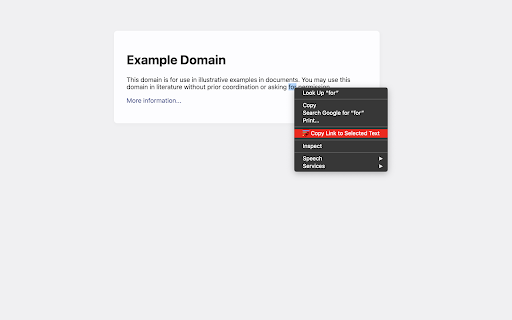
Browser extension that allows for linking to arbitrary text on a page. Update: Chrome now has a built-in feature ("Copy Link to Highlight" in the context menu) to copy text fragment links. The extension has an additional feature that allows you to also copy rich links. You can activate this feature in the options. This extension allows for easily creating a special link to the currently selected text on a page via the context menu. When opening such a special link, a compatible browser will scroll the selected text into view and highlight it. • Select the text that you want to link to. • Right-click and choose "Copy Link to Selected Text" from the context menu. • If the link creation succeeded, the selected text will be briefly highlighted in yellow. • Paste your link wherever you want to share it. • 💡 Pro-tip: you can assign a keyboard shortcut to the copy action! 📖 Article: https://web.dev/text-fragments/ 🧩 Extension: https://chrome.google.com/webstore/detail/link-to-text-fragment/pbcodcjpfjdpcineamnnmbkkmkdpajjg 🎬 Demo video: https://www.youtube.com/watch?v=Y5DmGqnzvBI For more information, see the Text Fragments specification (https://wicg.github.io/scroll-to-text-fragment/) where this feature is described. This extension is open-source (https://github.com/GoogleChromeLabs/link-to-text-fragment) and licensed under the terms of the Apache 2.0 license. By installing this item, you agree to the Google Terms of Service and Privacy Policy (https://www.google.com/intl/en/policies/).

Enable Copy Everywhere
Allow right-click for copying text from restricted web pages. Enable copy-paste on all the websites. Unlock the freedom to enable copy-paste on websites with the Enable Copy Everywhere Chrome extension in 2025! This powerful text copy unblocker Chrome tool empowers users to bypass copy restriction Chrome on popular websites, allowing seamless text copying, even from protected websites that have disabled the right-click function. Perfect for researchers, students, and anyone needing to capture content without limitations, this easy-to-use tool makes copying restricted text as simple as a single click. Bypass Restrictions: Effortlessly copy text from protected websites with disabled right-click or copy functions. One-Click Enable/Disable: Instantly turn the extension on or off with a single click from your toolbar. Simple and Free: A free copy-paste Chrome extension that is user-friendly and completely free to install and use. Cross-Browser Support: Available on Chrome and Edge for maximum compatibility. Install the "Enable Copy Everywhere" Chrome extension by clicking on "Add to Chrome." Activate the extension by selecting the icon in your Chrome toolbar. Allow copy-paste everywhere and enjoy unrestricted access to text across the web with Enable Copy Everywhere. This disable copy protection extension is the ultimate Chrome extension for copying restricted text, giving you the power to enable right-click on restricted websites and bypass copy restrictions Chrome effortlessly. 1. What does the Enable Copy Everywhere Chrome Extension do? The extension allows users to copy text from any website, even if the site has disabled right-clicking or copy functions. It's ideal for accessing content without restrictions. Yes, Enable Copy Everywhere is entirely free to download and use. The extension is designed to work on most websites with copy restrictions, though a few heavily protected sites may still block copy functions.

Page Plain Text
Chrome extension that shows page plain text and allows you to edit or download the text [Features] - Shows page plain text (keyboard shortcut: Ctrl + Shift + 1) - Extracts text from the selection on the page - Text editing - Download page plain text (keyboard shortcut: Ctrl + Shift + 2) - Removes all formatting from text - Removes all advertising to focus only on the content of the text - Copy text to use it in other documents (keyboard shortcut: Ctrl + Shift + 3) - Zoom In and Zoom Out text to improve legibility (keyboard shortcut: Ctrl + ➕ / Ctrl + ➖) - Contextual menu to quickly copy or download the plain text of the current page - Dark Mode color scheme [Keyboard Shortcuts] To change the keyboard shortcuts of the extensions you can go here: chrome://extensions/shortcuts [Links] - My Home page: https://www.vincenzodevivo.com/ - My GitHub: https://github.com/deltavi ... or you can buy my books on Amazon 📚 www.amazon.it/Vincenzo-De-Vivo/e/B09MPTBBFY

Extensions shortcut
Lets you create a keyboard shortcut to the extensions page An extremely lightweight extension (only runs when used) which lets you specify a custom keyboard shortcut which opens the extensions page. If turned on in the options, this extension will check if you already have an extension page open and switch to that one instead of opening a new. Because it is an option you don't have to trust this extension with a dangerous permission if you don't want to. Extension icon by Ganeshk (derived from "Wiki puzzle.svg") and Mysid (derived from "Insertpad.svg") both licensed under GFDL (http://www.gnu.org/copyleft/fdl.html) or CC-BY-SA-3.0 (http://creativecommons.org/licenses/by-sa/3.0/), via Wikimedia Commons.

Bible Previewer
Turns every bible verse into a link you can hover to see the contents of the verse. Easily view the bible verses referenced in an article, without ever having to leave! Simply hover over the link to open a popup containing the verse in any web page, or click on the link to go to the verse on bibles.org. You can also change the language and translation of the popup.
