
boalecjkpmcokhlmpomldpdeohipkkda
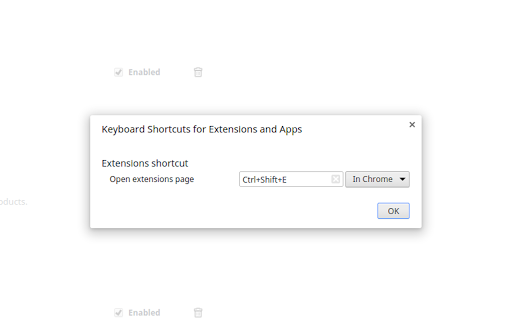

Lets you create a keyboard shortcut to the extensions page An extremely lightweight extension (only runs when used) which lets you specify a custom keyboard shortcut which opens the extensions page. If turned on in the options, this extension will check if you already have an extension page open and switch to that one instead of opening a new. Because it is an option you don't have to trust this extension with a dangerous permission if you don't want to. Extension icon by Ganeshk (derived from "Wiki puzzle.svg") and Mysid (derived from "Insertpad.svg") both licensed under GFDL (http://www.gnu.org/copyleft/fdl.html) or CC-BY-SA-3.0 (http://creativecommons.org/licenses/by-sa/3.0/), via Wikimedia Commons.

Quickeys - Custom Keyboard Shortcuts
Create and configure custom keyboard shortcuts for your browser Quickeys gives you full control over your browser's keyboard shortcuts, allowing you to create custom shortcuts for any action you regularly perform. • Create Custom Shortcuts – Easily set up keyboard combinations for common actions like opening specific websites, navigating pages, or controlling media. • Site-Specific Shortcuts – Configure shortcuts that work only on specific websites – perfect for your most-used web applications. • Advanced Browser Controls – Access hard-to-reach browser functions with simple keyboard combinations, including tab management, window controls, and navigation tools. • Clipboard & Media Actions – Copy URLs, page titles, or selected text with a single keystroke. Control media playback across any website. • Dark Mode & Accessibility – Toggle dark mode on any site, adjust font sizes, and use other accessibility features with custom shortcuts. • Custom JavaScript Execution – For power users, run custom JavaScript on any page with a keyboard shortcut. • Clean, User-Friendly Interface – Manage all your shortcuts from an intuitive dashboard with search and filtering capabilities. • Seamless Integration – Works alongside Chrome's native shortcuts system, giving you the best of both worlds. Navigation • Go Back • Go Forward • Reload Page • Clear Cache & Reload • Scroll to Top • Scroll to Bottom • Scroll Down • Scroll Up • Open Website 1 • Open Website 2 • Open Website 3 • Open Website 4 • Navigate to Path Tabs • New Tab • Close Current Tab • Close All Tabs to the Right • Next Tab • Previous Tab • First Tab • Last Tab • Duplicate Tab • Pin/Unpin Tab • Mute/Unmute Tab • Open in Incognito Clipboard • Copy Current URL • Copy Page Title • Copy Selected Text • Copy All Links on Page • Paste and Navigate Quickeys respects your privacy and only requests permissions for the specific features you choose to use. Always adding new shortcuts, feel free to leave suggestions for shortcuts you'd like to see.

ShortcutKey2URL
ShortcutKey2URL for Chrome is an extension for Google Chrome that allows you to open, and move url using shortcut keys. You can also run JavaScript. Display the action list with the startup key and execute the action with the next key. The startup key default is Ctrl+Period(on mac, Command+Comma). You can change this key later. Characters that can be used as keys are not limited to one character. It can be set as multiple characters. ShrotcutKey2URL executes its action from the characters entered consecutively as keys when the target is narrowed down to one. The items that can be set as actions are as follows. * Jump to URL. For already opened URL, go to that tab. Open it as a new tab if it is not already open. * Open URL in new tab. * Open URL in current tab. * Execute the JavaScript on the current tab. * Open URL as a new tab and then execute the JavaScript. * Open specified URL in incognito window. * Open same URL as the current tab in incognito window.

Keyboard Shortcuts
25 keyboard shortcut shortcuts for browser. Save time and mouse clicks by using keyboard shortcuts in the Google Chrome browser. There are 25 pre-set keyboard shortcuts which you can modify. You can also add in more keyboard shortcuts for features/functions you use on a constant basis. Try using this free keyboard shortcut software today to save time when you are browsing the Internet. These keyboard shortcuts work for both windows and mac. Try this free chrome keyboard shortcuts app today.

Disable keyboard shortcuts
Lets you set browser keyboard shortcuts containing Ctrl and Alt keys (Ctrl+S, Ctrl+P, Ctrl+Shift+C, etc.) to do nothing. Just head on over to chrome://extensions/shortcuts and assign away! Small, simple, and requires no permissions. Licensed under the Apache License, version 2.0. Source: https://git.benjamin.barenblat.name/disable-keyboard-shortcuts
