
biphbdgnppemddehflmppkimnjhhkohp

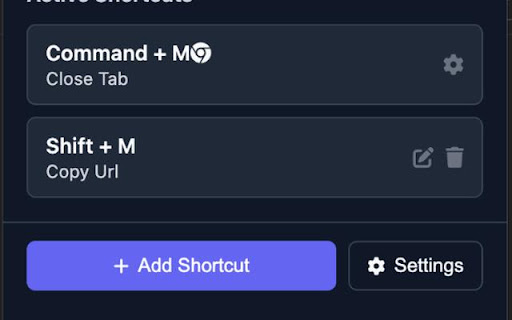
Create and configure custom keyboard shortcuts for your browser Quickeys gives you full control over your browser's keyboard shortcuts, allowing you to create custom shortcuts for any action you regularly perform. • Create Custom Shortcuts – Easily set up keyboard combinations for common actions like opening specific websites, navigating pages, or controlling media. • Site-Specific Shortcuts – Configure shortcuts that work only on specific websites – perfect for your most-used web applications. • Advanced Browser Controls – Access hard-to-reach browser functions with simple keyboard combinations, including tab management, window controls, and navigation tools. • Clipboard & Media Actions – Copy URLs, page titles, or selected text with a single keystroke. Control media playback across any website. • Dark Mode & Accessibility – Toggle dark mode on any site, adjust font sizes, and use other accessibility features with custom shortcuts. • Custom JavaScript Execution – For power users, run custom JavaScript on any page with a keyboard shortcut. • Clean, User-Friendly Interface – Manage all your shortcuts from an intuitive dashboard with search and filtering capabilities. • Seamless Integration – Works alongside Chrome's native shortcuts system, giving you the best of both worlds. Navigation • Go Back • Go Forward • Reload Page • Clear Cache & Reload • Scroll to Top • Scroll to Bottom • Scroll Down • Scroll Up • Open Website 1 • Open Website 2 • Open Website 3 • Open Website 4 • Navigate to Path Tabs • New Tab • Close Current Tab • Close All Tabs to the Right • Next Tab • Previous Tab • First Tab • Last Tab • Duplicate Tab • Pin/Unpin Tab • Mute/Unmute Tab • Open in Incognito Clipboard • Copy Current URL • Copy Page Title • Copy Selected Text • Copy All Links on Page • Paste and Navigate Quickeys respects your privacy and only requests permissions for the specific features you choose to use. Always adding new shortcuts, feel free to leave suggestions for shortcuts you'd like to see.

Tap-It
Wish that button had a keyboard shortcut? Now it can! Tap-It lets you create site-specific key bindings in seconds. Click less, do more.

Keyboard Shortcuts
Create custom key combos to control pages and tabs. Create your own custom keyboard shortcuts with this software. To begin, simply install the software. Click on the extension icon, start creating your own custom keyboard shortcuts. Copying URLs for citations, duplicating a tab to compare two forms, or jumping instantly to the page top might sound trivial, but each requires multiple mouse movements and context-menu clicks. A shortcut extension condenses those routines into single keystrokes—Ctrl + Shift + U to copy the current link, Alt + D to duplicate, Alt + ↑ to scroll to the top. Over a typical eight-hour day, eliminating a few seconds from a hundred touchpoints can reclaim 15–20 minutes of productive time. 2. Fully customisable to match muscle memory Built-in browser shortcuts often collide with operating-system defaults, local language layouts, or personal preference. A shortcut extension lets you overwrite or supplement native bindings with combinations that feel natural to you. Left-handed users can migrate commands away from the arrow keys; design teams can standardise shortcuts across machines so everyone follows the same editing conventions. Because the map lives in the browser’s storage, your setup persists across reboots and syncs with any synced profile. 3. Minimises hand travel and repetitive strain Switching constantly between mouse and keyboard forces the wrist into awkward angles and increases the risk of repetitive-strain injuries (RSI). By performing scroll, copy, mute, and close-tab commands without leaving the home row, you keep your hands in a neutral posture. Ergonomists recommend this “keyboard-centric” approach to cut down on ulnar deviation (sideways wrist bending) and the pinch grip that causes thumb fatigue on trackpads. Over months, fewer micro-stresses translate into healthier tendons and reduced discomfort.

Custom Hotkeys
Custom Hotkeys is a flexible Chrome extension designed to help users create and use custom keyboard shortcuts for faster and more efficient browsing. By allowing users to define their own hotkeys, the extension reduces repetitive actions and streamlines common tasks performed in the browser. The extension enables users to assign keyboard shortcuts to specific actions, helping them navigate and interact with web pages more quickly. This is especially useful for power users, professionals, and anyone who prefers keyboard-driven workflows over mouse-based interactions. Custom Hotkeys improves productivity by minimizing interruptions and making frequently used actions instantly accessible. Custom Hotkeys is built with simplicity and usability in mind. It provides a clear and focused interface that makes it easy to manage shortcuts without complex setup or unnecessary configuration. Users remain fully in control of their custom shortcuts and can adjust or remove them at any time. Privacy and performance are core principles of Custom Hotkeys. The extension does not track browsing activity, collect personal data, or send information to external servers. All shortcut configurations are handled locally within the browser, ensuring a fast and secure experience. Whether you want to speed up daily browsing, optimize repetitive actions, or create a more personalized workflow, Custom Hotkeys offers a practical and reliable solution for using custom keyboard shortcuts in Chrome.

Shortkeys (Custom Keyboard Shortcuts)
Custom keyboard shortcuts for your browser Shortkeys lets you create custom keyboard shortcuts for anything your browser can do. Choose from 125+ built-in actions, chain them into macros, or write your own JavaScript — all with a clean, modern interface. Shortkeys ships with 125+ built-in actions across 11 categories: - Scrolling: scroll up/down/left/right, jump to top or bottom - Tabs: open, close, pin, mute, move, sort, duplicate, suspend, group, and switch tabs - Navigation: back, forward, reload, copy URL, open from clipboard - Windows: new window, new private window, close window, fullscreen - Bookmarks: open any bookmark or bookmarklet with a shortcut - Zooming: zoom in, zoom out, reset - Video controls: play/pause, speed up/down, skip, mute, fullscreen - Search: search Google, YouTube, Wikipedia, or GitHub for selected text - Page tools: cheat sheet overlay, toggle dark mode on any page - Page scripts: 25 ready-to-use scripts (highlight links, remove images, extract emails, and more) - Miscellaneous: run custom JavaScript, insert text, trigger other shortcuts, take screenshots, print, and more Chain up to 10 actions into a single shortcut with optional delays between steps. Example: press one key to open a new tab, navigate to a URL, and pin it. Get started fast with 9 curated shortcut packs: - Vim Navigation — Vimium clone: browse the web with hjkl - Emacs Navigation — Emacs-style movement and editing - YouTube Power User — speed controls, skip, fullscreen - Productivity — tab management and navigation essentials - Developer Tools — view source, console, clear cache - Speed Reading — scroll, font size, reading mode - Tab Manager — advanced tab switching and organization - Keyboard Power User — power user essentials - Media Control — universal play/pause, skip, volume Click the Shortkeys icon (or set a global shortcut) to open a searchable command palette. Search and trigger any of your shortcuts instantly, or add a new one without opening settings. - Cloud sync: shortcuts sync across devices via Chrome Sync, with automatic local fallback if your data exceeds the sync quota - Groups: organize shortcuts into collapsible, renamable groups with bulk enable/disable - Per-site filtering: set any shortcut to work on all sites, all sites except specific ones, or only on specific sites - Shortcut recorder: click Record and press your keys — supports multi-key sequences (like "g i" for Gmail-style shortcuts) - Conflict detection: warns you when a shortcut conflicts with a browser default (platform-aware for Mac vs Windows/Linux) - Shareable links: generate a URL to share individual shortcuts or entire groups with anyone - Custom JavaScript: full code editor with syntax highlighting, Greasyfork/userscript import, and a Test button to run scripts in any tab - Live reload: saved shortcuts update in all open tabs instantly — no page refresh needed - Dark mode: follows your system preference - Undo/redo: made a mistake in settings? Ctrl+Z to undo - Guided onboarding: new users get a step-by-step wizard - Usage analytics: see which shortcuts you use most (local only, never shared) Use any combination of modifier keys (Ctrl, Alt, Shift, Cmd/Meta) with letters, numbers, punctuation, or special keys (F1-F19, arrows, Home, End, Page Up/Down, etc.). String multiple combos together for key sequences like "g i" or "ctrl+k ctrl+c". Shortkeys is free, open source (MIT license), and has been trusted by 200,000+ Chrome users. Star us on GitHub: https://github.com/crittermike/shortkeys - Documentation: https://www.shortkeys.app/docs/ - Bug reports and feature requests: https://github.com/crittermike/shortkeys/issues - Website: https://shortkeys.app Shortkeys requests only the permissions it needs. For details on each permission and why it's required, see: https://www.shortkeys.app/docs/#faq-permissions
