
obemfgmikdfkejnfioiodicdhjnnojla

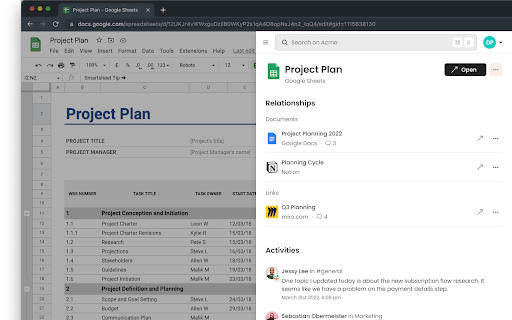
Get important information instantly. Search across all your apps. Meet our brand new Chrome extension for Sense! It’s designed to bring you all important work information right from the context. With completely refreshed design it works smoothly and looks sexy :heart_eyes: With Sense Chrome extension you can: Search across all your apps right from a browser tab. Just press search button in the sticky bar or press Cmd(Ctrl)+Shft+S to enjoy a Spotlight-like search for your browser. Get all resources related to the tab you are currently on. Sense will signal if it has important information for your current context that you should pay attention to: related documents, tasks, links, activities, etc. Add your tabs to spaces. Don’t try to keep tons of tabs open. Just add the most important ones to spaces and make it available for your team instantly. Get important things from anywhere. List of unread email, mention, important updates is now available from any browser tab. Just press “For you” button in the sticky bar. We would really appreciate your feedback, it helps us to constantly update our product! Please share it on request@senseapp.ai. Join our Discord community: https://discord.gg/dDD9cvz37b

Tabsets.net
Use tabsets.net to safely keep track of all your tabs and links in the Side Panel, stored locally on your browser With the Tabsets Extension, you'll have a new way to organise your Links, Tabs, and Bookmarks - store and find any website quickly. * It runs in the Side Panel :) * Your data is stored solely on your own computer * Integrates Bookmarks: simply use both * Organise your tabs using: tags, domains, folders, colours etc. The code is open source and available at GitHub. Do not navigate through multiple levels of folders of your browsers bookmark manager until you might find what you were looking for. This is what you can do instead: - Organise and Manage everything in your Browser's SidePanel - Utilise multiple windows and access them with inline window manager - Search for websites easily (by URL, title, or even content) - Quick access to your bookmarks (optional feature*) - Conveniently find and open an URL, or open all tabs of a set - Archive Tabsets (for later use) (optional feature*) - Quick access: newest tabs, most used tabs, tabs by domain Further Features: - Dark Mode - Import and export Tabsets as JSON - Use Color Markers for Organising (optional feature*) *) optional features need to be activated in the settings page

myReach Web Clipper
Save the things that matter on the web in an interconnected network Introducing myReach: Unleash Your Productivity with AI-Powered Superpowers Discover the browser extension that revolutionizes how you save, organize, and access your digital knowledge. myReach is your second brain, seamlessly integrating with your browser to empower you with AI-driven intelligence and effortless retrieval of information. 📚 Save Anything, Find Everything: Capture websites, files, images, notes, and contacts effortlessly, and connect them to relevant tags. No more struggling to remember where you saved that important document or the name of a website – myReach lets you search based on your personal context, empowering you to find what you need quickly and effortlessly. 💡 AI-Assistant at Your Fingertips: Meet your smart AI-Assistant powered by myReach. Simply ask any question about your saved items, and it will instantly provide answers. Whether you need contract details, summarized articles, or reminders from your past conversations, it has the knowledge to assist you effortlessly. No more tedious searching or reading through endless pages – just ask and get instant answers. 🗂️ Organize Your Way: Say goodbye to traditional folders and embrace the freedom of myReach’s flexible workspaces. Create customized workspaces to separate business and personal matters, ensuring efficient organization and effortless collaboration for teams. With myReach, everyone can find the same document using their own context, eliminating the need for extensive training or navigating complex folder structures. 🔍 Intelligent Search, Even in Images: Extracted text from images and files makes every piece of content searchable, delivering unparalleled convenience and efficiency. Locate information buried within images effortlessly, saving you time and frustration. ⚡️ Enhance and Integrate: Customize your saved items with properties like rating, description, cost, and more, allowing for deeper organization and personalization. Seamlessly integrate myReach with your favorite tools, including Evernote, Zapier, Twitter, Google Maps, and more, expanding its capabilities and streamlining your workflow. Welcome to your personal knowledge hub, designed to boost productivity and streamline information retrieval. With myReach, your browser gains superpowers, empowering you to save, connect, and access your digital world effortlessly. Embrace the future of intelligent organization and download myReach today. Get myReach, and unlock a world of limitless knowledge at your fingertips

Link Roamer
A browser extension for gathering, organizing, and inspecting all the links on a web page. 1. Inspect links - Highlight broken links on a page (i.e. 404) - Highlight non-secure links on a page (i.e. http) - Quickly find, view, organize, and navigate links on a page - See the status and reasoning for requests that don't succed - View links and where they redirect to before navigating 3. Interact with links - Copy links to clipboard - Open links in a new window or tab - Open individual links in a background tab - Export links as `json`, `text`, or `csv` - Export detailed URL and fetch request data Open source This extension is open source and doesn't collect any information from users. You can inspect the source fode at https://github.com/rossmoody/link-roamer. It's free, and made available because I like making useful things for the web. Please consider contributing with an idea, bug fix, or feature request on GitHub.

Stash
A tiny browser extension that saves and syncs your favorite links across all your browsers. Never lose a link again. Stash is your witty, no-nonsense assistant for bookmarks—syncing your favorite websites across Chrome, Edge, Arc, Dia and all your Chromium-based browsers. Effortlessly save, organize, and access your links, no matter where you are or what account you’re using. Ever emailed yourself a link and felt like a caveman? Us too. That’s why we built Stash—a tiny (but mighty) browser extension that remembers your favorite websites, syncs them across all your browsers and devices, and keeps them safer than your Halloween candy stash. - Save links in a flash (shortcut: Shift + Alt + S) - Works with multiple browsers and accounts—no more “Where did I save that?” - No folders, no fuss—just stash and go - Your data, your rules—encrypted and private, powered by Github - 100% free, forever—no hidden fees, no premium tears Stop being a digital squirrel. Start stashing like a boss. - 🚀 One-click save: Add links instantly from any page - 🔄 Cross-browser sync: Chrome, Edge, Arc, Vivaldi, Brave, and more - 🦾 Github-powered: Your data, your control - 🔒 End-to-end encryption: Only you can see your stash - 🆓 No signup required: Just connect your Github - 🌴 Completely free forever - Works everywhere you browse - No vendor lock-in—your data lives in your Github - Designed for privacy and speed - No learning curve, just stash and go - Built by someone who’s been burned by lost links (that’s me) - A Github account (to keep your stash safe and synced) - Any Chromium-based browser (Chrome, Edge, Arc, Vivaldi, Brave, etc.) Ready to stop losing links? Add Stash to Chrome and start syncing your bookmarks like a tech-savvy wizard. Support Questions? Feedback? Just want to chat about your favorite bookmarks? Email me at hello@rafaelgandi.com or visit https://rafaelgandi.com/contact. Made with 🤙 by Rafael G.
