
kegfimibbdadlkgbiijhljlolgfndcem
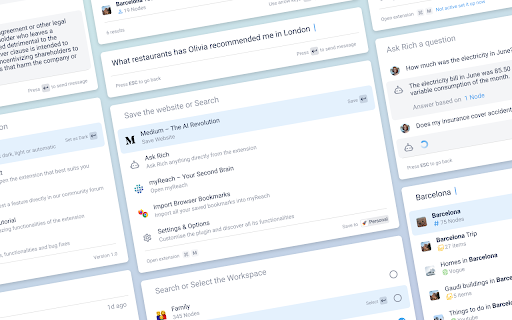
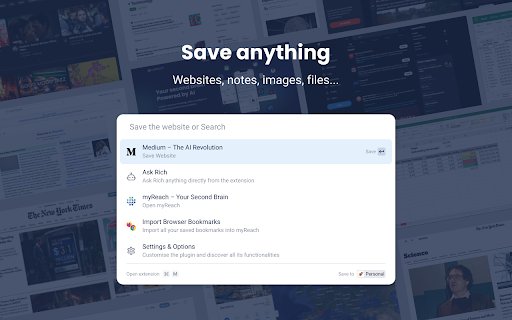

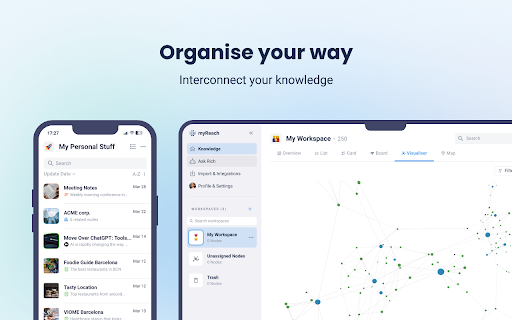
Save the things that matter on the web in an interconnected network Introducing myReach: Unleash Your Productivity with AI-Powered Superpowers Discover the browser extension that revolutionizes how you save, organize, and access your digital knowledge. myReach is your second brain, seamlessly integrating with your browser to empower you with AI-driven intelligence and effortless retrieval of information. 📚 Save Anything, Find Everything: Capture websites, files, images, notes, and contacts effortlessly, and connect them to relevant tags. No more struggling to remember where you saved that important document or the name of a website – myReach lets you search based on your personal context, empowering you to find what you need quickly and effortlessly. 💡 AI-Assistant at Your Fingertips: Meet your smart AI-Assistant powered by myReach. Simply ask any question about your saved items, and it will instantly provide answers. Whether you need contract details, summarized articles, or reminders from your past conversations, it has the knowledge to assist you effortlessly. No more tedious searching or reading through endless pages – just ask and get instant answers. 🗂️ Organize Your Way: Say goodbye to traditional folders and embrace the freedom of myReach’s flexible workspaces. Create customized workspaces to separate business and personal matters, ensuring efficient organization and effortless collaboration for teams. With myReach, everyone can find the same document using their own context, eliminating the need for extensive training or navigating complex folder structures. 🔍 Intelligent Search, Even in Images: Extracted text from images and files makes every piece of content searchable, delivering unparalleled convenience and efficiency. Locate information buried within images effortlessly, saving you time and frustration. ⚡️ Enhance and Integrate: Customize your saved items with properties like rating, description, cost, and more, allowing for deeper organization and personalization. Seamlessly integrate myReach with your favorite tools, including Evernote, Zapier, Twitter, Google Maps, and more, expanding its capabilities and streamlining your workflow. Welcome to your personal knowledge hub, designed to boost productivity and streamline information retrieval. With myReach, your browser gains superpowers, empowering you to save, connect, and access your digital world effortlessly. Embrace the future of intelligent organization and download myReach today. Get myReach, and unlock a world of limitless knowledge at your fingertips

Chat with Desksense AI Powered by GPT4
The Ultimate AI Assistant with GPT-4 powered responses. Answers any queries, summarize articles, create emails, content & AI images. Desksense ChatGPT AI app provides Free Chat GPT & GPT-4 access, AI writer for Email, Blogs, Articles, Tweets, Linkedin posts, Facebook Posts, Replies and more. Desksense AI uses OpenAI ChatGPT to summarize Youtube videos & Blog in one-click. Desksense AI app revolutionizes your online search experience by integrating Open AI ChatGPT alongside your Google search engine. With Desksense you can access instant AI-generated responses, providing valuable insights and information right alongside the search results you're browsing. With just a CMD+ I OR CTRL+ I Desksense makes it easy for you to access the ChatGPT on any website. Use "Shortcuts" for Advanced users. 👉👉 Save ANY ChatGPT, GPT-4, Claude3 OR Genini Pro response to your Desksense Account in one-click. 👉 [New Update] Desksense comes with new Chat GPT models like; GPT-4-o-mini and other LLM's like Claude3, Gemini Pro & Llama 3version. 👉 [New Update] Desksense comes AI Image Analyzer 👉 Desksense iOS App is now live in App Store. 👉 New AI Summarizer is now live with upload file feature. 👉 AI Writer for ANY content with ChatGPT-4, GPT-4-o-mini, Claude 3 & Gemini Pro option (Emoji, character limit included with a different lanuage model.) 👉 FREE AI Chatbot integrated with ChatGPT & GPT-4 in web app 👉 Get ChatGpt AI response or replies with 'Tone' and 'Emoji' 👉 Unlimited AI response on Google Search 👉 One-click AI summarizer for Youtube videos 👉 One-click AI summarizer for ANY website 👉 ChatGPT AI Image generator using Dall-E 👉 Save ChatGPT response in your account for later use. 👉 Save your frequently used prompt(s) 👉 List of 100+ preset prompts and option to edit and save in your account. 👉 Easy Access with CMD + I OR CTRL + I on ANY website 👉 Grow your Social Media presence using Desksense AI response in LinkedIn posts, Twitter & Facebook posts. 👉 Write faster and smarter emails on Gmail, Tweets, Linkedin Posts and Facebook posts 👉 Generate online content, video script, hashtags & keywords and topics for blog posts, articles and socials using Desksense AI ChatGPT App. 👉 Share your saved response to social media using our Desksense Web App 👉 Copy to clipboard, Save, Favorite and add tags to ChatGPT responses as Card. 👉 Desksense Chat GPT & GPT 4 Android Mobile App 👉 Auto Dark/light mode 👉 Change the Tone of your response and include emoji when needed. 👉 AI Chatroom Collaboration with your Team 👉 AI Chatbot in Extension 👉 AI Content Generator - AI Email Writer, AI Article Writer using ChatGPT, GPT-4, GPT-4-o-mini, Claude3 and Gemini Pro., AI Code Generator, AI Social Media Post Generator and more... Are you a busy professional juggling multiple tasks? A student striving for academic excellence? Or someone seeking to optimize their daily routines? Look no further! Desksense is here to revolutionize your digital experience. Desksense is a powerful chrome extension that leverages the ChatGPT API to enhance your productivity. It provides a range of AI applications, including ChatGPT & GPT-4 AI chatbot, summarizers, AI writers, and more, accessible on any website. Yes, Desksense is completely free to download and use. Every free user gets 5000 Word limit for month. No, you do not require a separate ChatGPT account. Simply sign up for free at Desksense.com to access the extension. Yes, Desksense chrome extension works seamlessly in all countries, ensuring that users worldwide can benefit from its features. To install Desksense on your browser, you will need to follow these steps: 1) In your browser open the browser's app store or extension store 2) Search for the Desksense in the browser's app store or extension store (or click for : Google Chrome | Edge) 3) Click on the "Add to Browser" or "Install" button to begin the installation process. 4) Follow the prompts to give the extension permission to access certain parts of your browser, if prompted. 5) Once the installation is complete, you will be redirected to our onboarding page 6) That’s it ! you are done :) Please pin the ext. on top bar to get on-time updates. If you have any questions, please feel free to reach us at support@desksense.com === VERSION 1.0.13 ==== * NEW FEATURE: AI Writer for ANY content with newest version of GPT models (Emoji, character limit included with a different lanuage model.) * NEW FEATURE: AI Image Analyzer that analyses any image and gives you response describing the image. * File Summarizer: Upload any file & summarize in one-click * Minor Bug fixes

Second.Me
Second Me: Your Second Brain that Enhances Your Memory and Sparks Creativity Use our Second.Me(Me.bot) web clipper to save any webpage, text and image into your Second.Me. Second.Me is your second brain in your life, where you can dump link, doc, text, voice, image...anything you want to be remembered and organized for lifetime. We launched the Second.Me Web clipper so you can directly save and then get inspired by any webpage or content that interests you with no more copy and paste! 1. One-click Save to Second.Me If you want to save the link while browsing web pages, hit the button on the top right of your browser. 2. Underline and Capture Web Content You can also save link, text and image you're interested in by right-clicking. 3. Snapshot Summary: A brief summary of what you saved, capturing content at a glance. 4. Rapid Outline and Insights Review No time to read? Second.Me helps you summarize key points and provides great insights on the side of webpage. 5. Search Second.Me Memories in a Snap Simply type 'secondme,' add a space, and then your query directly into the Chrome Omnibox to seamlessly search your saved memories. 6. Open in Second.Me Further to explore? Open what you clipped in Second.Me to check the highlights and inspirations!

Fabric web clipper - save anything from the web
🍱 All your stuff in one place. 👋 Collaborate on anything. **Get started free with your Fabric account A beautiful personal explorer for your digital world, trusted by 300k+ researchers, creators, and thinkers. Save your inspiration and research to fabric — an intelligent workspace for collecting, organizing, and discovering web content. Find anything instantly with AI search and collaborate in real-time. UNIVERSAL SAVE 🌎 – Save anything: articles, images, videos, PDFs, and entire web pages – More than a bookmark manager — capture complete content with visual previews SMART ORGANIZATION ⚡️ – AI-powered automatic tagging and organization – Spaces, custom tags, and filters keep everything findable AI SEARCH & DISCOVERY 🔍 – Natural language search across all your content – Just describe what you're looking for — it's like having a perfect memory – Get AI summaries and insights from your saved content REAL-TIME COLLABORATION 👥 – Work together with live updates and shared cursors – See instant notifications as your team contributes – Skip the back-and-forth of email chains and group chats AI CHAT ASSISTANT 💬 – Chat with your knowledge base using natural language – Get answers and insights from your saved content – Connect with Google Drive, Notion, and more [Coming Soon] CROSS-PLATFORM ACCESS 📲 – Use Fabric anywhere — browser, mobile, desktop – Everything syncs automatically across all your devices • • • PERFECT FOR • • • – Finding inspiration & references for creative projects – Organizing research materials and sources – Building a searchable team knowledge base – Saving articles to read later with AI summaries – Creating visual collections for any project Your data security is our priority. All content is encrypted at rest (AES-256) and in transit (SSL/TLS). Learn more about our privacy commitment: https://fabric.so/privacy – Works with Chrome, Edge, and other Chromium browsers. We don't officially support Arc, Dia or Brave yet. – Compatible with Windows, Mac, and ChromeOS – Mobile apps available for iOS and Android • • • CONNECT WITH US • • •

Saner.AI - Capture information instantly
Saner.ai seamlessly captures, organizes information and generates insights, thus freeing up your time to focus on what's matter. We believe that information capturing should be fast & convenient. These beliefs have driven us to develop features such as: - Capture directly via a side panel note that follows you across the web - Take notes using keyboard shortcuts or with just two clicks - Quickly label notes with Auto-tag functionality - Easily show/hide notes to maintain focus flow - All notes are automatically stored in the Inbox of Saner.ai.
