
lgcgflalbmeodapiohjepkjlgipmhofe

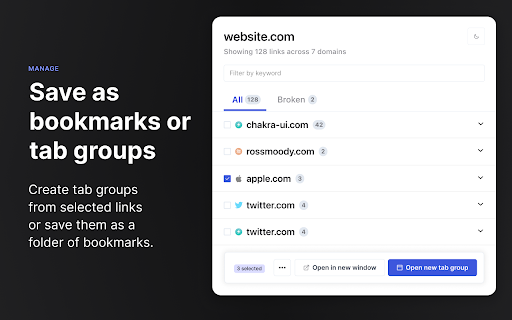

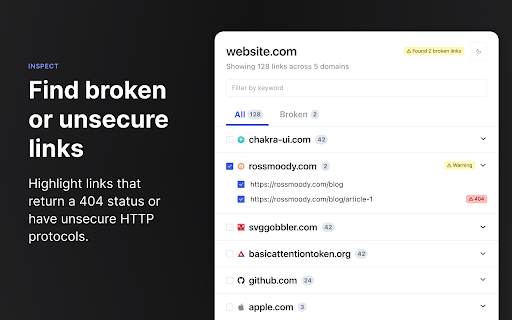

A browser extension for gathering, organizing, and inspecting all the links on a web page. 1. Inspect links - Highlight broken links on a page (i.e. 404) - Highlight non-secure links on a page (i.e. http) - Quickly find, view, organize, and navigate links on a page - See the status and reasoning for requests that don't succed - View links and where they redirect to before navigating 3. Interact with links - Copy links to clipboard - Open links in a new window or tab - Open individual links in a background tab - Export links as `json`, `text`, or `csv` - Export detailed URL and fetch request data Open source This extension is open source and doesn't collect any information from users. You can inspect the source fode at https://github.com/rossmoody/link-roamer. It's free, and made available because I like making useful things for the web. Please consider contributing with an idea, bug fix, or feature request on GitHub.

Useful Forks
To list GitHub forks ordered by stars, with additional information and automatic filtering of irrelevant ones. The plugin inserts a button next to the "Fork" button when you visit a GitHub repository. Clicking on it will open a new tab which will use the online tool to scan the forks. This tool aims at increasing the discoverability of useful forks of open-source projects. The criteria is simple: if a fork was created, but never received any other activity on its main branch, it is filtered out. For sharing: the results can be exported as CSV, or you can point people to the quick-link URL.

Bookmarks Table
View your Chrome bookmarks by date in a sortable searchable table Search your entire Chrome bookmarks collection in a table format. Each column is sortable and searchable. To open click the icon to the right of your address bar. This is an Open Source source project, please see the website link for more info.

Easy web scraper by Databar
A simple, no-code extension to collect data from any website. The simplest way to collect data from any website. How it works: 1. Open any webpage and click the Databar extension 2. Select the data you want by clicking on elements 3. Watch as matching data is automatically detected across the page 4. Export your dataset or send it to your favorite tools Features: > Visual point-and-click selection — no CSS or XPath needed > Smart detection finds similar elements automatically > Extract nested data with sub-fields > Auto-scroll captures data from infinite scroll pages > Export to CSV instantly > Connect to Google Sheets, n8n, or your CRM Supercharge with Databar: > Send data directly to your Databar workspace and enrich it with 100+ third-party APIs — add contact info, company data and more to build complete datasets. > Built for individuals and teams. Free to use. Please ensure your use complies with the terms of service of any website you scrape. Users are responsible for using this tool ethically and legally.

Stacks - Web Clipper and AI Assistant
The fastest way to save links, notes, and files with AI-powered recall. Instead of dumping content into endless folders or tabs, Stacks lets you save with context. It connects the dots across your browsing - helping you remember why you saved something, surface it at the right time, and organize without effort. ✨ Key features: - One-click save for links, text, notes, screenshots & more - AI-powered recall to find what you forgot - Smart suggestions as you browse - Collections to organize your thinking - Private by default, built for creators and curious minds Whether you're researching, planning, learning, or building - Stacks is your second brain in the browser. Here's everything Stacks can do for you: ✨ One-Click Saving - Save any webpage, article, video, or document instantly - Support for YouTube, LinkedIn, Twitter, and more - Quick keyboard shortcut (Ctrl/Cmd + K) 🔍 Smart Search & Discovery - Get personalized recommendations in Google search results - Find your saved content when you need it most - Search across all your bookmarks instantly 🤖 AI-Powered Organization - Automatic categorization of saved content - Smart collections based on topics and themes - Custom folders and tags for personal organization 💼 Professional Features - Create shareable collections - Collaborate with team members - Build a searchable knowledge base - Access from any device or browser Perfect for: - Researchers & Students - Professionals & Teams - Content Creators - Digital Collectors ⚡️ Install Stacks now and transform how you save and find online content.
