
eaabmhkokgaboihbikohlooneokghmcp


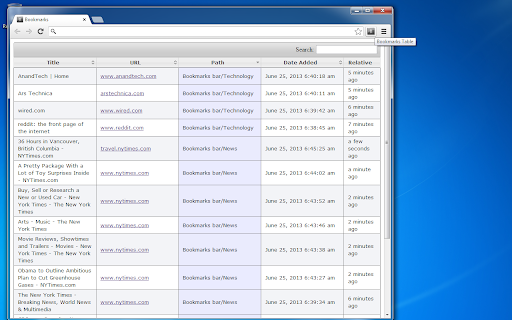
View your Chrome bookmarks by date in a sortable searchable table Search your entire Chrome bookmarks collection in a table format. Each column is sortable and searchable. To open click the icon to the right of your address bar. This is an Open Source source project, please see the website link for more info.

Chrome History Cleaner
Clears the chrome browser history automatically on browser start. You can also schedule to clear chrome history periodically. Chrome History Cleaner extension clears only the browsing history automatically when the browser starts every time. This will not clear cookies, cache and passwords etc., to keep the user session alive. You can schedule this extension to run every predefined time interval such as 5, 10, 15 minutes. You can select the time interval from the extension popup page. Support for clearing the other browsing data will be added soon. 1.0.5 - Added support clearing the history on startup if the time is set.

MyDodo | A simple todo list
Create a todo list in your Google Chrome browser What do you need to do today? :) Create a simple todo list with MyDodo! You don't need more papers or notepads! You can control, create and remove items in your Google Chrome browser.

Dynamic Bookmarks
Chrome extension which dynamically updates bookmarks based on the specified regular expression. Lately, I found myself wondering too much: "On what episode was I last on?", "What video in a playlist was I last watching?" and similar. So I decided to solve this problem by creating an extension where bookmarks can update themselves if a certain condition is met. This allows us to track: ✔️ anime / TV shows ✔️ videos in a YouTube playlist ✔️ last read blog / documentation page ✔️ etc. (basically ANYTHING with URL!) It also comes with its bookmark manager which lets you easily filter tracked bookmarks, edit the regular expression, etc. You can also view the history of the 10 most recent links for each dynamic (tracked) bookmark. To stop tracking a bookmark, just remove the regular expression (RegExp) from it. It simply is a sequence of characters that define a search pattern. Ever did CTRL+F to find something on the page? Well, it's pretty much the same thing, but with extra special characters that let your search be more flexible. In most cases, you won't even have to worry about the RegExp field since the automatically generated value will be good enough, but you might run into rare occasions where the site will be using unique URL notation which would require manual entry of this field. Now ask yourself, what part stays the same? - animekisa.tv/mo-dao-zu-shi-season-2 And that would be our value for the RegExp field! Hopefully, by now you understood how to use this extension, but if that is not the case, a complete guide on how to use this extension with pictures and FAQ can be found here: https://github.com/DaniloNovakovic/chrome-dynamic-bookmarks/blob/master/README.md 🤔 If you have any additional ideas, requests, or if you encounter bugs, you can post an issue on GitHub page: https://github.com/DaniloNovakovic/chrome-dynamic-bookmarks/issues 💡🐛 If you enjoyed this extension you can support me by giving it 5 stars ⭐️⭐️⭐️⭐️⭐️

Omni Search - Spotlight Tab Search & Tab Manager
The fastest tab manager for Chrome. Search tabs, bookmarks, history & page content. Sort by recent, snooze, find duplicates. Tired of hunting through dozens of open tabs? Omni Search is a fast tab manager that gives you instant access to everything in your browser from a compact popup or a Spotlight-style search overlay. Use the compact popup for quick tab management, or open OmniSearch Spotlight to search without leaving the page you are on. Chrome lets you customize both shortcuts from chrome://extensions/shortcuts, and Omni Search shows the current shortcut status in the popup. Search Prefixes for Power Users Type normally to search open tabs for recently closed tabs for bookmarks @ for history ! to find duplicate tabs ~ to find suspended tabs % to search page content (opt-in) ^ to find snoozed tabs Key Features • Spotlight mode — search tabs, bookmarks, history, and more without leaving the current page • Sort tabs by most recently used — see your active tabs first • Instant fuzzy search with smart ranking • Search page content across all open tabs (opt-in) • Snooze tabs — set reminders to come back later • Duplicate tab detection — find and close redundant tabs • Suspended tab search — quickly find unloaded tabs • Tab groups support with color coding • Full keyboard navigation — never touch your mouse • Copy URLs with one click • Restore recently closed tabs instantly • Light and dark theme support Privacy Focused Omni Search works entirely locally. No data is sent to external servers. Optional content search requires explicit permission and indexes only on your device. Popup shortcut: shown in the popup footer and configurable in Chrome shortcuts Spotlight shortcut: shown in the popup when available, or use Set to configure it Arrow keys / Tab: Navigate results Enter: Switch to selected tab Ctrl+Backspace: Close selected tab Escape: Close popup or Spotlight Perfect for researchers, developers, and anyone who needs to manage tabs efficiently.
