
lebddibgdgkjheglmfpannlomiobdbhm
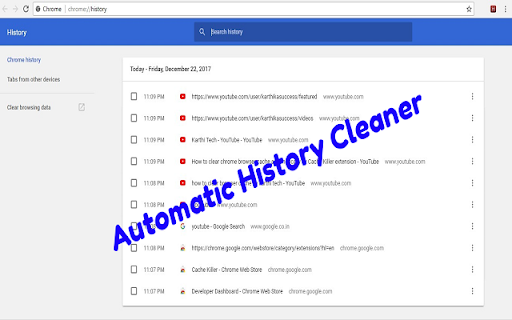

Clears the chrome browser history automatically on browser start. You can also schedule to clear chrome history periodically. Chrome History Cleaner extension clears only the browsing history automatically when the browser starts every time. This will not clear cookies, cache and passwords etc., to keep the user session alive. You can schedule this extension to run every predefined time interval such as 5, 10, 15 minutes. You can select the time interval from the extension popup page. Support for clearing the other browsing data will be added soon. 1.0.5 - Added support clearing the history on startup if the time is set.

History Cleaner
Chrome extension that deletes history older than a specified amount of days. * Behavior * Decides what history the extension will delete when it triggers. * Either disabled, delete old history, or delete all history. * Defaults to disabled, so the extension doesn't do anything until you configure it. * Number of Days to Keep History * Delete history older than midnight on the specified number of days ago. * Only has effect if behavior is set to delete old history. * Defaults to 0. * Trigger Mode * Whether the extension triggers on browser startup or at a set interval. * Defaults to timer. * Timer Interval * Interval in minutes between triggering. * Only has effect if trigger mode is set to timer. * Defaults to 1440 (24 hours), Minimum 1 * `history` * Used to clear browser history * `storage` * Used to save user options * `idle` (Prior to 1.6.0) * Used to detect when the browser is idle for the idle trigger mode * `notifications` * Used to send a notification when history is cleared * Notifications are only sent if the user enables notifications in options * `downloads` * Used to clear download history * Download history is only cleared if user enables the option * `alarms` * Used to set a timer for the timer trigger mode.

Cleaner - history & cache clean
Best way to clean cache and chrome browsing data! Easily clean history, downloads, cookie or set auto history cleaning! Fasten Browser with Smart Cleaner extension *New Option: Hot key "Clear" - Alt+C (works for all OS). Smart Cleaner is a simple utility to clean browser data, cache, cookies, downloads and increase an overall browser speed. Click "add to chrome" button to run Smart Cleaner and flush the browser history without any efforts. My Google Chrome is getting too slow. What can I do? The problem with all the browsers, whether it’s internet explorer or Google Chrome, is that they become slow and clunky after a period of time. They take time to start up to, to load websites and to open and close tabs. This is when one should consider cleaning up the browser and getting rid of the cache, history etc. Clean is a useful browser extension that helps you quickly clean up the browser. and It help to delete all traces of your online activity to protect your privacy. Clean is very easy to use and fast. Clean up browsing data from a user's local profile. Make your Chrome browser more faster and Protect your personal data!! + Instant removal with one-click + Cleaner Chrome history + Empty the cache + Automatic data remove + Delete cookies and other site and plug-in data + Delete History + Remove Passwords + Cleaner for saved form data + Ability to choose time period + Dark mode + Quick clear button + Making fetch call based on the response creating tab with response url This lightweight extension enables you to do all that mentioned above instantly, with one click on the Eraser icon in the Chrome toolbar.

Enhancer for YouTube™
Take control of YouTube and boost your user experience! Enhancer for YouTube™ is the ultimate tool to supercharge your YouTube experience with a host of highly customizable features, making it smoother and more enjoyable. Whether you’re looking to fine-tune playback settings or customize the look and feel, this YouTube enhancer gives you complete control to tailor YouTube to your needs. Video Playback: • Quickly adjust playback speed, quality, volume, and more with the mouse wheel or keyboard shortcuts. • Playback Speed: Set a default playback speed and adjust it anywhere from 0.07x to 16x while watching. • Playback Quality: Set a default playback quality for videos, playlists, and embedded videos. • Volume Booster: Boost volume and bass for louder, clearer sound (up to 10x audio boost). • Enhanced Loop Mode: Repeat specific parts or the entire video effortlessly. • Autoplay Control: Fine-tune or disable YouTube’s autoplay features for better control. • Video Formats: Disable high frame rate formats (60fps). Appearance and Themes: • Video Filters: Adjust brightness, contrast, color, and more without changing your monitor's settings. • Enhanced Dark Mode: Enjoy a sleek, eye-friendly interface with the built-in Dark Theme and its 50+ variants. • Custom Themes: Personalize YouTube's appearance with custom themes to suit your style. • Cinema Mode: Dim everything around the player to keep your focus on the video. Video Player: • Wide Player: Expand the player beyond the default Theater Mode, or fill the entire screen without going full screen. • Mini Player: Keep watching while reading comments so you never miss a moment. • Pop-up Player: Watch videos in a resizable window while multitasking or browsing other content. Distractions and Shorts: • Block Distractions: Hide end screens, info cards, recommendations, related videos, chat, or comments. • YouTube Shorts: Hide Shorts or watch Shorts like regular videos. Other Features: • Screenshot: Capture high-quality screenshots of your favorite video moments. • Keyboard Shortcuts: Set up customizable keyboard shortcuts to control YouTube like a pro. • Reverse Playlists: Watch playlists in reverse order for a fresh viewing experience. And more! Get the most popular YouTube enhancer now and transform the way you watch YouTube forever! Enhancer for YouTube™ is a third-party extension and is not affiliated with YouTube. YouTube is a trademark of Google LLC. Use of this trademark is subject to Google Permissions.

Looper for YouTube
Auto replay videos with ONE-CLICK, able to customise features such as AUTO LOOP toggle, setting loop counts and loop portion. ♥♥♥♥♥♥♥♥♥♥♥♥♥♥♥♥♥♥♥♥♥♥♥♥♥♥♥♥ Please rate ★★★★★ if you like it ♥♥♥♥♥♥♥♥♥♥♥♥♥♥♥♥♥♥♥♥♥♥♥♥♥♥♥♥ Have you ever wanted to watch to the same video on the YouTube™ without pressing replay button every time at the end of the video? With Looper for YouTube you will get a loop button under the YouTube player. After you press the button, video will repeat itself infinitely. Key Features: - ** Able to set default auto loop on every video ** - Able to set loop in a portion/range - Able to set loop how many time you want - Uses Content Script without background page >> means less memory used - Able to use keyboard shortcut 'P' to start loop - Set "&loop=10" in url to start loop for 10 times - Set "&start=00:10&end=01:00" to start loop from 10s to 1 min - When loop button pressed playlist auto-play will be disabled - Able to set "continue the playlist" after loop number of times - Match latest (2026) YouTube style - Translation display according to YouTube language * Any issues and suggestions with this extension, please submit a support request instead of leaving in reviews which is hard to follow and response. * Hope you enjoy this extension. Please rate 5 stars and leave a review, this is a key motivation for me to keep updating the extension.
