
npogkncheacjllmfhehhofcacmeigpgl
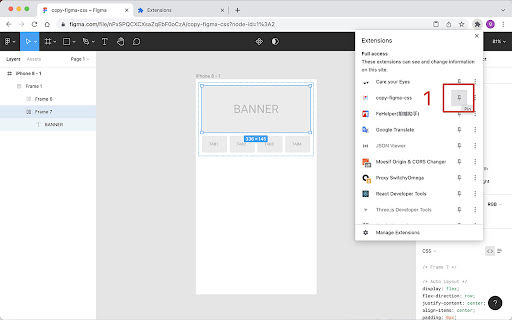

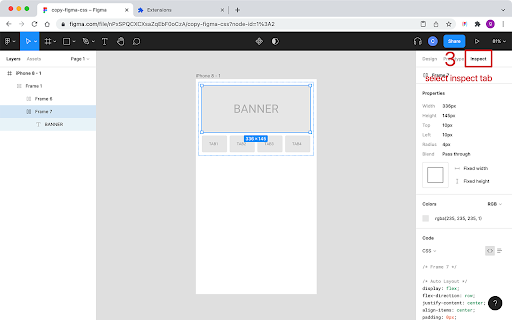
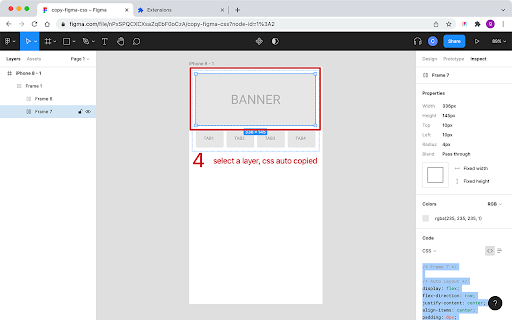
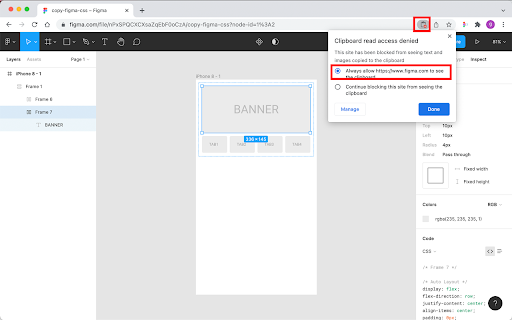
Enable this extension and activate the inspect tab in a figma file, the CSS can be automatically copied according to the rules you set after any node is selected Feature: * Copy Figma Css automatically (Expired, please copy manually) * Ignore useless comments and unwanted properties * Set Scale level of the number and custom unit * Custom replace rule * Replace the value by css/less/sass variables * Different configs for different projects Usage: * Install this plugin and Pin it in the extension bar * Open or refresh the figma file * Manually copy the css code, and the code will be modified according to the rules and written to the clipboard * If the browser ask the permission to read the clipboard, click Allow to read, it read the CSS code only

Web to Figma
Web to Figma extension to capture pages and components and import them into Figma as editable designs. No more screenshots. Web to Figma lets you import full webpages using the plugin, or import specific components from a website, using our Chrome Extension. Convert any HTML to design file in Figma. Import components or webpages using the Chrome Extension: 1. Download the Web to Figma Chrome Extension 2. Go to any page in your Chrome Browser 3. Invoke the extension, and then choose if you want to capture the entire page or a single component 4. Once the extension captures the page, save the page/component to a Collection 5. Go to Figma and run the plugin 6. Go to the Collections tab of the plugin 7. Find your latest capture and click on Add to Figma Import webpages using the plugin: 1. Install the plugin 2. From within any file, run the plugin by going to Plugins menu and selecting Web to Figma 3. In the Import tab of the plugin, enter the URL of the webpage that you want to import. For example, https://github.com/home 4. Choose the relevant settings 5. Click on Import 1. Create a library of design inspirations using Collections 2. Create a moodboard 3. Collaborate with developers by importing their implementation and comparing against the reference design 4. Learn how some of the more complex websites have been structured 5. Quickly explore various design patterns when solving a new task

DesignNext
DesignNext Chrome 插件是一个为 Figma 查看者提供快速查看 CSS 信息,以及其它辅助开发信息的工具 方便前端研发查看 figma 元素的 css 等信息,团队内部使用,感谢开源项目 https://github.com/leadream/figma-viewer-chrome-plugin,插件基于此项目做的功能扩展;

Better Copy For Figma
Support non-latin content copy for Figma By this extension you can use "copy button" on Figma for all non-latin languages includes Persian (farsi), Arabic and so on. Enable it and copy content !

Hover inspector like in Zeplin , Figma
Inspector is the tool which mimic display dimension between selected and hover element. It would be good for designers, QA version 3.0.2 - fix bug: prevent click(thanks Marcelo Alejandro) - add background rule permission for save setting version 3.0.1 - fix bug: extension dropped (thanks @invisioN7) version 3.0.0 - refactor core(prepare for the new features) - add sidebar (setting, more details of selected element) - add freezing selected element after 2 click - press 'space' for unfreeze selected element - add link to discord - add uninstall form - fixed calculation position of popup version 2.0.0 - used ReactJS (expected simplifying of maintain and support) - add data: padding, margin, font, color, background, line-height, class, id - fixed calculation position of popup version 1.1.0 - add highline padding(green color) and margin(orange color). - fix bugs version 1.0.5.1 - minify file for more faster loading version 1.0.5 - add top bar with styles(padding, margin, font-size, height, width) for hover and selected element - fixed bugs (when user scroll label and lines position not display correctly) - add change style for label which display height and width hovered element - change active and regular icon: - add 2 hotkeys: -- command + enter / ctrl + enter - for hide/show topbar -- esc for close extension
