
pnodijpkjplmlanbppgpjmihnoaohpoa
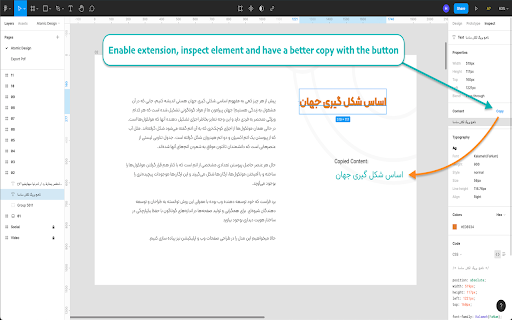
Support non-latin content copy for Figma By this extension you can use "copy button" on Figma for all non-latin languages includes Persian (farsi), Arabic and so on. Enable it and copy content !

Markflow: Copy Elements to Figma, React, etc.
Introducing Markflow, the ultimate Chrome extension designed to simplify the workflow for web designers and developers. Easily copy… Introducing Markflow, the ultimate Chrome extension designed to simplify the workflow for web designers and developers. Easily copy elements from any website to Figma, React, Svelte, Webflow, and more, boosting your productivity and streamlining your design process. Key Features: 1. Copy Elements: Seamlessly copy any element from any website to your own project. 2. Inspector: Quickly view all applied CSS styles for any element without opening DevTools. 3. Eye Dropper: Instantly pick the color of any pixel on your screen, including images and videos. 4. Color Palette: Effortlessly identify the colors used on a website. 5. Assets: Access all images used on a website and download them individually or in bulk. Getting Started: 1. Install the Markflow extension. 2. Add your license key (get one for free). 3. Click on any element to copy it to your project. Compatibility: Markflow works with any version of Chrome without any specific requirements. Privacy and Security: Your data stays on your local browser. We do not collect any data from our users. Pricing: All features can be used for free. The free plan allows copying up to 5 elements per month. Upgrade to the Pro plan for unlimited copied elements. Support and Updates: Markflow is under active development, with continuous improvements and updates to ensure a seamless user experience. Visit our website at https://markflow.app to learn more about Markflow and stay updated with the latest features and enhancements. Try Markflow today and revolutionize your web design and development workflow!

Heurio - One-Click Bug Report & UX Check Tool
Fastest website review, bug report and heuristic evaluation tool for designers and devs. Make comments and collaborate with your team directly on any live website or web application. 1. Turn on the Heurio extension on the website. 2. Make comments. Pin your ideas. Report bugs. Do a heuristic evaluation. 3. Invite others to the project for seamless collaboration, or just share the project link with them. 1. For UX Researchers Do heuristic evaluations, UX audits, and remote user testing. 2. For UX/UI Designers Create UX reviews, track changes, and boost cross-team collaboration. 3. For Frontend Developers Track development feedback, report bugs, and communicate with designers. 4. For WordPress Developers Improve communication and fasten the website approval process. 5. For Copywriters & Marketers Suggest copy changes and track content ideas directly on live websites. 6. For Creative Minds Manage real-time website reviews during brainstorming or a workshop. Empower your team with an interactive visual feedback tool Heurio gives the power of real-time visual communication directly on your site. Analyze and prioritize comments to provide clear and actionable feedback without complexity. The heatmap of priorities Simple & straightforward color-coding to visually group comments for your team. Seamless heuristic evaluations Conducting heuristic evaluations has never been easier! No matter which website you are on, starting a review is always just one click away. Your favourite heuristics are integrated into Heurio - from Nielsen's 10 Usability Heuristics to Dieter Rams' 10 Principles. Communicate efficiently with live, embedded commenting Keep up with your team and clients directly on live websites to unlock pain points & deliver research results.

Figma UI Mod
Figma UI enhancements and Analytics CSV export Provide powerful options for Figma users, including: Changes • 14 October 2025: Fixed issue preventing CSV export for component analytics. Updated the UI mod styles to fix container width issue. • 27 April 2025: Fixed issue preventing CSV export for component analytics. Added inline download button to the analytic modals. • 10 March 2025: Fixed issue preventing CSV export. Added export of style analytics. • 11 November 2024: Fixed issue preventing CSV export. Corrected "undefined" library title in Org Analytics modal. • 23 September: Fixed issue preventing CSV export. • 12 August: Fixed issue preventing CSV export. 1) Export Analytics as CSV • Export library analytics as CSV • Export component analytics as CSV Note: Analytics modal needs to be visible on screen 2) Enable several CSS overrides to adjust the Figma UI to make better of available space on larger viewports: • Doubled the width of the Properties Panel (Right hand sidebar) – reduce truncation • Wider Select Dropdowns – reduce truncation • Increased the size of File Preview thumbnail – more space due to the wider sidebar • Added horizontal scroll to the Layer List – avoid truncation of layer names • Increased the size of Library Analytics modal – instead of a narrow modal it now takes up the full viewport • Full size branch review modal • Swap instance picker enlarged – reduce truncation

Hover inspector like in Zeplin , Figma
Inspector is the tool which mimic display dimension between selected and hover element. It would be good for designers, QA version 3.0.2 - fix bug: prevent click(thanks Marcelo Alejandro) - add background rule permission for save setting version 3.0.1 - fix bug: extension dropped (thanks @invisioN7) version 3.0.0 - refactor core(prepare for the new features) - add sidebar (setting, more details of selected element) - add freezing selected element after 2 click - press 'space' for unfreeze selected element - add link to discord - add uninstall form - fixed calculation position of popup version 2.0.0 - used ReactJS (expected simplifying of maintain and support) - add data: padding, margin, font, color, background, line-height, class, id - fixed calculation position of popup version 1.1.0 - add highline padding(green color) and margin(orange color). - fix bugs version 1.0.5.1 - minify file for more faster loading version 1.0.5 - add top bar with styles(padding, margin, font-size, height, width) for hover and selected element - fixed bugs (when user scroll label and lines position not display correctly) - add change style for label which display height and width hovered element - change active and regular icon: - add 2 hotkeys: -- command + enter / ctrl + enter - for hide/show topbar -- esc for close extension
