
mafpepbepbabkenbfpcdjmmjmeeemoal
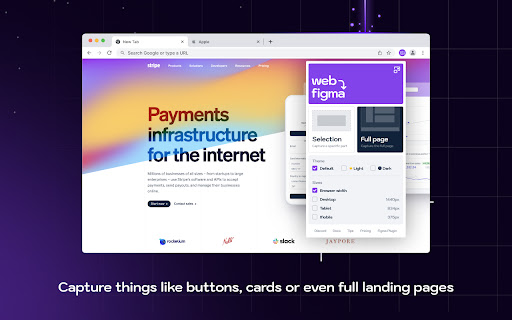

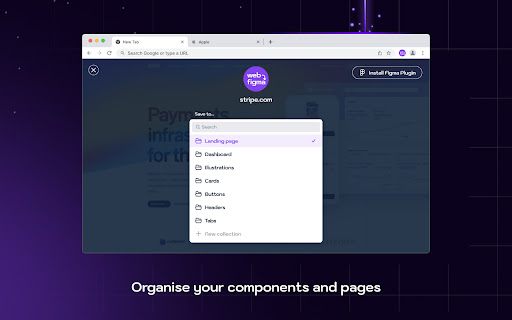
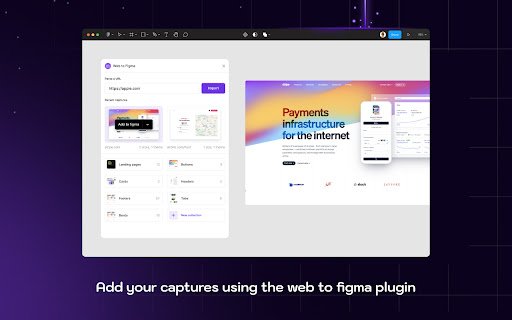
Web to Figma extension to capture pages and components and import them into Figma as editable designs. No more screenshots. Web to Figma lets you import full webpages using the plugin, or import specific components from a website, using our Chrome Extension. Convert any HTML to design file in Figma. Import components or webpages using the Chrome Extension: 1. Download the Web to Figma Chrome Extension 2. Go to any page in your Chrome Browser 3. Invoke the extension, and then choose if you want to capture the entire page or a single component 4. Once the extension captures the page, save the page/component to a Collection 5. Go to Figma and run the plugin 6. Go to the Collections tab of the plugin 7. Find your latest capture and click on Add to Figma Import webpages using the plugin: 1. Install the plugin 2. From within any file, run the plugin by going to Plugins menu and selecting Web to Figma 3. In the Import tab of the plugin, enter the URL of the webpage that you want to import. For example, https://github.com/home 4. Choose the relevant settings 5. Click on Import 1. Create a library of design inspirations using Collections 2. Create a moodboard 3. Collaborate with developers by importing their implementation and comparing against the reference design 4. Learn how some of the more complex websites have been structured 5. Quickly explore various design patterns when solving a new task

html.to.design
Convert any website into fully editable Figma designs. Requires the associated Figma plugin! With html.to.design, convert any website into fully editable Figma layers. Leverage an existing website and import its HTML to Figma to start your own designs, without building each element from scratch. This Chrome extension is a companion to the html.to.design Figma plugin, which you’ll need to install for certain features. If you are using the “Copy to clipboard” option, you do not need to run the Figma plugin — simply paste (⌘+V) your captured webpage in your canvas! This extension also has built-in support for AI Tools like ChatGPT, Bolt and Lovable, and can directly capture their results without any extra steps. You can find the full list of AI tools supported here: https://html.to.design/docs/import-from-ai-tools 1. Install the html.to.design Chrome extension by clicking on [Add to Chrome] on this page. 2. Navigate to the page you would like to import into Figma. 3. Click on the html.to.design extension icon in your Chrome top bar. 4. Hit 'Capture' and the extension will automatically start capturing the page. Once your webpage has been captured, there are several ways to import it into Figma: a) Store it locally as an .h2d file that must be dropped into the html.to.design Figma plugin b) Send it directly to the Figma plugin d) Copy it to the clipboard to then directly paste the result in Figma --- Notes: In order to best map what you see in your browser to Figma, we need to access Chrome's debugging features.

Export to Figma
Capture any webpage or element and paste it into Figma as editable layers, instantly. Capture real UI from any webpage and convert it into clean, structured Figma layers. Skip screenshots and manual rebuilding. • Convert any website to Figma layers — full page or specific sections • Copy landing pages, dashboards, or competitor designs into Figma • Inspect typography, colors, spacing, padding, margins, and CSS without code • Extract logos, SVGs, images, and assets with one click • Audit color palettes, font families, and WCAG contrast • Build design system references from live products 🎯 PERFECT FOR DESIGNERS & DEVELOPERS • Copy a website into Figma without rebuilding it manually • Redesign or modernize existing websites • Convert HTML and CSS to Figma • Use competitor landing pages as editable references • Extract brand colors, fonts, and assets in seconds • Work directly from real products instead of screenshots 1. Install the Chrome extension 2. Open any webpage 3. Click "Export to Figma" and capture the full page or an element 4. Paste into Figma (Cmd/Ctrl + V) using the free companion plugin Get a real Figma frame with editable text, fonts, colors, images, and clean layer structure — not a flat screenshot. • Full-page and element-level capture • Editable, organized layer structure • Preserves layouts, styles, fonts, and text • Inspect Mode with spacing, padding, and margin overlays • Color extractor (HEX, RGB, HSL, OKLCH, Tailwind) • Typography scanner with font usage details • Download images, SVGs, videos, GIFs, and Lottie files • WCAG accessibility contrast checker • Works with AI-generated websites (v0, Lovable, Bolt, Replit, Framer, etc.) • Desktop, tablet, mobile, and custom viewport presets • Client website redesigns • Competitor research and analysis • Migrating existing websites into Figma • Extracting design systems from production sites • Rapid prototyping and mockups • Building style guides from real websites • Studying production UI and UX patterns Built by designers, for designers ( and developers :) )

Visily - Screenshot Capture & Design
Easily capture app and website screenshots and turn them into fully editable wireframes in Visily. Visily is an AI-powered UI design platform built for non-designers and teams. With this companion extension, you can quickly transform any app or website into editable wireframes that you can customize and refine. USE CASES • Kick-start new projects by turning inspiration from websites, apps, or even screenshots from Dribbble, Behance, and Mobbin into editable wireframes. • Redesign legacy apps by capturing screenshots of outdated UIs and modernizing them with Visily’s powerful editor. • Build your inspiration library by saving and organizing remarkable designs directly in Visily for future use. HOW IT WORKS IN 3 EASY STEPS 👤 STEP 1: Sign up for a free Visily account at https://app.visily.ai/signup 📷 STEP 2: Capture screenshots from any webpage 🖍 STEP 3: Import them into Visily as images or editable wireframes We hope you find this extension useful! Please feel free to share your thoughts or feedback by sending an email to support@visily.ai. ABOUT VISILY Visily (https://www.visily.ai/) is the easiest wireframe software, enabling teams of all sizes and skill levels to create stunning wireframes and prototypes at lightning speed. With its intuitive interface, extensive UI library, and advanced AI features, Visily has helped thousands of teams iterate and validate ideas quickly and efficiently.

EdPage
Turn a webpage into your notebook. Add drawings/text/images/emojis & more to any webpage / PDF. Take Screenshots of your work. EdPage is a free, innovative Chrome extension that redefines how students and teachers interact with online content. Designed to promote active learning, creativity, and student agency, EdPage allows users to transform any webpage or PDF into a personalized digital notebook — fully compliant with New York State’s EdLaw 2‑D requirements for student data privacy and safe instructional technology use. With just one click, students can: ✏️ Draw, type, and annotate directly on webpages or PDFs 💬 Insert emojis, images, highlights, and custom notes 📸 Capture and screenshot their work to submit or share EdPage transforms traditional browsing into a living, breathing learning experience. It takes passive scrolling and turns it into purposeful interaction. With EdPage, students aren’t just reading content... they’re activating it. Student-Centered: Learners take the wheel in their own educational journey Teacher-Supported: Educators become facilitators of skill application and growth Customizable: Supports differentiated instruction, learning styles, and accessibility needs Trackable: Capture, review, and analyze annotated work to monitor progress over time Flexible: Ideal for blended, in-person, or remote learning settings Built for Compliance, Privacy, and Peace of Mind EdPage is built from the ground up to align with New York State Education Law 2‑D, ensuring safe, secure, and approved use in K‑12 learning environments. Student data is never collected, stored, or shared — protecting both privacy and compliance every step of the way. Use Cases for Teachers 📚 Annotated readings and current events discussions ✍️ Digital close reading and literary analysis 🌍 Customized geography maps and data visualizations 🌟 Ready to Activate Your Lessons? Install the EdPage Chrome Extension Use EdPage’s toolbar to draw, annotate, and customize Screenshot or save your work — share it, submit it, reflect on it Repeat and refine — the learning never stops The Possibilities Are Infinite With EdPage, every student becomes an explorer, every lesson becomes a canvas, and every webpage becomes a learning adventure.
