
nkhfcdjgbohgnjhikglopaingehoimbh
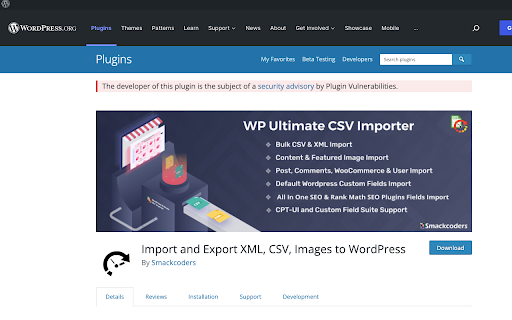
Adds warning message to WordPress Plugin Directory pages when plugins are from developer we have released security advisories for. One of the little understood realities of security issues with WordPress plugins is that the insecurity of them is not evenly spread across those plugins. Instead, many developers are properly securing their plugins and others get them properly secured when alerted they haven’t done that, while other plugin developers either are unable or unwilling to properly secure their plugins. With the latter group, among the issues we have seen, are developers who have introduced new serious vulnerabilities that are substantially similar to vulnerabilities that they know have been exploited in their plugins. In situations where we become aware of developers who have shown that inability or unwillingness to properly secure their plugin, we are releasing advisories to warn customers of our service and the wider WordPress community of the risk of utilizing those developers' plugins. This extension adds a notice on the pages of the WordPress Plugin Directory for the plugins from those developers.

IP, DNS & Security Tools | HackerTarget.com
Quick access to IP, DNS & Network Tools. Check DNS, Whois, ASN, Traceroute, Ping and more. Tools for technical operators. IP, DNS and Security tools for technical systems operators. Instant access to Whois, GeoIP, DNS, Traceroute, Ping, HTTP Headers, Nmap and more all from your browser. Perfect for: - security professionals - network operators - systems administrators - analysts - or simply those who are curious about technical aspects of the Internet While all these tools are available on HackerTarget.com, our Chrome Extension offers quick and easy access, saving you time. Perform external network queries in a single click. HackerTarget.com is an established provider of hosted open source security scanning services such as Port Scanners (Nmap), Vulnerability Scanners (OpenVAS) and Web application security (WordPress, Nikto) testing. Online Nmap Port Scanning has been available from HackerTarget.com since 2007. While continuing to provide a stable hosted vulnerability scanning service the site continues to evolve and provides tactical information to those who manage Internet connected systems. By using hosted security scanning and network testing tools you are able to probe and troubleshoot your networks, firewalls and servers from an external perspective. This testing from outside the network perimeter or firewall simulates probes and scanning that may be performed by a determined attacker. In addition to finding vulnerabilities and security configuration errors in your systems these types of probes will also enable you to test intrusion detection (IDS / IPS) and even incident response processes.

Shodan
The Shodan plugin tells you where the website is hosted (country, city), who owns the IP and what other services/ ports are open. The Shodan plugin for Chrome automatically checks whether Shodan has any information for the current website. Is the website also running FTP, DNS, SSH or some unusual service? With this plugin you can see all the info that Shodan has collected on a given website/ domain.

d3coder
Encoding/Decoding Plugin for various types of encoding like base64, rot13 or unix timestamp conversion This extension enables you to encode and decode selected text via the context menu. This reduces the time you spend on looking up values and gives you more time to concentrate on the important things of development. The context menu this extension enables is customizable through the options page. To get there either click on the item or go to Wrench -> Tools -> Extensions -> d3coder options. Via the popup you are able to choose between four message types: alert the result, adding a DIV-element to the bottom of the page, via console.log() or replacing the selected text on the page. You can also deactivate functions(e.g. if you don't need them and want to free the space they use). The current version has implemented the following en-/decoding functions:

Threat Analytics Search
Use the Context Menu (right click menu) in the browser to conduct single or group searches for selected text. Threat Analytics Chrome Extension is a tool for Security Analysts, Malware Hunters, and Incident Responders. This extension enables you to use the Context Menu (right click menu) in Chrome to conduct single or group searches for selected text. Most useful scenarios are when you need to search a File Hash, IP Address or Domain across multiple websites at once. The only requirement is that the Website you are searching provides a way to send parameters either using GET or POST requests. This extension supports both mechanisms. Threat Analytics is focused on using information to make decisions during event analysis about assets in your organization. During our work with customers, our analysts often use the same websites repeatedly to gather information about File Hashes, IP Addresses, Domains etc. Also integrates with RSA Security Analytics, NetWitness Investigator, and Carbon Black. Also supports encoding when the website you are using for your research requires Base64 encoded parameters. This extension is fully Open Source under Apache 2 license and developed/maintained on GitHub here https://github.com/AdvancedThreatAnalytics/threat-analytics-search
