
gncnbkghencmkfgeepfaonmegemakcol
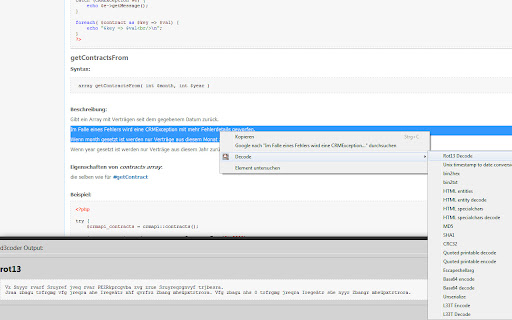

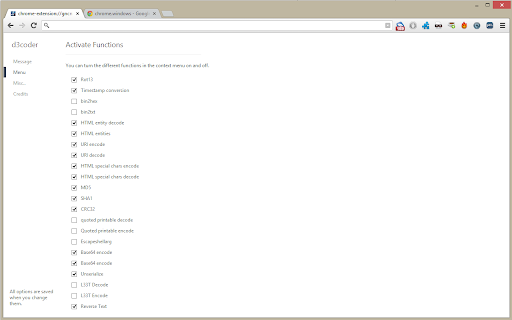

Encoding/Decoding Plugin for various types of encoding like base64, rot13 or unix timestamp conversion This extension enables you to encode and decode selected text via the context menu. This reduces the time you spend on looking up values and gives you more time to concentrate on the important things of development. The context menu this extension enables is customizable through the options page. To get there either click on the item or go to Wrench -> Tools -> Extensions -> d3coder options. Via the popup you are able to choose between four message types: alert the result, adding a DIV-element to the bottom of the page, via console.log() or replacing the selected text on the page. You can also deactivate functions(e.g. if you don't need them and want to free the space they use). The current version has implemented the following en-/decoding functions:

Pulsedive Threat Intelligence
Highlight IPs, domains, and URLs on any website to enrich them using Pulsedive's threat intelligence. Streamline real-time threat research and analysis on any website you visit with Pulsedive’s threat intelligence browser add-on. Highlight IPs, domains, URLs, or threat names in any website text to enrich them using Pulsedive's free Community dataset. Get immediate, up-to-date context when reading cybersecurity news and threat advisories, or exploring threat intelligence collections and research. Create a free account at pulsedive.com for increased limits and additional capabilities. – FEATURES: • Indicator Lookup - highlight text around an IP, URL, or domain to enrich with contextual data from Pulsedive, including associated threats, screenshots, ports, protocols, web technologies, HTTP headers, meta tags, WHOIS data, and much more • On-Demand Scans - perform real-time passive or active scans on IPs, domains, and URLs to fetch live data • Bulk Processing - highlight text containing hundreds or thousands of indicators to parse and refang in bulk, download them as a CSV, and submit to Pulsedive Analyze for bulk enrichment • Threat Research - look up threat names and aliases to retrieve threat summaries, associated indicators, TTPs, latest news, and additional context • Website Enrichment - click the add-on button without highlighting text to retrieve domain information for the website you're visiting • Mute Options - reduce noise by easily muting the auto-popup temporarily or on specific sites • Flexible Controls - adjust the add-on settings to control when, where, and how Pulsedive parses threat intelligence information • Quick Pivoting - convenient one-click pivot to the Pulsedive Community platform at pulsedive.com for further analysis – WHAT'S NEW - VERSION 3: The latest update introduces bulk indicator processing, advanced settings & controls, and an improved user experience and interface. • Dark mode • Free-text parsing for IPs, URLs, and domains • Bulk indicator processing • Muting/unmuting and website exclusions • Usage guide in Settings page • Fixed punycode domain support • Fixed various CSS conflicts with injected popup – Pulsedive offers frictionless threat intelligence solutions for growing teams. The Pulsedive Community platform at pulsedive.com aggregates, enriches, and correlates community threat data to support analyst workflows and time to action. With 50M+ searchable indicators and threats collected from user submissions and feeds, the Pulsedive add-on delivers invaluable context wherever you work.

IP, DNS & Security Tools | HackerTarget.com
Quick access to IP, DNS & Network Tools. Check DNS, Whois, ASN, Traceroute, Ping and more. Tools for technical operators. IP, DNS and Security tools for technical systems operators. Instant access to Whois, GeoIP, DNS, Traceroute, Ping, HTTP Headers, Nmap and more all from your browser. Perfect for: - security professionals - network operators - systems administrators - analysts - or simply those who are curious about technical aspects of the Internet While all these tools are available on HackerTarget.com, our Chrome Extension offers quick and easy access, saving you time. Perform external network queries in a single click. HackerTarget.com is an established provider of hosted open source security scanning services such as Port Scanners (Nmap), Vulnerability Scanners (OpenVAS) and Web application security (WordPress, Nikto) testing. Online Nmap Port Scanning has been available from HackerTarget.com since 2007. While continuing to provide a stable hosted vulnerability scanning service the site continues to evolve and provides tactical information to those who manage Internet connected systems. By using hosted security scanning and network testing tools you are able to probe and troubleshoot your networks, firewalls and servers from an external perspective. This testing from outside the network perimeter or firewall simulates probes and scanning that may be performed by a determined attacker. In addition to finding vulnerabilities and security configuration errors in your systems these types of probes will also enable you to test intrusion detection (IDS / IPS) and even incident response processes.

FindSomething
Find interesting things in the webpage's source code or JavaScript This tool is used to quickly extract some interesting information from the HTML source code or JS code of the web page, including possible requested resources, interface URLs, possible requested IPs and domain names, leaked ID numbers, mobile phone numbers, email addresses, etc. Welcome to communicate with us, WeChat canxiao_xiao

DotGit
An extension for checking if .git is exposed in visited websites An extension for checking if .git is exposed in visited websites - Check if a .git/.svn/.hg folder exists for each site you visit - Check if a .env file exists for each site you visit - Check if a .DS_Store file exists for each site you visit - Check if the site is open source (github/gitlab) - Check if the site has security.txt - You will be notified when a folder is found - List of exposed sites found - Download the entire .git folder in zip format, even if the files are not listed on the site - View .git/config with one click - Options for: colors, notifications and downloads Some checks are turned off by default, open the settings to turn them on Source code: https://github.com/davtur19/DotGit
