
jjalcfnidlmpjhdfepjhjbhnhkbgleap
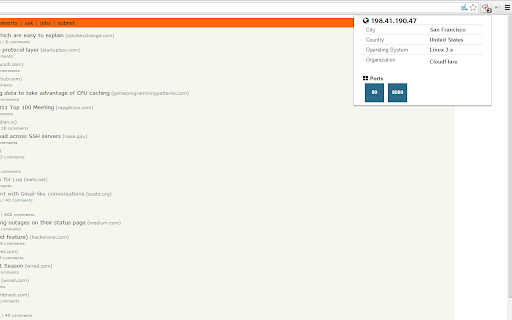


The Shodan plugin tells you where the website is hosted (country, city), who owns the IP and what other services/ ports are open. The Shodan plugin for Chrome automatically checks whether Shodan has any information for the current website. Is the website also running FTP, DNS, SSH or some unusual service? With this plugin you can see all the info that Shodan has collected on a given website/ domain.

EndPointer
An endpoint parser and extractor with many flexible features EndPointer: Advanced Endpoint Parser and Extractor EndPointer is a powerful tool designed for developers, security researchers, and web application testers. It parses and extracts endpoints from web applications, providing a comprehensive view of an application's API structure. Core Features: - Automatic Endpoint Parsing: Automatically detects and extracts endpoints from the active tab. - Custom Scope Settings: Define specific domains or URL patterns to focus your analysis. - Concurrent Request Management: Configure the number of simultaneous requests for efficient parsing. - User-Friendly Interface: Easy-to-use popup for quick access to main functions. - Detailed Endpoint View: Examine parsed endpoints, including their source location. - Export Functionality: Save your findings for further analysis or reporting. - URL Classification: Categorize the types of URLs they are. Experimental Features: - Request Editor: Modify and resend captured requests for thorough testing. - Proxy Capture: Intercept and analyze HTTP/HTTPS responses. EndPointer streamlines the process of mapping out web application structures, making it an invaluable asset for API discovery, security assessments, and web application development. Whether you're conducting penetration testing, API integration, or just exploring web application architectures, EndPointer provides the insights you need. Note: This extension requires permission to access website content. It only analyzes the active tab and does not collect or transmit personal data. Enhance your web application analysis with EndPointer - your go-to tool for comprehensive endpoint discovery and testing.

CrowdScrape
Scrape web content for indicators of interest and integrate CrowdStrike Intelligence information The CrowdStrike Intelligence Team is proud to announce the release of CrowdScrape version 1.5.0. CrowdScrape is a Chrome Plugin designed to allow you to be able to scrape indicators from various websites and in-browser documents such as PDF reports while matching the data up against CrowdStrike Intelligence. This release provides bug fixes and enables support for customers in all cloud environments, and includes support for the OAuth2-based Intel API, which has replaced the deprecated legacy key-based APIs (see https://falcon.crowdstrike.com/support/documentation for further information on our API). This easy to use tool produces indicator lists that collect: · Domain, IP addresses, URLs, hashes (MD5, SHA1, SHA256) and Bitcoin addresses · On-Screen Tagging of CrowdStrike known indicators, and links to Indicator Search · Matches to CrowdStrike Intelligence with links to reports in CrowdStrike Intel Portal · Integrations with the CrowdStrike Indicator Graph to visualise intelligence In addition, you can use CrowdScrape to copy any indicators to clipboard making it easier to pull OSINT from different sources and converting this to a text file for implementation into your systems.

d3coder
Encoding/Decoding Plugin for various types of encoding like base64, rot13 or unix timestamp conversion This extension enables you to encode and decode selected text via the context menu. This reduces the time you spend on looking up values and gives you more time to concentrate on the important things of development. The context menu this extension enables is customizable through the options page. To get there either click on the item or go to Wrench -> Tools -> Extensions -> d3coder options. Via the popup you are able to choose between four message types: alert the result, adding a DIV-element to the bottom of the page, via console.log() or replacing the selected text on the page. You can also deactivate functions(e.g. if you don't need them and want to free the space they use). The current version has implemented the following en-/decoding functions:

Mitaka
A browser extension for searching IP, domain, URL, hash, etc. via the context menu. Mitaka is a browser extension for searching IP, domain, URL, hash, etc. via the context menu. This extension can: - Extract & refang IoC from a selected block of text. -- e.g. example[.]com to example.com, test[at]example.com to test@example.com, hxxp://example.com to http://example.com, etc. - Search / scan it on various engines. -- e.g. VirusTotal, urlscan.io, Censys, Shodan, etc. See https://github.com/ninoseki/mitaka for more details.
