
niaimikeenadjnnphckiphohaafickoe
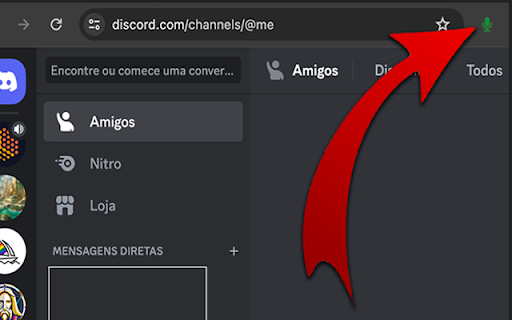


Shortcuts for full control over an audio channel in Discord and quick access button next to the address bar. Enables you to… Shortcuts for full control over an audio channel in Discord and quick access button next to the address bar. Enables you to activate, deactivate and toggle the microphone. Enables you to activate, deactivate and toggle the sound. Disconnect from an audio channel. Attention: After installation, you need to reload the Discord page for it to work properly. Unfortunately it is only possible to enable 4 global shortcuts, but the others can be used within the browser. To configure the shortcuts do the following: 1. In your Chrome browser. 2. Click on the three-dot menu in the top-right corner of your Chrome window. 3. Go to "More tools” -> "Extensions." 4. In the Extensions page, look for a menu or hamburger icon (three lines) on the top-left and click on it. 5. Now select "Keyboard shortcuts." 6. Find the extension “DiscordMic" 7. Click in the field where it says "Activate the extension" or a similar command. 8. Press the keys for your desired shortcut (like Ctrl+Shift+Y). 9. Make sure the "In Chrome" dropdown is selected if you want it to work globally (across all of Chrome). 10. Click 'Save' or just close the tab, and your global shortcut should now be set! This extension is not a Discord partner, so any update may stop working.

Discord Chromium Global Shortcuts
Ajout de raccourcis globaux pour Discord Chromium pour l'activation du micro et la mise en sourdine Ajout de raccourcis globaux pour Discord Chromium pour l'activation du micro et la mise en sourdine. Ajout d'un badge de notification quand Discord.com est installé comme une Application sur Microsoft Edge. Possède actuellement pour sa V0.1 uniquement les raccourcis "toggle" de Mute et Sourdine. Si vous souhaitez un autre raccourcis, dites le moi.

Discord Get User Token
Discord Get User Token extension streamlines the process of obtaining an Authorization Token for a logged-in Discord user The Discord Get User Token extension simplifies the process of obtaining an Authorization Token for logged-in Discord users. Whether you're a developer integrating Discord's API or a user managing bots, this tool provides a hassle-free way to access your token quickly and securely. Important Notice: Occasionally, the token may display as NULL. To resolve this, simply visit https://discord.com/channels/@me or reload the page. Key Features: Streamlined Token Retrieval: Get your Discord Authorization Token effortlessly. Ideal for Developers: Simplifies Discord API integration and bot development. User-Friendly: Convenient for managing your Discord account and authentication. 👋Feel free to contribute, report issues, or suggest improvements! For assistance, contact me via the "Contact me here" section on the extension page.

Discord System-Wide PTT
Push-to-talk from anywhere with the Discord web client. [Now updated for manifest V3] This extension allows the "push to talk" feature of the Discord web client (https://discord.com/app) to be accessed from other Chrome tabs or system-wide. You should assign the extension a shortcut in Chrome (from chrome://extensions/shortcuts). If you would like to use PTT outside of Chrome (and you are not using Chrome OS), select the "Global" option. You must also assign a PTT shortcut in the Discord web client voice settings page. The particular PTT shortcut assigned does not matter. From that point on, you can hold the extension shortcut to enable PTT even when the tab isn't focussed. The extension icon will display the "ON" badge while PTT is occurring. The extension is open source and its source code can be found here: https://github.com/mjmartis/discord_web_sys_ptt

Hide Discord Sidebar
Hide Discord Servers and Channels! Installs a button that hides/shows the Discord server list and autohides the channels list. If you find this extension helpful, I would be grateful if you can buy me a coffee at https://ko-fi.com/patrickxchong. 🙏 Hide Discord Sidebar is a Chrome extension that minimizes the channels list into a small left sidebar when it is not in use and installs a button on the top right corner to hide/show the Discord server list. Users are able to customise the extension with the popup that shows when the extension button is clicked. Appreciate feedback/support in the reviews! Or email me at patrickxchong@gmail.com. Source code can be found at https://github.com/patrickxchong/hide-discord-sidebar. IMPORTANT: This extension is only meant to work on Discord in Chromium based browsers. Tested and working on Windows, Mac and Linux versions of Brave Browser and Chrome. === Version History === v5.0.0: Update extension selectors after Discord update v4.4.0 Update channel list query v4.3.0: improve server list query v4.2.0: fix servers query from Discord update v4.1.0: Proxy refresh event with onUpdated instead of webNavigation API v4.0.1: UX improvements on client startup and server list v4.0.0: migrate extension to Manifest V3 v3.3.1: fixes hide/show servers button covering inbox button v3.3: fixes autohiding channels not working after discord update v3.2: update code to use Vanilla javascript for Firefox support v3.1: revamp architecture to support auto initialising extension when moving from Discord non-chat page (like homepage) to chat page v3.0: add extension popup menu to customise extension behaviour v2.17: update extension description for SEO v2.16: fixes extra space on the right of sidebar after discord update v2.15: fixes hide server button not working after discord update v2.14: set !important on some CSS properties to fix sidebar not collapsing on Edge Dev v2.13: enable/disable extension by clicking on extension button v2.12: changes tab permission from discordapp.com to discord.com v2.11: fixed width of left sidebar on hover v2.10: fixes channels issue from discord update
