
negoghfibkgbcpobdmmpplpdhafjjjmj
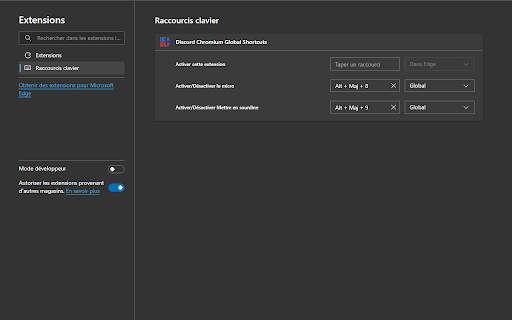
Ajout de raccourcis globaux pour Discord Chromium pour l'activation du micro et la mise en sourdine Ajout de raccourcis globaux pour Discord Chromium pour l'activation du micro et la mise en sourdine. Ajout d'un badge de notification quand Discord.com est installé comme une Application sur Microsoft Edge. Possède actuellement pour sa V0.1 uniquement les raccourcis "toggle" de Mute et Sourdine. Si vous souhaitez un autre raccourcis, dites le moi.

ChatGPT Bulk Delete
A Chrome extension to bulk delete ChatGPT conversations This Chrome extension is designed to help users quickly and efficiently delete conversations in the ChatGPT’s left sidebar. With the extension installed, users can add checkboxes to each conversation in the sidebar, select multiple conversations to delete or archive, and accomplish this with just a few clicks. Hold Shift and click to select multiple conversations for efficient bulk actions. This extension is particularly useful for users who frequently use ChatGPT and need to manage their conversations efficiently. Instead of deleting conversations one by one, users can remove multiple conversations at once, saving both time and effort. Additionally, this extension now offers a “bulk archive” feature for a one-time fee of $0.99 USD. This paid feature allows users to archive multiple conversations simultaneously, further enhancing the tool’s utility and convenience. The extension popup includes a small advertisement labeled “Ad” in the footer, linking to TubeVocab (https://www.tubevocab.com/), a third-party language-learning product. This ad helps support the continued development and free distribution of ChatGPT Bulk Delete. Clicking it is entirely optional and does not affect any of the extension’s core functionality.

Discord Translator Extension
A Chrome extension that automatically translates Discord messages Discord Translator Extension allows you to automatically translate messages in Discord into your preferred language. Communicate seamlessly with global communities, understand conversations in real time, and break down language barriers. Easy to use, fast, and reliable translation experience.

DeepSeek Open SideBar in Chrome
DeepSeek Extensions For Chrome. DeepSeek New AI and Open SideBar in Chrome DeepSeek is a company focused on artificial intelligence (AI) and machine learning technologies. It specializes in providing solutions in areas such as big data analytics, natural language processing (NLP), computer vision, and autonomous systems. DeepSeek leverages advanced technologies to enhance business efficiency and develop innovative solutions. The company aims to deliver customized AI solutions to clients across various industries, helping them solve complex problems and optimize business processes. DeepSeek Extensions For Chrome. DeepSeek New AI and Open SideBar in Chrome The DeepSeek Open SideBar Chrome extension is a powerful tool designed to enhance productivity and streamline workflows directly within your browser. This extension integrates seamlessly with Chrome, allowing users to access a customizable sidebar that provides quick and easy access to a variety of features, tools, or resources. Whether you're managing tasks, conducting research, or multitasking across different applications, the DeepSeek Open SideBar ensures that essential tools are just a click away. Key features of the DeepSeek Open SideBar extension may include: Quick Access: The sidebar remains accessible while browsing, enabling users to switch between tasks without leaving their current tab. Integration with DeepSeek Services: If part of the DeepSeek ecosystem, the extension may integrate with other DeepSeek AI-powered tools for enhanced functionality, such as data analysis or task automation. User-Friendly Design: The extension is designed to be intuitive and easy to use, ensuring a smooth experience for both casual and power users. The DeepSeek Open SideBar Chrome extension is ideal for professionals, students, or anyone looking to optimize their browsing experience and boost productivity. By bringing essential tools and features into a single, accessible interface, it helps users stay organized and focused while navigating the web.

Chrome Dice
A simple dice rolling extension for Google Chrome Chrome Dice is a simple dice rolling extension for Google Chrome. Simply click the button and click a die to roll, wherever and whenever. * Ad-free * Works offline * Very small (less than 0.1mb) * No permissions and no data
