
jlmpdldjipfblopcdkcfccmnmnmiajnb
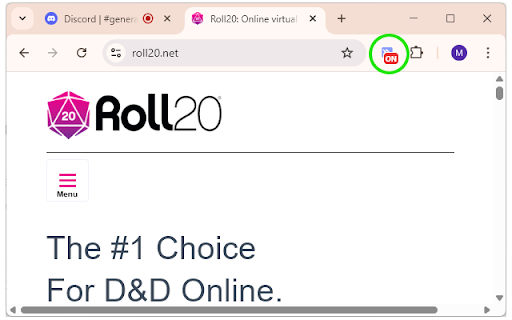

Push-to-talk from anywhere with the Discord web client. [Now updated for manifest V3] This extension allows the "push to talk" feature of the Discord web client (https://discord.com/app) to be accessed from other Chrome tabs or system-wide. You should assign the extension a shortcut in Chrome (from chrome://extensions/shortcuts). If you would like to use PTT outside of Chrome (and you are not using Chrome OS), select the "Global" option. You must also assign a PTT shortcut in the Discord web client voice settings page. The particular PTT shortcut assigned does not matter. From that point on, you can hold the extension shortcut to enable PTT even when the tab isn't focussed. The extension icon will display the "ON" badge while PTT is occurring. The extension is open source and its source code can be found here: https://github.com/mjmartis/discord_web_sys_ptt

Workstation for Discord
Access to Discord instant messaging for communications through text, media and files with friends and game communities. This is an extension that provides a workstation to access to the Discord social platform. Our application aims to offer users a way to connect with others on the popular communication platform that lets you share voice, video, and text chat with friends, game communities, and developers. This extension provides access to most of these Discord features. Users can connect to the platform without revealing any personal information from their PC, ensuring their privacy and security online.

Discord Blur
Blur and Hides your messages on Discord until you hover over them. Blur and Hides your messages on Discord until you hover over them. To increase privacy in public spaces the Discord Blur Extension For Discord Web blurs your messages as well as other content. And only reveals one when you hover over it with your mouse cursor. Additionally, you can quickly toggle all effects by using a keyboard shortcut (Alt+X) or by clicking the toggle button in the extension menu. It adapts to your needs by letting you decide which elements you want to blur. Your options: - Blurs all messages in the current chat. - Blurs all message previews on the left. - Blurs all images, videos, stickers, ... in separation from the text. - Blurs all small icons of images, videos, ... while viewing an image, video, ... - Makes the color in your input field lighter to make it hard to read. - Blurs all profile pictures. - Blurs all groups and users names. - Allows you to turn off the delay before revealing an item on hover. - Unblurs all elements when you hover over the Discord Web app

Discord Embeds
Preview sites' Discord embeds for debugging purposes. Not affiliated in any way with Discord. An open-source tool to help web developers test their sites' embeds as they would look in Discord. The aim of this tool is to eliminate the tedious process of evading Discord's embed cache, and eliminate the need to deploy the site somewhere to test it (which might expose unannounced projects prematurely). This tool provides a simple preview window of the Discord embed.

Chrome to Discord
One-Click Sharing from Chrome to Discord #channel. Perfect for team collaboration and building personal knowledge bases. Chrome to Discord is a lightweight Chrome extension that allows you to instantly share web pages to Discord channels with just a keyboard shortcut or a single click. Effortlessly build a repository for your team and even maintain your own personal knowledge base with a streamlined approach that is simpler than traditional bookmarking tools or Notion. Enjoy intelligent AI-powered Q&A for seamless content discovery and management. 🚀 KEY FEATURES: • One-click sharing to Discord • Quick keyboard shortcut: Cmd+Shift+D (Mac) / Ctrl+shift+D (Windows) • Automatic page title and URL capture • Custom Discord webhook support • Clean and intuitive interface • Zero configuration needed after initial setup 🔧 HOW TO USE: 1. Install the extension 2. Click the Discord icon in your toolbar 3. Set up your Discord webhook URL in the settings (one-time setup) 4. Use Cmd+Shift+D (Mac) / Ctrl+shift+D (Windows) or click the icon to share any page ✨ PERFECT FOR: • Team collaboration • Saving interesting articles • Sharing resources with your community • Personal bookmarking to Discord channels 🔒 PRIVACY & SECURITY: • Minimalist permissions - only access current tab information • No personal data collection • No Discord login required • All settings stored locally • Open source for transparency 💡 USE CASES: • Development teams sharing documentation • Content creators collecting inspiration • Students collaborating on research • Communities sharing interesting finds • Personal knowledge management ⚙️ TECHNICAL DETAILS: • Lightweight (
