
nfmkaonpdmaglhjjlggfhlndofdldfag
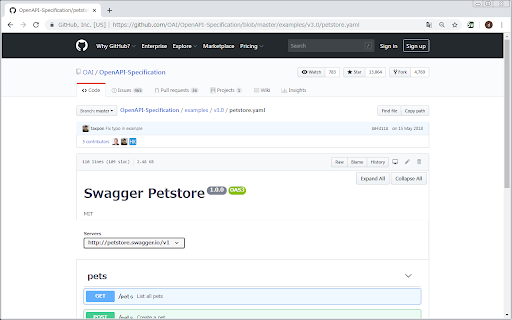
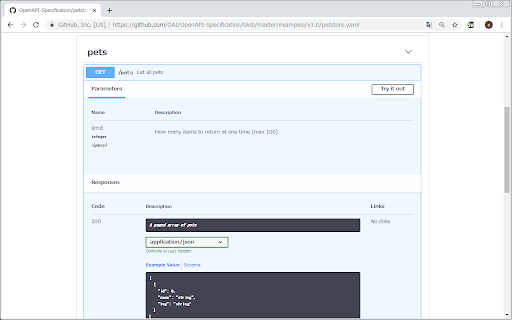
Shows swagger yaml/json rendered by Swagger-UI. This extension replace swagger code into preview html in GitHub. Due to time constraints, I'm archiving the swagger-viewer repository and ending support. Grateful for all contributions, please feel free to fork and continue the project. Thank you for your understanding. 1. Install this app. 2. Open swagger page in GitHub. - Try: 3. Click this app icon. 4. Have a good development!

OpenAPI DevTools
Instantly generate API specifications in real time for any app or website. Instantly generate API specifications in real time for any app or website. OpenAPI DevTools generates OpenAPI specifications in real time from network requests. Once installed it adds a new tab to Chrome DevTools called OpenAPI. While the tool is open it automatically converts network requests into a specification. The algorithm works locally on your device. This extension doesn't make requests of any form. It only has access to network requests when developer tools is open and you have begun recording. Features: - Instantly generate an OpenAPI 3.1 specification for any website or application just by using it - Automatically merges new request & response headers, bodies, and query parameters per endpoint - Click on a path parameter and the app will automatically merge existing and future matching requests - View the specification inside the tool and download with a click - Export and save a session at any time, or share it with others

AWS Extend Switch Roles
Extend your AWS IAM switching roles. You can set the configuration like aws config format Switch role history does not remain only five maximum on the AWS Management Console. This extension gives you show all of switch roles from a browse menu by loading your aws configuration. ### Simple Configuration The simplest configuration is for multiple **target roles** when you always intend to show the whole list. **Target roles** can be expressed with a `role_arn` or with both `aws_account_id` and `role_name`. * `color` - The RGB hex value (without the prefix '#') for the color of the header bottom border and around the current profile. * `region` - Changing the region whenever switching the role if this parameter is specified. * `image` - The uri of an image to use on top of any color attribute supplied. The color and image are not mutually exclusive. ### Complex Configuration More complex configurations involve multiple AWS accounts and/or organizations. - If your account is aliased, you specify `aws_account_alias` in **base account**. - A **target role** is associated with a **base account** by the **target role** specifying a `source_profile`. - As above, **target roles** can be expressed with a `role_arn` or with both `aws_account_id` and `role_name` and can optionally pass the optional parameters. - If `target_role_name` is set in **base account**, the value is provided as the default role name for each **target roles**. ``` [organization1] aws_account_id = your-account-alias If you sign-in a base account, target roles of the other base accounts are excluded. For more information, please visit the homepage.

Boomerang - SOAP & REST Client
Seamlessly integrate and test SOAP & REST services. Boomerang is a powerful yet lightweight API testing tool that runs directly in your browser. With over a decade of proven reliability, it provides developers, QA engineers, and integration teams with a streamlined solution for testing both REST APIs and SOAP services. Test your APIs effortlessly with Boomerang's intuitive interface. Create, organize, and execute API requests without the bloat of traditional desktop applications. Whether you're validating endpoints, debugging integrations, or automating test workflows, Boomerang offers the perfect balance of simplicity and capability. Key Features: ★ Test REST APIs and SOAP services with a clean, intuitive interface ★ Import service definitions from OpenAPI/Swagger specifications and WSDL files ★ Organize requests in projects and collections for better workflow management ★ Switch between environments (development, staging, production) seamlessly ★ Create dynamic requests using variables and scripting ★ Run collections of requests to test complex API workflows ★ Dark mode support for comfortable testing in any lighting condition Boomerang stands out with its browser-native approach, eliminating the need for separate applications or complex setups. Your API testing workflow stays right where you need it - in your browser. Perfect for developers who need: ★ A fast, reliable tool for API testing ★ Support for both REST and SOAP services ★ Simple organization of API requests ★ Quick switching between development environments ★ Collection-based testing capabilities ★ Local data storage without cloud dependencies The extension works offline and stores all your data locally, ensuring your API testing remains secure and private. Join thousands of developers who've made Boomerang their go-to API testing companion. Experience the difference that a thoughtfully designed, browser-based API client can make in your development workflow.

Markdown Preview Plus
Converts and previews markdown files (.md, .markdown) to HTML(include TOC) right inside Chrome and support live reload Automatically parses markdown files (.md) into HTML with live reload 1. Install extension from webstore (creates no new UI) 2. Check "Allow access to file URLs" in chrome://extensions listing: 3. Open local or remote .md file in Chrome. 4. See nicely formatted HTML! Note: The auto reload feature is disabled default. * Support auto reload. * Support external css file. * Customize theme for every md file. * Support github flavored markdown. * Export nicely formatted HTML. * Support render Katex, Mermaid. The extension is open source. https://github.com/volca/markdown-preview Fix a bug for the tag style * Fix a bug for load fonts of Katex * Fix a bug for "table of contents" * Compatible with Chrome 136 * Update mermaid lib * Update marked lib * Update marked lib * Fix a bug for clear custom CSS paths * Supports add custom CSS path. See #19 * Fix a bug for render mermaid. See #158
