
jpmkfafbacpgapdghgdpembnojdlgkdl
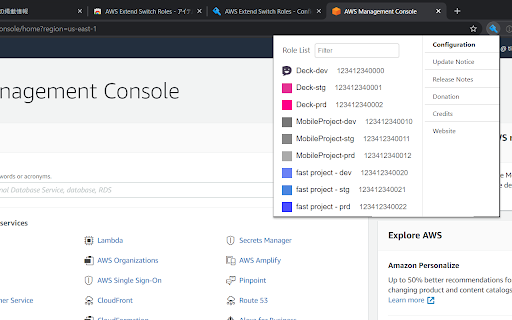

Extend your AWS IAM switching roles. You can set the configuration like aws config format Switch role history does not remain only five maximum on the AWS Management Console. This extension gives you show all of switch roles from a browse menu by loading your aws configuration. ### Simple Configuration The simplest configuration is for multiple **target roles** when you always intend to show the whole list. **Target roles** can be expressed with a `role_arn` or with both `aws_account_id` and `role_name`. * `color` - The RGB hex value (without the prefix '#') for the color of the header bottom border and around the current profile. * `region` - Changing the region whenever switching the role if this parameter is specified. * `image` - The uri of an image to use on top of any color attribute supplied. The color and image are not mutually exclusive. ### Complex Configuration More complex configurations involve multiple AWS accounts and/or organizations. - If your account is aliased, you specify `aws_account_alias` in **base account**. - A **target role** is associated with a **base account** by the **target role** specifying a `source_profile`. - As above, **target roles** can be expressed with a `role_arn` or with both `aws_account_id` and `role_name` and can optionally pass the optional parameters. - If `target_role_name` is set in **base account**, the value is provided as the default role name for each **target roles**. ``` [organization1] aws_account_id = your-account-alias If you sign-in a base account, target roles of the other base accounts are excluded. For more information, please visit the homepage.

Former2 Helper
Helps avoid CORS issues with former2.com Calls to the AWS service API endpoints are made either directly with the JavaScript SDK or via the browser extension (which also hits endpoints directly). Recording data is kept entirely in memory or on local disk and is never sent over the internet or anywhere else. You should take care to remove any sensitive data (passwords etc.) when sharing your generated code/templates with others.

SAML-tracer
A debugger for viewing SAML messages A tool for viewing SAML and WS-Federation messages sent through the browser during single sign-on and single logout.

ModHeader - Modify HTTP headers
Modify HTTP request headers, response headers, and redirect URLs The most popular Chrome extension to modify headers and monitor page statistics simultaneously. ** What can ModHeader do?** - Add, modify, and remove request and response headers - Use ModHeader to set X-Forwarded-For, Authorization, Access-Control-Allow-Origin, Content-Security-Policy, and your custom headers! - Modify cookies in request / response header - Advanced Content-Security-Policy editor - Redirect URL to another - Enable header modification by URLs - Advanced filtering by tab, tab group, or window ** Why ModHeader ** - ModHeader is fast, efficient, and light-weight. You can quickly enable/disable header modification with just 1-2 clicks. - ModHeader provides you with many convenient features that will help you increase your development velocity with the least amount of frictions. Check out the big list the features below! - ModHeader is free to use, with a paid option to unlock even more features. - ModHeader works on Chrome, Firefox, Edge, and Opera. - ModHeader is used by over 800,000+ users on Chrome Web Store! ** ModHeader features ** - Add comments to header - One-click "undo" if you made a mistake - Support having multiple profiles with quick switching between profiles - Export and import profile - Easily share your profiles with others - Customize autocomplete names and values - Support for dynamic variables - Dark mode support - Sorting headers and name, value, or comments - Append value to existing request or response header - Customizable profile badge - Clone profile - Cloud backup ...and more!!! ** What is new in 4.4.0 ** - Enable ad-supported plan where users can get pro for allowing affiliated ads in extension. Users can opt-out of ads by selecting ... -> Opt out of ads (will revert back to having limited profiles and rules). ** What is new in 4.3.7 ** - Support iso_date and utc_date variable ** What is new in 4.3.6 ** - Suggest when advanced header editor is available - Suggest when a response header is incorrectly entered in request header field and vice versa - Suggest using tab domain filter, tab group filter, window filter, etc. ** What is new in 4.3.5 ** - Revise the add dialog to give more description ** What is new in 4.3.2 ** - Support query parameter as dynamic value - Support matching HTTP methods in request URL filter and exclude request URL filter ** What is new in 4.3.1 ** - Make import with auto-sync available for free - Gather feedbacks on uninstallation ** What is new in 4.3.0 ** - Allow free users access to all mods and filters, but limit number of rules to 10. ** What is new in 4.2.4 ** - Fix a minor bug with time filters ** What is new in 4.2.3 ** - Fix a minor bug with tab domain filters ** What is new in 4.1.0 ** - Update login, logout, and license checking logics ** What is new in 4.0.21 ** - Add support for advanced Content-Security-Policy modification ** What is new in 4.0.20 ** - Fix ModHeader not showing up for new users. - Add {{ip_v4}} dynamic value ** What is new in 4.0.18 ** - Support for simple dynamic value: {{uuid}}, {{url}}, {{url_origin}}, {{url_hostname}}, {{url_path}}, {{existing_value}}, {{timestamp}} ** What is new in 4.0.17 ** - Allow ModHeader to read from managed storage (for enterprise) - Fix CSS not loading correctly ** What is new in 4.0.16 ** - Add regex cookie matching and ability to retain cookie value while modifying its attributes ** What is new in 4.0.15 ** - Add support for Time filter ** What is new in 4.0.14 ** - Dependency upgrades and some minor bug fixes ** What is new in 4.0.12 ** - Support auto-sync profile import: https://docs.modheader.com/profiles/auto-sync-profile - Remove support for dynamic value as Firefox addon policy and Manifest V3 both disallow it. If you need this feature, please email support@modheader.com and we will try to figure out how to support your use-case. ** What is new in 4.0.8 ** - Support reordering profile, headers, and filters. ** What is new in 4.0.0 ** - Support enhanced cookie modification - Replace tab lock with tab filter, along with tab group and window filter - Support autocomplete customization - Dark mode support - Keyboard commands mapping - Give users more controls over share profile URLs - Paid subscription required for some of the newly introduced features. Most existing features should continue to work for free users. "webRequest" and "webRequestBlocking" are required in order for request headers modification to work. Because ModHeader doesn't know ahead of time which website the modification should apply to, it needs to request permissions for all URLs (3). "storage" permission is needed to save settings to the cloud. "contextMenus" is used to enable quick pause/unpause by right-clicking on the icon. "alarm" is used to periodically auto-sync profiles (if auto-sync is setup). ** Automation ** For Selenium WebDriver users, please try: https://github.com/modheader/modheader_selenium

1Password – Password Manager
The best way to experience 1Password in your browser. Easily sign in to sites, generate passwords, and store secure information. This extension requires a 1Password membership. If you don’t have one yet, you can sign up when you install the extension and try one free. Passkey support is now available for 1Password for Chrome! Go passwordless today and start using passkeys. 1Password is a password manager that keeps you safe online. You want to use different passwords for every website, but it can be hard to keep track of them all. With 1Password you only ever need to memorize…one password. All your other passwords and important information are protected behind the one password only you know. 1Password manages everything for you: generating, saving, and filling your passwords. Get to know 1Password in your browser: About your privacy: 1Password was designed with a deep respect for your privacy. The data you save is encrypted and inaccessible to us. Anything else is only ever used to provide you with service and support. We believe strongly that your data is yours, and we don’t want to know anything about it. This is one of the fundamental beliefs 1Password was built upon. That’s why our privacy policy is simple: your data is your data. We don’t use it, we don’t share it, and we don’t sell it. You’re our customer, not our product.
